

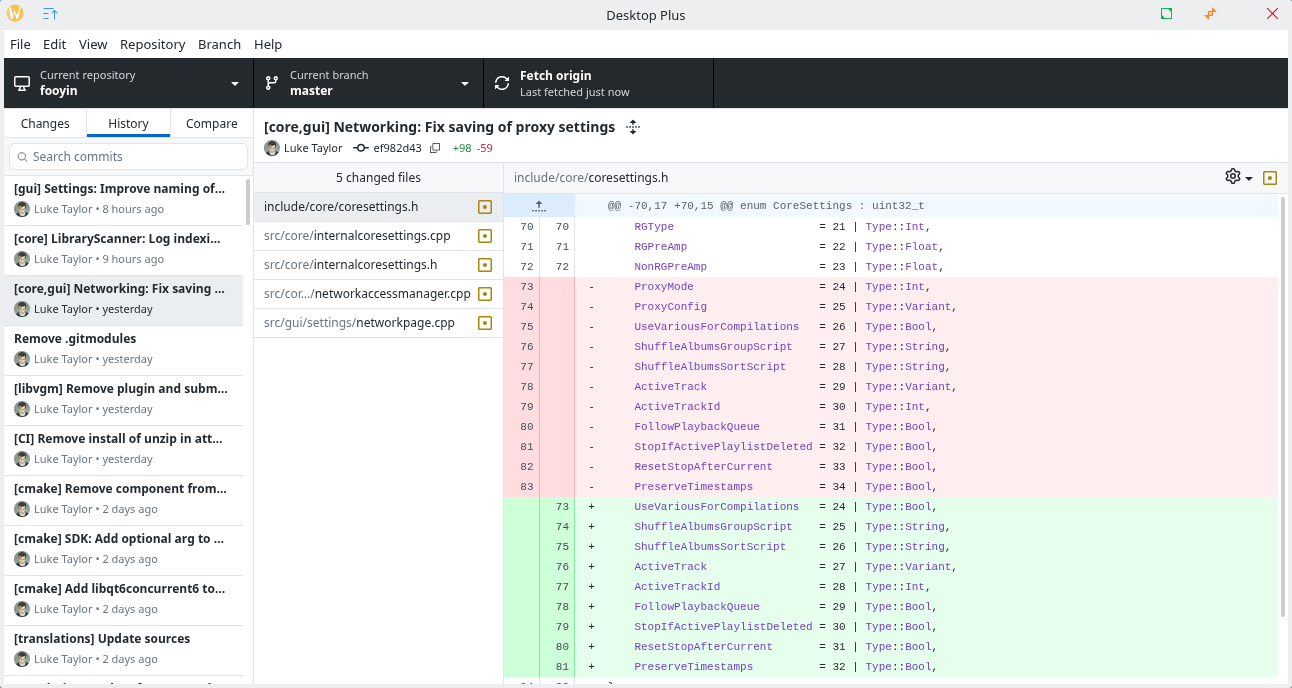
Desktop Plus is a Git client with advanced functionality and Bitbucket integration.
This is an up-to-date fork of GitHub Desktop, with many quality of life improvements and advanced features for power users.
Desktop Plus is free and open source software.
Key Features
- General:
- Red color for destructive action buttons.
- Add icons to some similar-looking buttons for faster visual recognition.
- Allow generating branch name presets by calling an external script (e.g. fetching ticket numbers from an issue tracker). Click here for more details.
- Allow using a different text editor for a given repo, by overriding it in the repository settings.
- Bitbucket integration:
- Preview and create pull requests.
- View pull requests status, including checks.
- Display a commit or PR in Bitbucket (web browser).
- Correctly set repository owner (instead of displaying “Other”).
- Repositories list:
- Pull all button to fetch and pull from all remotes at once.
- Allow hiding the ‘Recent’ repositories section.
- Branches list:
- Add warning indicator to local-only branches (branches that are not on the remote).
- Allow manually setting which is the default branch for a repository (even if it doesn’t match the one configured in the remote).
- History tab:
- Search commits by title, message, tag, or hash.
- Use a different font style for merge commits in order to make them visually distinct, since most of the time they are not as relevant.
- If a commit modifies only 1 file, allow double-clicking the commit to open the file. For other commits, you can still double-click the file as usual.
- Changes tab:
- Context menu option to permanently discard changes without sending to trash (useful when the there are many changed files and the regular “Discard” is extremely slow).
Website: github.com/desktop-plus/desktop-plus
Support:
Developer: Pol Rivero
License: MIT License
Desktop Plus is written in TypeScript. Learn TypeScript with our recommended free books and free tutorials.
Related Software
| GUI Git Clients | |
|---|---|
| Git Extensions | Runs on multiple platforms (including Linux) using Mono |
| Gittyup | Continuation of the GitAhead clie |
| GitButler | Git branch management tool |
| git-cola | Feature-laden carbonated Git browser |
| SourceGit | Lightweight client |
| Gitnuro | Git client written in Kotlin |
| GitFourchette | Comfortable Git UI |
| GitQlient | Multi-platform Git client originally forked from QGit |
| RelaGit | Modern graphical Git client |
| MeGit | Standalone graphical Git client |
| gitg | Fast Git repository browser for the GNOME desktop |
| GitAhead | Understand your Git history with this Qt-based client |
| Stage | Git GUI client inspired by Magit |
| Kommit | Designed for day-to-day version control work |
| Guitar | Git GUI client powered by Qt 5 |
| GitPulsar | Lightweight, GNOME-native Git GUI |
| GitForce | C# frontend |
| Desktop Plus | Fork of GitHub Desktop |
| Gitember | Java-based GUI |
| Actioneer | Graphical desktop client for GitHub Actions |
| Gitte | Desktop Git client for GNOME |
| gitonic | Uses a Tkinter-based interface |
| QGit | Git GUI viewer built on Qt/C++ |
| GitHub Desktop | Electron-based GitHub app |
| Thermal | One stop to manage all git repository |
| giggle | GTK+ frontend to the git content tracker |
Read our verdict in the software roundup.
 Explore our carefully curated directory of recommended free and open source software, covering every major software category. Explore our carefully curated directory of recommended free and open source software, covering every major software category.The directory forms part of our extensive collection of articles for Linux enthusiasts. It includes hundreds of detailed reviews, together with free and open source alternatives to proprietary software from companies such as Google, Microsoft, Apple, Adobe, IBM, Cisco, Oracle, and Autodesk. LinuxLinks also covers interesting projects worth exploring, Linux-compatible hardware, free programming books and tutorials, and much more. Know a useful free and open source Linux application that we haven’t covered? Tell us about it using our submission form. |
Please read our Comment Policy before commenting.