

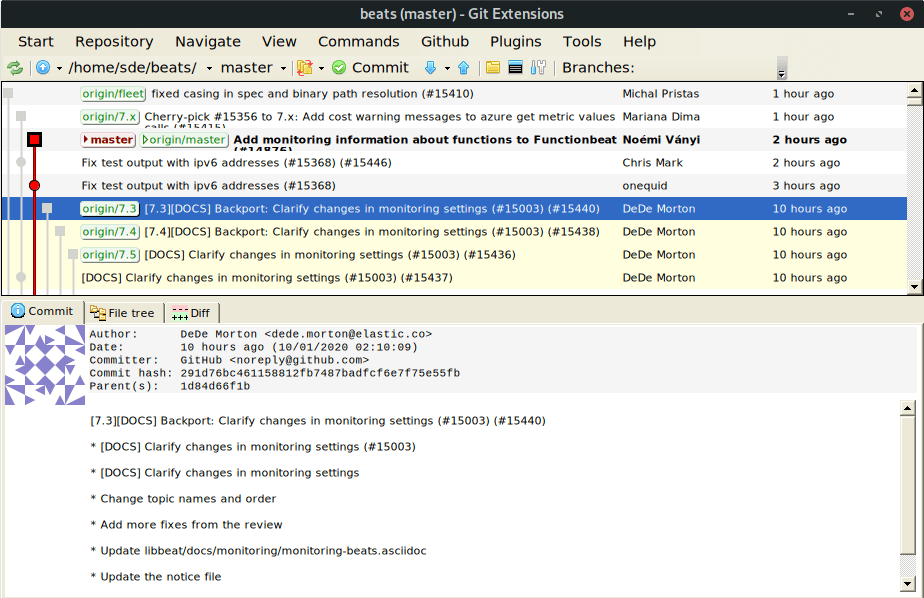
Git Extensions is a toolkit aimed at making working with Git more intuitive. It implements classic GIT by using a GUI (Graphical user interface), basically driven by a set of dedicated commands, hence maintains the version control system intuitively.
The shell extension integrates in Windows Explorer and presents a context menu on files and directories. There is also a Visual Studio extension to use Git from the Visual Studio IDE.
Git Extensions runs on multiple platforms (including Linux) using Mono. Mono is a free and open-source project to create an Ecma standard-compliant .NET Framework-compatible software framework, including a C# compiler and a Common Language Runtime.
Key Features
- Feature rich user interface for Git.
- 32-bit and 64-bit support.
- Many options to manage repositories. They include viewing the committed logs and changes made in comparison to the previous commit, cloning a repository, traversing through the file directory and filtering the committed logs using custom search input, etc.
- Good range of plugins including GitFlow, find large files, Gerrit code review, release notes generator, delete obsolete branches, impact graph, gource, Github, auto compile submodules, proxy switcher, create local tracking branches, statistics, and periodic background fetch.
- Wide range of settings can be configured
- Internationalization support – there’s support for Dutch, English, French, German, Japanese, Polish, Russian, Simplified Chinese, and Spanish.
- Windows Explorer context menu integration for Git.
- Visual Studio extension (2015-2017).
Website: gitextensions.github.io
Support: GitHub Code Repository
Developer: Many contributors
License: GNU General Public License v3.0
Git Extensions is written in C#. Learn C# with our recommended free books and free tutorials.
Related Software
| GUI Git Clients | |
|---|---|
| Git Extensions | Runs on multiple platforms (including Linux) using Mono |
| Gittyup | Continuation of the GitAhead clie |
| GitButler | Git branch management tool |
| git-cola | Feature-laden carbonated Git browser |
| SourceGit | Lightweight client |
| Gitnuro | Git client written in Kotlin |
| GitFourchette | Comfortable Git UI |
| GitQlient | Multi-platform Git client originally forked from QGit |
| RelaGit | Modern graphical Git client |
| MeGit | Standalone graphical Git client |
| gitg | Fast Git repository browser for the GNOME desktop |
| GitAhead | Understand your Git history with this Qt-based client |
| Stage | Git GUI client inspired by Magit |
| Kommit | Designed for day-to-day version control work |
| Guitar | Git GUI client powered by Qt 5 |
| GitPulsar | Lightweight, GNOME-native Git GUI |
| GitForce | C# frontend |
| Desktop Plus | Fork of GitHub Desktop |
| Gitember | Java-based GUI |
| Actioneer | Graphical desktop client for GitHub Actions |
| Gitte | Desktop Git client for GNOME |
| gitonic | Uses a Tkinter-based interface |
| QGit | Git GUI viewer built on Qt/C++ |
| GitHub Desktop | Electron-based GitHub app |
| Thermal | One stop to manage all git repository |
| giggle | GTK+ frontend to the git content tracker |
Read our verdict in the software roundup.
 Explore our comprehensive directory of recommended free and open source software. Our carefully curated collection spans every major software category. Explore our comprehensive directory of recommended free and open source software. Our carefully curated collection spans every major software category.This directory is part of our ongoing series of informative articles for Linux enthusiasts. It features hundreds of detailed reviews, along with open source alternatives to proprietary solutions from major corporations such as Google, Microsoft, Apple, Adobe, IBM, Cisco, Oracle, and Autodesk. You’ll also find interesting projects to try, hardware coverage, free programming books and tutorials, and much more. Discovered a useful open source Linux program that we haven’t covered yet? Let us know by completing this form. |
Please read our Comment Policy before commenting.