

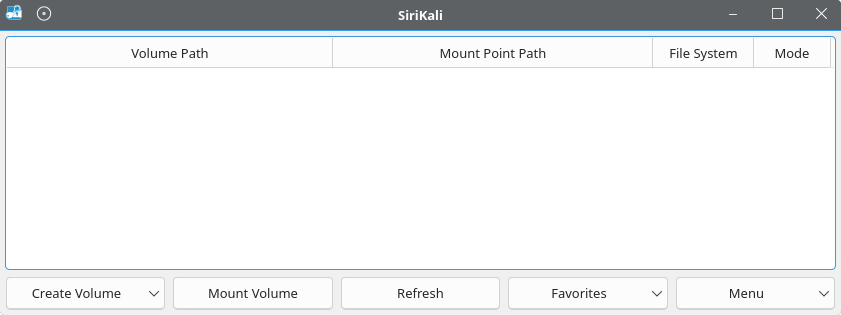
SiriKali is a Qt-based graphical application for creating, unlocking and managing encrypted folders. It supports several filesystem encryption utilities, providing a common desktop interface for tools that would otherwise require separate command-line workflows.
The application supports local encrypted storage and remote filesystem access through SSHFS. Users can save frequently accessed volumes as favourites and configure different methods for retrieving their passwords or keys. SiriKali also supports integration with desktop credential stores, helping users manage multiple encrypted locations without repeatedly entering complex commands.
This is free and open source software.
Key Features
- Supports multiple encryption backends, including CryFS, gocryptfs, securefs, EncFS, fscrypt and eCryptfs through supported helpers.
- Provides remote filesystem mounting through SSHFS.
- Creates, mounts and unmounts encrypted volumes through a unified graphical interface.
- Stores frequently accessed volumes as favourites for convenient mounting.
- Supports password retrieval through KDE Wallet, libsecret and its internal credential storage system.
- Allows passwords, keyfiles or combinations of the two to be used with supported backends.
- Can unlock favourite volumes using a configured key source without displaying a password prompt.
- Supports custom backends and command-line options for automated volume mounting.
Website: mhogomchungu.github.io/sirikali
Support:
Developer: Francis Banyikwa
License: GNU General Public License v3.0
SirKali is written in C++. Learn C++ with our recommended free books and free tutorials.
Related Software
| GUI File Encryption Tools | |
|---|---|
| GpgFrontend | Qt frontend for OpenPGP encryption, signing and key management |
| Cryptomator | Multi-platform transparent client-side encryption of files in the cloud |
| VeraCrypt | Strong disk encryption software (File and Disk) |
| Picocrypt NG | Community-developed continuation of the archived Picocrypt project |
| KGpg | KDE frontend for GnuPG with encryption and key management |
| Picocrypt | Very small (hence Pico), very simple, yet very secure encryption tool |
| Kleopatra | KDE tool for managing X.509 and OpenPGP certificates |
| Vaults | Create encrypted vaults in which you can safely store files |
| SiriKali | Qt/C++ GUI front end |
| Qccrypt | Qt cross-platform frontend for the ccrypt command-line tool |
| PGPTool | Java-based desktop GUI for PGP decryption/encryption |
| OpaqueFiles | Store or archive files in the cloud |
| Volaris for Desktop | Wrapper for Volaris |
| File Lock PEA | Password Encrypting Archive |
| Hideout | Simple drag-and-drop file encryption and decryption using GnuPG |
Read our verdict in the software roundup.
 LinuxLinks helps you discover the best free and open source software for Linux. Explore our extensive collection of recommended applications, including alternatives to popular proprietary software. We also publish software reviews, Linux tutorials, hardware reviews, free programming books and articles covering the wider open source community. Browse our Linux resources to discover more. Know a useful free and open source Linux application we haven't covered? Suggest a program for inclusion. Has your software been featured on LinuxLinks? Display one of our Featured on LinuxLinks badges on your website or GitHub README. |
Please read our Comment Policy before commenting.
How does SiriKali handle the security trade-off between convenience and trust when it presents many different encryption backends through one interface, especially if users don’t fully understand the strengths and weaknesses of each backend?