

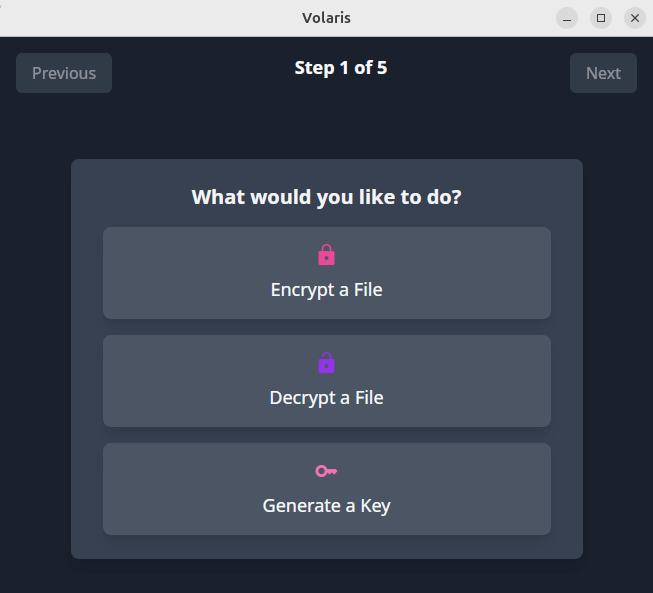
Volaris GUI is a sleek and modern Svelte/Tauri-based application designed to streamline the process of file encryption and decryption using key files.
This tool offers a user-friendly interface with drag-and-drop support, tabbed navigation, and seamless key file management.
This is free and open source software.
Key Features
- File Encryption & Decryption: Easily encrypt or decrypt files with just a few clicks.
- Key File Management: Create new key files or select existing ones directly from the app.
- Drag-and-Drop Support: Quickly select files by dragging them into the designated area.
- Modern UI: A clean and responsive design using Svelte and Tailwind CSS.
Website: github.com/volar-is/volaris-gui
Support:
Developer: greendoescode
License: BSD 2-Clause “Simplified” License
Volaris for Desktop is written in Rust. Learn Rust with our recommended free books and free tutorials.
Related Software
| GUI File Encryption Tools | |
|---|---|
| Cryptomator | Multi-platform transparent client-side encryption of files in the cloud |
| VeraCrypt | Strong disk encryption software (File and Disk) |
| Picocrypt NG | Community-developed continuation of the archived Picocrypt project |
| Picocrypt | Very small (hence Pico), very simple, yet very secure encryption tool |
| Kleopatra | KDE tool for managing X.509 and OpenPGP certificates |
| Vaults | Create encrypted vaults in which you can safely store files |
| SiriKali | Qt/C++ GUI front end |
| Qccrypt | Qt cross-platform frontend for the ccrypt command-line tool |
| PGPTool | Java-based desktop GUI for PGP decryption/encryption |
| OpaqueFiles | Store or archive files in the cloud |
| Volaris for Desktop | Wrapper for Volaris |
| File Lock PEA | Password Encrypting Archive |
Read our verdict in the software roundup.
 Explore our comprehensive directory of recommended free and open source software. Our carefully curated collection spans every major software category. Explore our comprehensive directory of recommended free and open source software. Our carefully curated collection spans every major software category.This directory is part of our ongoing series of informative articles for Linux enthusiasts. It features hundreds of detailed reviews, along with open source alternatives to proprietary solutions from major corporations such as Google, Microsoft, Apple, Adobe, IBM, Cisco, Oracle, and Autodesk. You’ll also find interesting projects to try, hardware coverage, free programming books and tutorials, and much more. Discovered a useful open source Linux program that we haven’t covered yet? Let us know by completing this form. |
Please read our Comment Policy before commenting.