

Picocrypt is billed as a very small (hence Pico), very simple, yet very secure encryption tool that you can use to protect your files.
It’s designed to be the go-to tool for encryption, with a focus on security, simplicity, and reliability. Picocrypt uses the secure XChaCha20 cipher and the Argon2id key derivation function to provide a high level of security, even from three-letter agencies like the NSA.
A command-line interface is also available for Picocrypt. It can encrypt and decrypt files, folders, and globs, and supports paranoid mode and Reed-Solomon encoding.
This is free and open source software.
Key Features
- Tiny using very little RAM.
- Portable – it doesn’t need to be installed and doesn’t need root privileges.
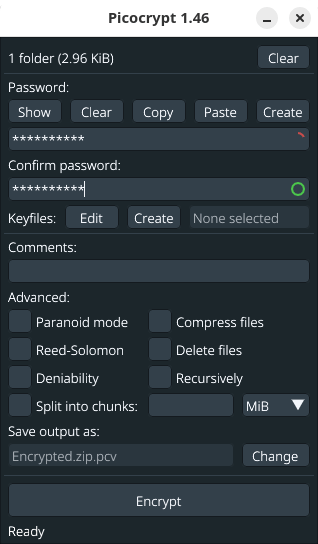
- Provides a secure password generator that you can use to create cryptographically secure passwords. You can customize the password length, as well as the types of characters to include.
- Supports the use of keyfiles as an additional form of authentication (or the only form of authentication). Any file can be used as a keyfile, and a secure keyfile generator is provided for convenience.
- Authenticates data in addition to protecting it, preventing hackers from maliciously modifying sensitive data
- Paranoid mode – provides the highest level of security available. Using this mode will encrypt your data with both XChaCha20 and Serpent in a cascade fashion, and use HMAC-SHA3 to authenticate data instead of BLAKE2b. Argon2 parameters will be increased significantly as well.
- Reed-Solomon – prevent file corruption with erasure coding. Picocrypt can still recover the header and decrypt your data with a high success rate. Picocrypt can also encode the entire volume with Reed-Solomon to prevent any corruption to your important files.
- Deniability – add plausible deniability to the volume. Picocrypt volumes typically follow an easily recognizable header format. However, if you want to hide the fact that you are encrypting your files, enabling this option will provide you with plausible deniability. The output volume will indistinguishable from a stream of random bytes, and no one can prove it is a volume without the correct password.
- Compress files – uses deflate compression before encrypting.
- Delete files – delete the input files after encryption.
- Recursively – encrypt and decrypt individual files individually.
- Split into chunks – by KiB, MiB, GiB, TiB, and total.
- Cross-platform support – runs under Linux, macOS, and Windows.
Website: github.com/Picocrypt/Picocrypt
Support:
Developer: Evan Su
License: GNU General Public License v3.0
Picocrypt is written in Go. Learn Go with our recommended free books and free tutorials.
This article was written with the help of a site visitor who completed this form. Help the site by suggesting new open source software.
Related Software
| GUI File Encryption Tools | |
|---|---|
| Cryptomator | Multi-platform transparent client-side encryption of files in the cloud |
| VeraCrypt | Strong disk encryption software (File and Disk) |
| Picocrypt NG | Community-developed continuation of the archived Picocrypt project |
| Picocrypt | Very small (hence Pico), very simple, yet very secure encryption tool |
| Kleopatra | KDE tool for managing X.509 and OpenPGP certificates |
| Vaults | Create encrypted vaults in which you can safely store files |
| SiriKali | Qt/C++ GUI front end |
| Qccrypt | Qt cross-platform frontend for the ccrypt command-line tool |
| PGPTool | Java-based desktop GUI for PGP decryption/encryption |
| OpaqueFiles | Store or archive files in the cloud |
| Volaris for Desktop | Wrapper for Volaris |
| File Lock PEA | Password Encrypting Archive |
Read our verdict in the software roundup.
| CLI File Encryption Tools | |
|---|---|
| SOPS | Editor of encrypted files |
| age | Simple file encryption tool |
| GnuPG | Implementation of the OpenPGP standard |
| Sequoia PGP | Comprehensive OpenPGP implementation |
| horcrux | File splitter with encryption and redundancy |
| rage | Simple encryption tool using the age format |
| Kryptor | Simple, modern, and secure file encryption and signing tool |
| Picocrypt | Very small (hence Pico), very simple, yet very secure encryption tool |
| fscrypt | Go tool for managing Linux filesystem encryption |
| enc | Designed as a modern, approachable alternative to GnuPG |
| ccrypt | Tool for encrypting and decrypting files and streams |
| Encpipe | Billed as the simplest encryption tool in the world |
| Volaris | Encryption tool designed to prioritize privacy and security |
| eddy | Simple and fast CLI file encryption |
| Xecrets Cli | AxCrypt compatible encryption tool |
| nacrypt | Simple and easy-to-use file encryption utility |
| v02enc | Symmetric encryption for multiple recipients |
| rsecure | AES-GCM file encryption and decryption tool |
| PurrCrypt | Fur-ociously secure encryption tool |
Read our verdict in the software roundup.
 Explore our comprehensive directory of recommended free and open source software. Our carefully curated collection spans every major software category. Explore our comprehensive directory of recommended free and open source software. Our carefully curated collection spans every major software category.This directory is part of our ongoing series of informative articles for Linux enthusiasts. It features hundreds of detailed reviews, along with open source alternatives to proprietary solutions from major corporations such as Google, Microsoft, Apple, Adobe, IBM, Cisco, Oracle, and Autodesk. You’ll also find interesting projects to try, hardware coverage, free programming books and tutorials, and much more. Discovered a useful open source Linux program that we haven’t covered yet? Let us know by completing this form. |
Please read our Comment Policy before commenting.
Hi Steve. Thanks for posting another of my recent software recommendations. I love that feedback feature. 🙂
Yes, the feedback forms are really popular.
We’d love to add more ways that visitors could express their views. Things like surveys and polls would be awesome, but sadly this functionality costs $200 a year 🙁