
Amazon S3 (Simple Storage Service) is a scalable object storage service from AWS. It lets users store and retrieve large amounts of data, including backups, media files and application data, using buckets and objects rather than a traditional filesystem hierarchy. S3-compatible storage is also widely offered by cloud providers and self-hosted storage platforms.
While command-line tools offer considerable flexibility, desktop clients can make everyday object storage management much more approachable. They typically provide facilities to browse buckets, upload and download files, create and remove folders or objects, manage multiple storage accounts, and transfer data between local and remote locations. Some also integrate cloud storage more closely with the desktop or provide a familiar dual-pane file management workflow.
This roundup looks at useful desktop S3 and S3-compatible storage tools for Linux. Only free and open source software is eligible for inclusion here.
Here’s our verdict captured in a legendary LinuxLinks-style ratings chart.
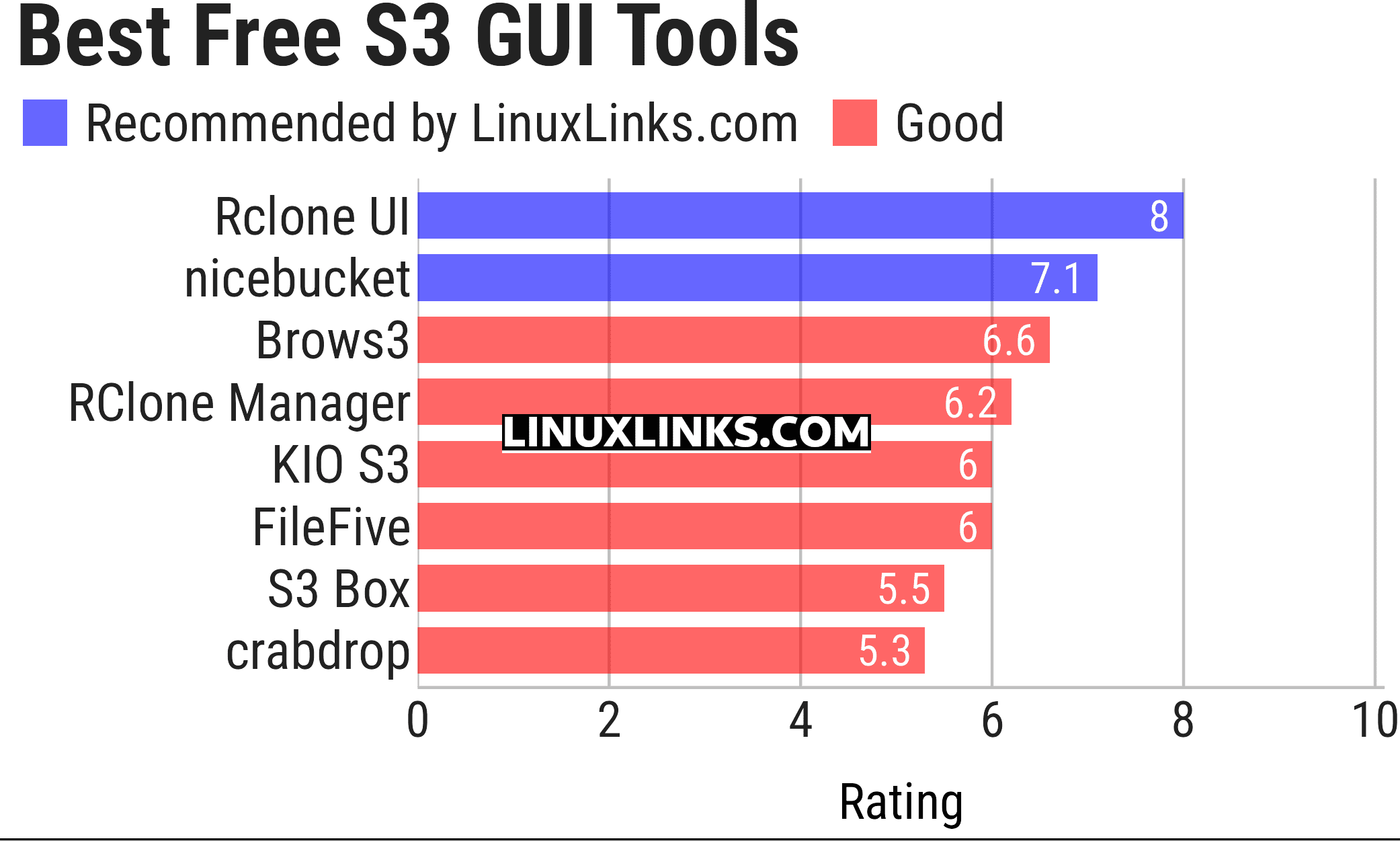
Click the links in the table below to learn more about each tool.
| S3 GUI Tools | |
|---|---|
| Rclone UI | Cross-platform front end for configuring and controlling rclone |
| nicebucket | Modern bucket browser for managing files and objects |
| Brows3 | Lightweight desktop client for exploring Amazon cloud storage |
| RClone Manager | Manage rclone remotes, transfers and mounted storage with ease |
| KIO S3 | Brings object storage directly into KDE applications |
| FileFive | Dual-pane file manager built for quick local and remote transfers |
| S3 Box | Clean desktop client for browsing, uploading and organising buckets |
| crabdrop | Desktop file manager for cloud object storage |
 Explore our carefully curated directory of recommended free and open source software, covering every major software category. Explore our carefully curated directory of recommended free and open source software, covering every major software category.The directory forms part of our extensive collection of articles for Linux enthusiasts. It includes hundreds of detailed reviews, together with free and open source alternatives to proprietary software from companies such as Google, Microsoft, Apple, Adobe, IBM, Cisco, Oracle, and Autodesk. LinuxLinks also covers interesting projects worth exploring, Linux-compatible hardware, free programming books and tutorials, and much more. Know a useful free and open source Linux application that we haven’t covered? Tell us about it using our submission form. |
Please read our Comment Policy before commenting.