

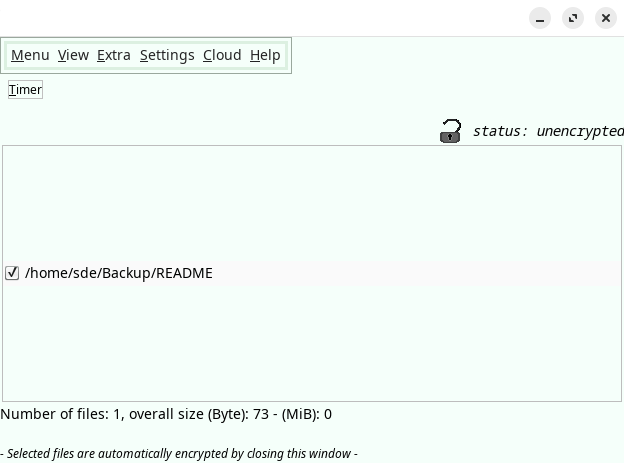
File Lock PEA (PEA = Password Encrypting Archive) encrypts data at the filesystem level and offers the possibility to decrypt single files or whole directories temporarily.
The program consists of a single archive file. Installation is not required.
This is free and open source software.
Key Features
- Files and folders are individually selected for decryption when they are needed.
- Cloud support – save your files in the cloud and upload new versions using several cloud providers. All data remain encrypted during this process.
- Authenticated Encryption – protects the integrity of the data by an authenticated encryption mode. This guarantees that the data has not been manipulated.
- Key File – add a second factor besides the password and protect your data additionally with a key file. Store this key file wherever you want.
- Metadata hiding – many metadata can be masked: File names and other data can be made invisible by encrypting them in zip files.
- Virtual keyboard against Keyloggers – provides an internal on-screen keyboard to protect against hardware keyloggers as well against some software keyloggers.
- Timer to encrypt the files automatically after a certain period of time.
- Uses a memory-hard key derivation function that defends custom-hardware attacks
- Adjustability for colors, font sizes, calendar view.
- Measures the quality of new passwords during input by a password strength meter. Indicates their strength by colored bars.
- Combines System Entropy with its own Entropy Source.
- Offers character tables to enlarge the character set of passwords.
- Cross-platform support – runs under Linux, macOS, and Windows.
Website: eck.cologne/peafactory
Support: GitHub Code Repository
Developer: PeaFactory
License: GNU General Public License v2.0
File Lock PEA is written in Java. Learn Java with our recommended free books and free tutorials.
Related Software
| GUI File Encryption Tools | |
|---|---|
| Cryptomator | Multi-platform transparent client-side encryption of files in the cloud |
| VeraCrypt | Strong disk encryption software (File and Disk) |
| Picocrypt NG | Community-developed continuation of the archived Picocrypt project |
| Picocrypt | Very small (hence Pico), very simple, yet very secure encryption tool |
| Kleopatra | KDE tool for managing X.509 and OpenPGP certificates |
| Vaults | Create encrypted vaults in which you can safely store files |
| SiriKali | Qt/C++ GUI front end |
| Qccrypt | Qt cross-platform frontend for the ccrypt command-line tool |
| PGPTool | Java-based desktop GUI for PGP decryption/encryption |
| OpaqueFiles | Store or archive files in the cloud |
| Volaris for Desktop | Wrapper for Volaris |
| File Lock PEA | Password Encrypting Archive |
Read our verdict in the software roundup.
 Explore our comprehensive directory of recommended free and open source software. Our carefully curated collection spans every major software category. Explore our comprehensive directory of recommended free and open source software. Our carefully curated collection spans every major software category.This directory is part of our ongoing series of informative articles for Linux enthusiasts. It features hundreds of detailed reviews, along with open source alternatives to proprietary solutions from major corporations such as Google, Microsoft, Apple, Adobe, IBM, Cisco, Oracle, and Autodesk. You’ll also find interesting projects to try, hardware coverage, free programming books and tutorials, and much more. Discovered a useful open source Linux program that we haven’t covered yet? Let us know by completing this form. |
Please read our Comment Policy before commenting.