
Foto is a lightweight image viewer designed for displaying individual pictures without the overhead of a conventional graphical application. Written in C, it can show images in a window or directly in a terminal, making it useful for scripts and command-line workflows.
The application deliberately avoids interactive controls. There are no keyboard shortcuts, menus or toolbars. Instead, its behaviour is determined by command-line arguments, allowing another program or shell script to control how an image appears.
Users can specify the initial position and dimensions of the display window. Background colour can also be configured, including transparent backgrounds and the areas surrounding images when their proportions do not match the available display space.
Its minimalist design makes it particularly suitable for scripts that need to present an image without requiring interaction from the user.
This is free and open source software.
Key Features
- Display images in a graphical window or terminal.
- Simple command-line interface designed for scripting.
- Specify the initial position of the image window.
- Configure window width and height.
- Set the background colour around displayed images.
- Support transparent backgrounds.
- Handle letterboxing and pillarboxing when image proportions differ from the display area.
- Minimal interface without menus or keyboard shortcuts.
- Uses SDL2 and SDL2_image for image display.
Website: github.com/sophuric/Foto
Support:
Developer: sophur
License: Mozilla Public License v2.0
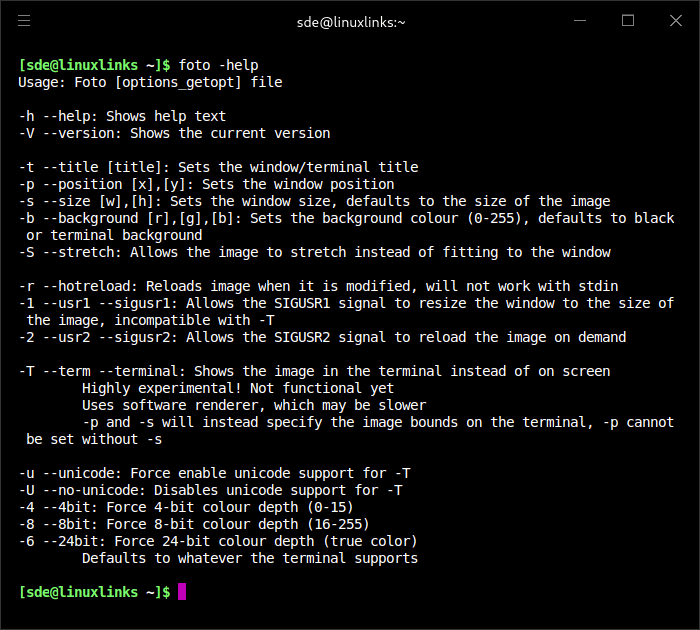
Foto is written in C. Learn C with our recommended free books and free tutorials.
Related Software
| Terminal-Based Image Viewers | |
|---|---|
| timg | Image and video viewer with good range of features. Written in C++ |
| Chafa | Character Art Facsimile |
| viu | Rust-based image viewer |
| vv | Image viewer for sixel terminals |
| TIV | Tiny C++ program that displays images in a terminal |
| Ranger | Terminal-based file manager supporting high quality previews of images |
| mcat | Extended cat command |
| icat | Cat like utility can specify multiple image files and/or directories |
| PixelTerm-C | High-performance terminal image browser written in C |
| pho | Lightweight image viewer |
| catimg | Renders images in the terminal |
| PTUI | Real-time image preview capabilities |
| imv | X11/Wayland image viewer |
| iv | Image viewer using terminal graphics |
| TermVisage | Front-end to the term-image library |
| Foto | Simple image viewer |
| vat | Renders SVG and other vector graphics in multiple formats |
| image_to_console | Fast image viewer supporting animations and graphics protocols |
| rsimg | Uses crossterm and zune as dependencies |
| imgcat | Displays images and gifs in your terminal emulator. |
Read our verdict in the software roundup.
 Explore our carefully curated directory of recommended free and open source software, covering every major software category. Explore our carefully curated directory of recommended free and open source software, covering every major software category.The directory forms part of our extensive collection of articles for Linux enthusiasts. It includes hundreds of detailed reviews, together with free and open source alternatives to proprietary software from companies such as Google, Microsoft, Apple, Adobe, IBM, Cisco, Oracle, and Autodesk. LinuxLinks also covers interesting projects worth exploring, Linux-compatible hardware, free programming books and tutorials, and much more. Know a useful free and open source Linux application that we haven’t covered? Tell us about it using our submission form. |
Please read our Comment Policy before commenting.