

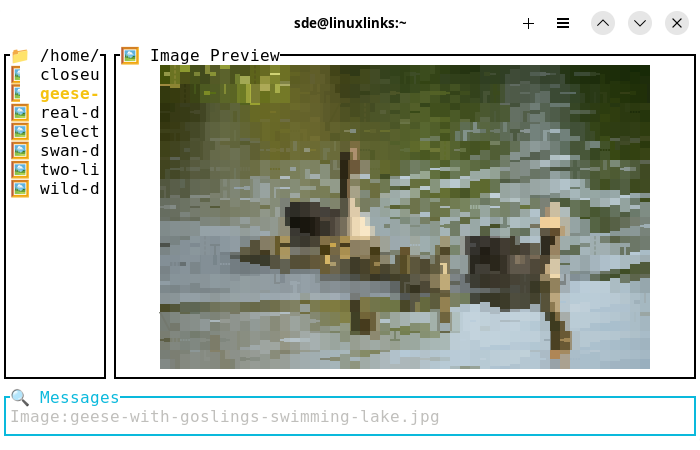
PTUI (Picture TUI) is a terminal-based image viewer written in Rust that provides a file browser interface with real-time image preview capabilities.
The software needs:
- chafa – For converting images to ANSI/terminal output
- ImageMagick (identify command) – For image dimension detection
This is free and open source software.
Key Features
- Support for common image formats.
- Real-time image preview using ANSI terminal graphics.
- Multiple picture-to-text converters: chafa and jp2a supported so far.
- Slide show mode with arrow-key support and transitions (transitions only with jp2a).
- Navigate with arrow keys or vim-style j/k.
- Enter directories with Enter, go back with Backspace.
- Multilingual support (English, German, Spanish, French, Japanese, Chinese).
- Dynamic window resizing with [ and ] keys and when terminal changes.
- Caching of rendered images for performance.
- Scrollable file lists for directories with many files.
- Support for both image and text file preview.
- Open in file system browser (if available).
- Delete file.
- Save picture to ascii.
- Sort by date asc/desc or name.
- Dynamic reloading of configuration.
Website: github.com/narbs/ptui
Support:
Developer: Christian Clare
License: MIT License
PTUI is written in Rust. Learn Rust with our recommended free books and free tutorials.
Related Software
| Terminal-Based Image Viewers | |
|---|---|
| timg | Image and video viewer with good range of features. Written in C++ |
| Chafa | Character Art Facsimile |
| viu | Rust-based image viewer |
| vv | Image viewer for sixel terminals |
| TIV | Tiny C++ program that displays images in a terminal |
| Ranger | Terminal-based file manager supporting high quality previews of image files |
| mcat | Extended cat command |
| icat | Cat like utility can specify multiple image files and/or directories |
| PixelTerm-C | High-performance terminal image browser written in C |
| pho | Lightweight image viewer |
| catimg | Renders images in the terminal |
| PTUI | Real-time image preview capabilities |
| imv | X11/Wayland image viewer |
| iv | Image viewer using terminal graphics |
| ucollage | Extensible command line image viewer |
| TermVisage | Front-end to the term-image library |
| Foto | Simple image viewer |
| rsimg | Uses crossterm and zune as dependencies |
| pxv | Instant feature rich terminal image viewer |
| imgcat | Displays images and gifs in your terminal emulator. |
Read our verdict in the software roundup.
 Explore our carefully curated directory of recommended free and open source software, covering every major software category. Explore our carefully curated directory of recommended free and open source software, covering every major software category.The directory forms part of our extensive collection of articles for Linux enthusiasts. It includes hundreds of detailed reviews, together with free and open source alternatives to proprietary software from companies such as Google, Microsoft, Apple, Adobe, IBM, Cisco, Oracle, and Autodesk. LinuxLinks also covers interesting projects worth exploring, Linux-compatible hardware, free programming books and tutorials, and much more. Know a useful free and open source Linux application that we haven’t covered? Tell us about it using our submission form. |
Please read our Comment Policy before commenting.