

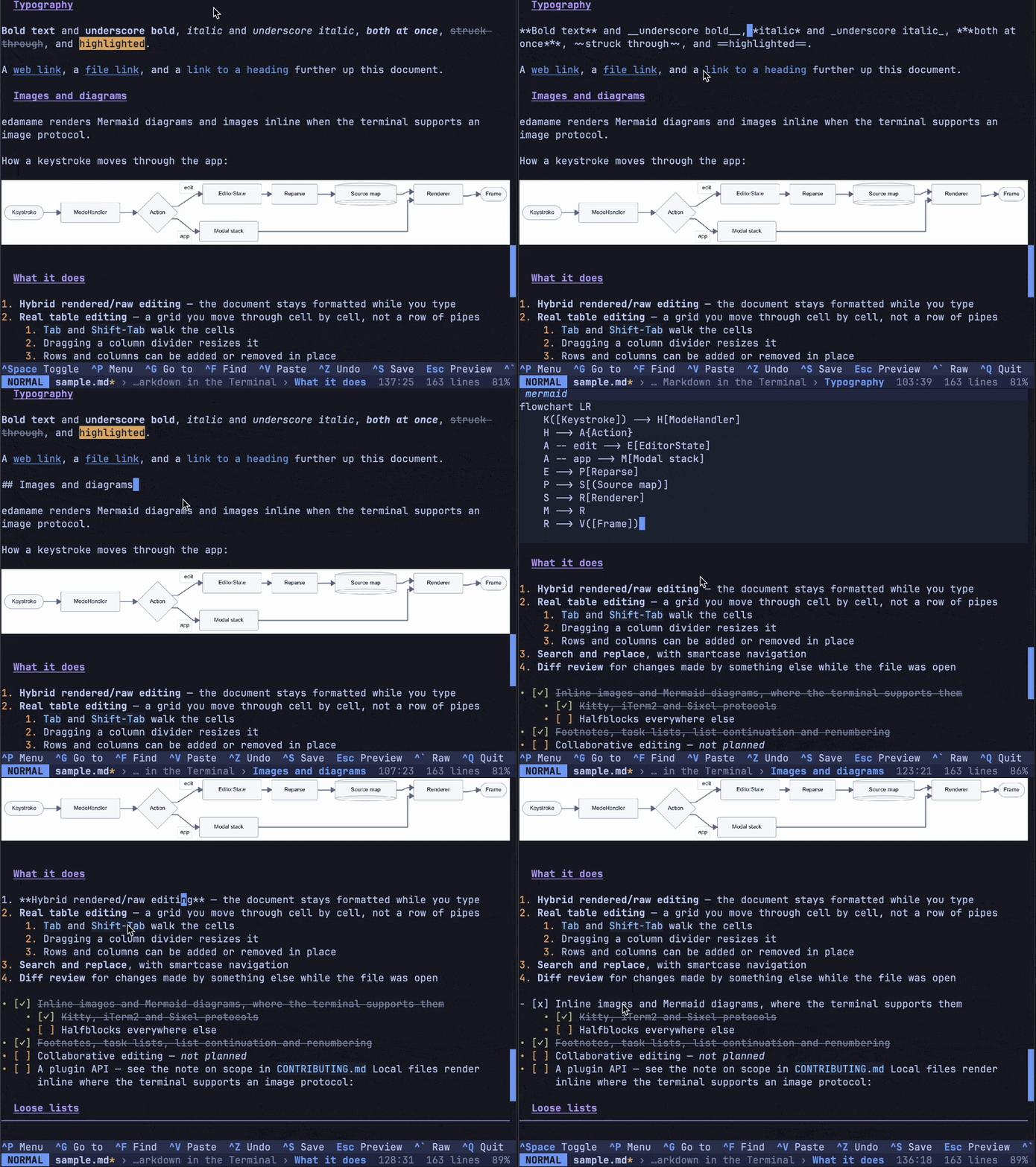
edamame is a terminal-based Markdown editor that combines formatted document rendering with direct text editing. Instead of displaying an entire document as raw Markdown source, it keeps most of the content rendered while revealing the underlying syntax on the line being edited.
This approach allows users to work with headings, lists, tables, links and other Markdown elements without constantly switching between editing and preview modes. The document remains readable throughout the editing process, while the original Markdown syntax is still readily accessible.
The editor pays particular attention to structured content. Tables are displayed as grids with individually editable cells, while supported terminals can display inline images, mathematical expressions and diagrams.
edamame also provides keyboard-driven navigation, optional Vim-style editing and tools for reviewing changes made by external programs. It is suitable for writing technical documentation, maintaining notes and editing Markdown files directly in a terminal.
This is free and open source software.
Key Features
- Hybrid editing model that displays rendered Markdown while exposing the source of the current line.
- Supports headings, lists, links, footnotes, task lists and other Markdown elements.
- Interactive table editing with cell navigation, row and column operations, and mouse-controlled resizing.
- Displays inline images, Mermaid diagrams and LaTeX mathematics in compatible terminals.
- Search and replace functionality with smartcase matching.
- Optional Vim mode with motions, operators, text objects and substitution commands.
- Reviews external file modifications and allows individual changes to be accepted or rejected.
- Provides a fuzzy command palette and jump-to-heading navigation.
- Supports automatic list continuation and numbering adjustments.
- Includes customisable keyboard shortcuts and mouse navigation.
- Offers 27 built-in colour themes and support for custom themes.
- Exports Markdown documents to HTML.
- Includes safeguards for image decoding, remote image loading and HTML export.
- Adapts its display to the capabilities of the terminal emulator.
- Cross-platform support – runs on Linux and macOS.
Website: github.com/mijowi/edamame
Support:
Developer: mijowi
License: Apache License 2.0
edamame is written in Rust. Learn Rust with our recommended free books and free tutorials.
Related Software
| Markdown Editors | |
|---|---|
| Mark Text | Simple and elegant Markdown editor |
| Zettlr | Billed as the Markdown editor for the 21st century |
| CodiMD | Realtime collaborative markdown notes |
| ghostwriter | Distraction-free Markdown editor |
| Yank Note | Extensible note app with plugins, diagrams, and code execution |
| NoteGen | Cross-platform note manager with local storage and clean organisation |
| MindForger | Thinking notebook and Markdown editor |
| MarkFlowy | Modern and intelligent Markdown editor |
| ReText | Supports Markdown and reStructuredText markup languages |
| Apostrophe | Distraction free Markdown editor |
| HedgeDoc | Real-time collaborative note-taking for teams and documentation |
| StackEdit | Full-featured Markdown editor based on PageDown |
| PanWriter | Distraction-free Markdown writing environment |
| Looksyk | Simple personal knowledge platform |
| Remarkable | Python-based editor with live preview, MathJax support and more |
| Folio | Markdown note-taking app for GNOME |
| Scratchmark | Organized Markdown editor |
| Rucola | Terminal-based markdown note manager |
| Marker | Simple yet robust Markdown editor |
| ThiefMD | Markdown and Fountain editor and file manager inspired by Ulysses |
| Marknote | Create rich text notes |
| SoloMD | Local-first writing tool focused on privacy and offline editing |
| Norka | Continuous text editing |
| MerMark Editor | Live editor with Mermaid diagram previews and export tools |
| Notes-Up | Write beautiful notes fast and easy using Markdown |
| Marko | WYSIWYG writing app with instant preview and clean formatting |
| Cedilla | Distraction-free editor for structured notes and long-form drafts |
| Abricotine | Markdown editor built for desktop |
Read our verdict in the software roundup.
 Explore our carefully curated directory of recommended free and open source software, covering every major software category. Explore our carefully curated directory of recommended free and open source software, covering every major software category.The directory forms part of our extensive collection of articles for Linux enthusiasts. It includes hundreds of detailed reviews, together with free and open source alternatives to proprietary software from companies such as Google, Microsoft, Apple, Adobe, IBM, Cisco, Oracle, and Autodesk. LinuxLinks also covers interesting projects worth exploring, Linux-compatible hardware, free programming books and tutorials, and much more. Know a useful free and open source Linux application that we haven’t covered? Tell us about it using our submission form. |
Please read our Comment Policy before commenting.