

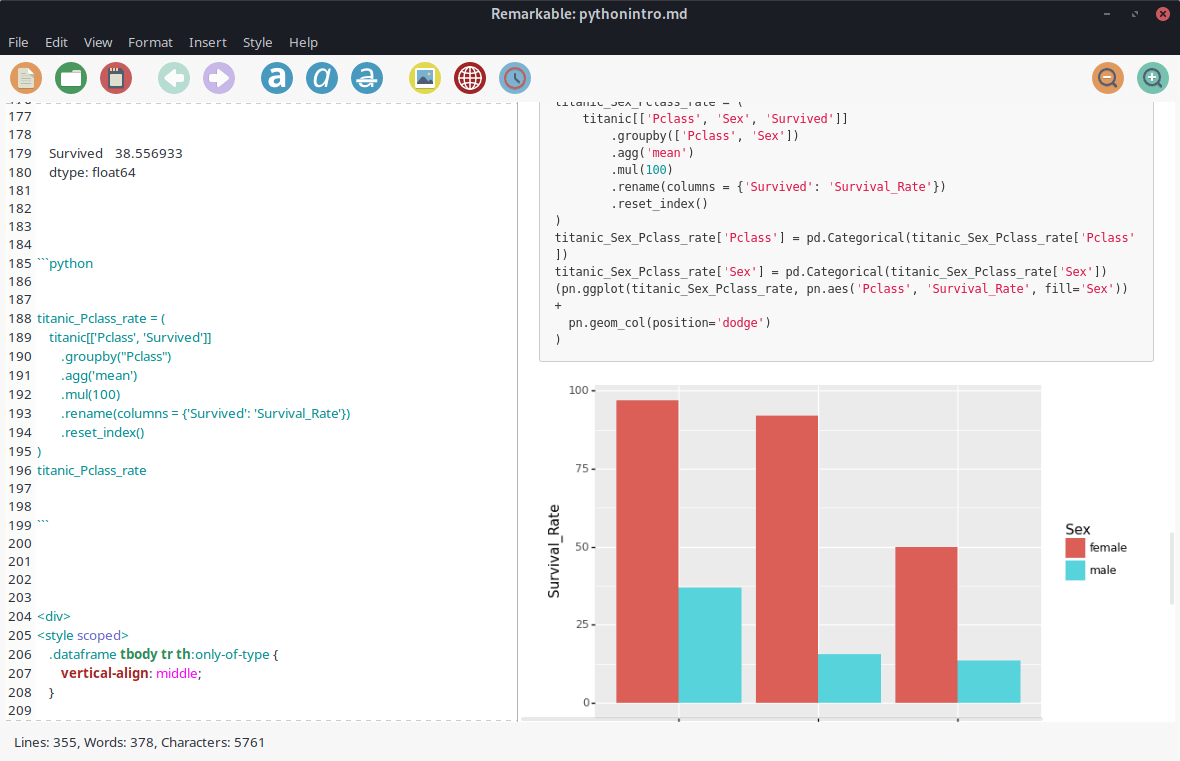
Remarkable is a desktop Markdown editor for Linux that displays source text alongside a rendered preview. It provides a straightforward environment for creating formatted documents while retaining access to the Markdown characters used to describe headings, emphasis, links and other elements. The preview updates as users edit their documents, making it possible to check formatting without exporting a separate file.
The editor supports GitHub Flavored Markdown and includes facilities for mathematical notation, document styling and export. It can be used for articles, notes and technical documentation where a plain-text source format is desirable. A selection of themes and keyboard shortcuts allows the interface to be adapted to individual writing preferences.
This is free and open source software.
Key Features
- Markdown editing with live rendered preview.
- Synchronised scrolling between editor and preview.
- GitHub Flavored Markdown support.
- Syntax highlighting for Markdown source.
- Mathematical expressions rendered using MathJax.
- Export documents to HTML and PDF.
- Dialogs for inserting links, images and tables.
- Customisable document styles and themes.
- Support for custom CSS stylesheets.
- Full-screen editing mode.
- Light and dark appearance options.
- Keyboard shortcuts for inserting common formatting.
- Find and replace facilities.
- Text zoom controls.
Website: remarkableapp.github.io
Support:
Developer: Jamie McGowan
License: MIT License
Remarkable is written in Python. Learn Python with our recommended free books and free tutorials.
Related Software
| Markdown Editors | |
|---|---|
| Mark Text | Simple and elegant Markdown editor |
| Zettlr | Billed as the Markdown editor for the 21st century |
| CodiMD | Realtime collaborative markdown notes |
| ghostwriter | Distraction-free Markdown editor |
| Yank Note | Extensible note app with plugins, diagrams, and code execution |
| NoteGen | Cross-platform note manager with local storage and clean organisation |
| MindForger | Thinking notebook and Markdown editor |
| MarkFlowy | Modern and intelligent Markdown editor |
| ReText | Supports Markdown and reStructuredText markup languages |
| Apostrophe | Distraction free Markdown editor |
| HedgeDoc | Real-time collaborative note-taking for teams and documentation |
| StackEdit | Full-featured Markdown editor based on PageDown |
| PanWriter | Distraction-free Markdown writing environment |
| Looksyk | Simple personal knowledge platform |
| Remarkable | Python-based editor with live preview, MathJax support and more |
| Folio | Markdown note-taking app for GNOME |
| Scratchmark | Organized Markdown editor |
| Rucola | Terminal-based markdown note manager |
| Marker | Simple yet robust Markdown editor |
| ThiefMD | Markdown and Fountain editor and file manager inspired by Ulysses |
| Marknote | Create rich text notes |
| SoloMD | Local-first writing tool focused on privacy and offline editing |
| Norka | Continuous text editing |
| MerMark Editor | Live editor with Mermaid diagram previews and export tools |
| Notes-Up | Write beautiful notes fast and easy using Markdown |
| Marko | WYSIWYG writing app with instant preview and clean formatting |
| Cedilla | Distraction-free editor for structured notes and long-form drafts |
| Abricotine | Markdown editor built for desktop |
Read our verdict in the software roundup.
 LinuxLinks helps you discover the best free and open source software for Linux. Explore our extensive collection of recommended applications, including alternatives to popular proprietary software. We also publish software reviews, Linux tutorials, hardware reviews, free programming books and articles covering the wider open source community. Browse our Linux resources to discover more. Know a useful free and open source Linux application we haven't covered? Suggest a program for inclusion. Has your software been featured on LinuxLinks? Display one of our Featured on LinuxLinks badges on your website or GitHub README. |
Please read our Comment Policy before commenting.