

KGpg is a graphical frontend for GnuPG, providing tools for encrypting files and messages, managing cryptographic keys and creating digital signatures. It is designed to make everyday encryption tasks accessible without requiring users to remember GnuPG commands.
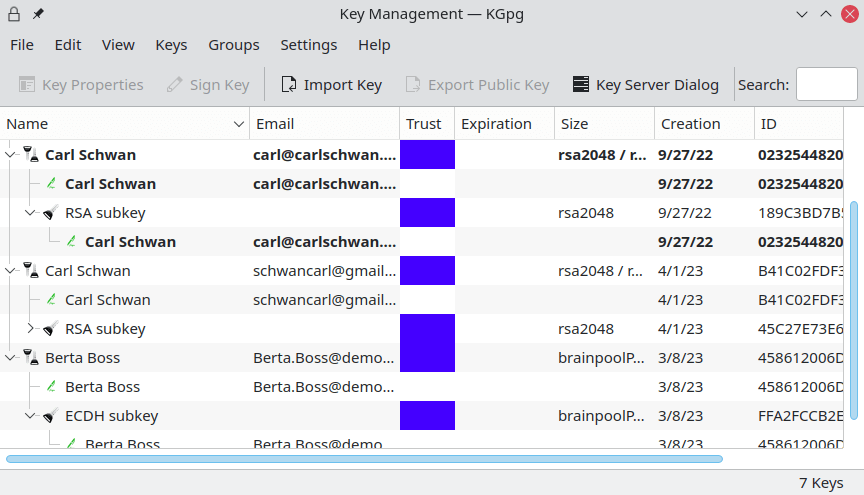
The application provides a central key manager for creating, importing, exporting and maintaining OpenPGP keys. Users can examine key signatures, manage trust settings and check expiry dates. It also includes tools for finding and exchanging public keys through keyservers.
KGpg integrates with the KDE desktop, including Dolphin, and provides a text editor for encrypting, decrypting and signing messages. It supports both public-key cryptography and symmetric encryption using a passphrase.
This is free and open source software.
Key Features
- Graphical interface for GnuPG encryption and key management.
- Generate OpenPGP public and private key pairs.
- Encrypt and decrypt files using public-key or symmetric encryption.
- Integrated text editor for encrypting, decrypting, signing and verifying messages.
- Import and export public and private keys.
- Examine key signatures, trust levels, creation dates and expiry information.
- Sign public keys to certify their ownership.
- Revoke keys and manage revocation certificates.
- Search keyservers for public keys and import matching results.
- Upload public keys to supported keyservers.
- Encrypt, decrypt and sign clipboard contents.
- Integrates with Dolphin and Konqueror for file encryption and decryption.
- Supports ASCII-armoured encrypted output for sharing through text-based channels.
- Manage key groups and configure a default encryption key.
- Configurable GnuPG executable, keyring location and encryption options.
- System tray integration for accessing the key manager and common operations.
Website: apps.kde.org/kgpg
Support:
Developer: KDE community, including y0k0, Rolf Eike ‘Dakon’ Beer and Jimmy Gilles
License: GNU General Public License v2.0
KGpg is written in C++. Learn C++ with our recommended free books and free tutorials.
Related Software
| GnuPG Frontends | |
|---|---|
| GpgFrontend | Awesome Qt-based cross-platform frontend |
| KGpg | Simple interface for GnuPG |
| Kleopatra | KDE tool for managing X.509 and OpenPGP certificates |
| Lock | Sports an attractive LibAdwaita GUI |
| Seahorse | GNOME application for managing encryption keys and passwords |
| GPA | GNU Privacy Assistant |
| Hideout | File encryption and decryption |
Read our verdict in the software roundup.
| GUI File Encryption Tools | |
|---|---|
| GpgFrontend | Qt frontend for OpenPGP encryption, signing and key management |
| Cryptomator | Multi-platform transparent client-side encryption of files in the cloud |
| VeraCrypt | Strong disk encryption software (File and Disk) |
| Picocrypt NG | Community-developed continuation of the archived Picocrypt project |
| KGpg | KDE frontend for GnuPG with encryption and key management |
| Picocrypt | Very small (hence Pico), very simple, yet very secure encryption tool |
| Kleopatra | KDE tool for managing X.509 and OpenPGP certificates |
| Vaults | Create encrypted vaults in which you can safely store files |
| SiriKali | Qt/C++ GUI front end |
| Qccrypt | Qt cross-platform frontend for the ccrypt command-line tool |
| PGPTool | Java-based desktop GUI for PGP decryption/encryption |
| OpaqueFiles | Store or archive files in the cloud |
| Volaris for Desktop | Wrapper for Volaris |
| File Lock PEA | Password Encrypting Archive |
| Hideout | Simple drag-and-drop file encryption and decryption using GnuPG |
Read our verdict in the software roundup.
 LinuxLinks helps you discover the best free and open source software for Linux. Explore our extensive collection of recommended applications, including alternatives to popular proprietary software. We also publish software reviews, Linux tutorials, hardware reviews, free programming books and articles covering the wider open source community. Browse our Linux resources to discover more. Know a useful free and open source Linux application we haven't covered? Suggest a program for inclusion. Has your software been featured on LinuxLinks? Display one of our Featured on LinuxLinks badges on your website or GitHub README. |
Please read our Comment Policy before commenting.