

A server log is a log file which is created and updated by a server. A common example is an access log generated by Apache (open source web server software), which provides a history of web page requests. However, Apache does not only capture information to that access log. There is also information captured in its error log as well as a process id file, script log and a rewrite log.
These log files are everywhere. Applications capture an enormous amount of information to log files, especially as a server may generate multiple logs. It is important to review log files to obtain feedback about the activity and performance of the server, and to identify hints to solve any problems that may arise. However, the administrator of the system can suffer from information overload, and reviewing the log files in an efficient way can be a very time consuming task.
Here steps in the trusty logfile viewer; a small utility which filters out extraneous information generated in logfiles, identifying specific strings in real time. Logfile viewers used in conjunction with logfile analysers make a powerful combination.
For many years system and kernel logs were handled by a utility called syslogd. Most Linux-based operating systems have since moved to systemd, which has a journal. It’s a giant log file for the whole system. Various software and services write their log entries into systemd’s journalctl.
To provide an insight into the quality of software that is available, we have compiled a list of 27 useful Linux logfile viewers. Hopefully, there will be something of interest for anyone needing to examine and process logfile data.
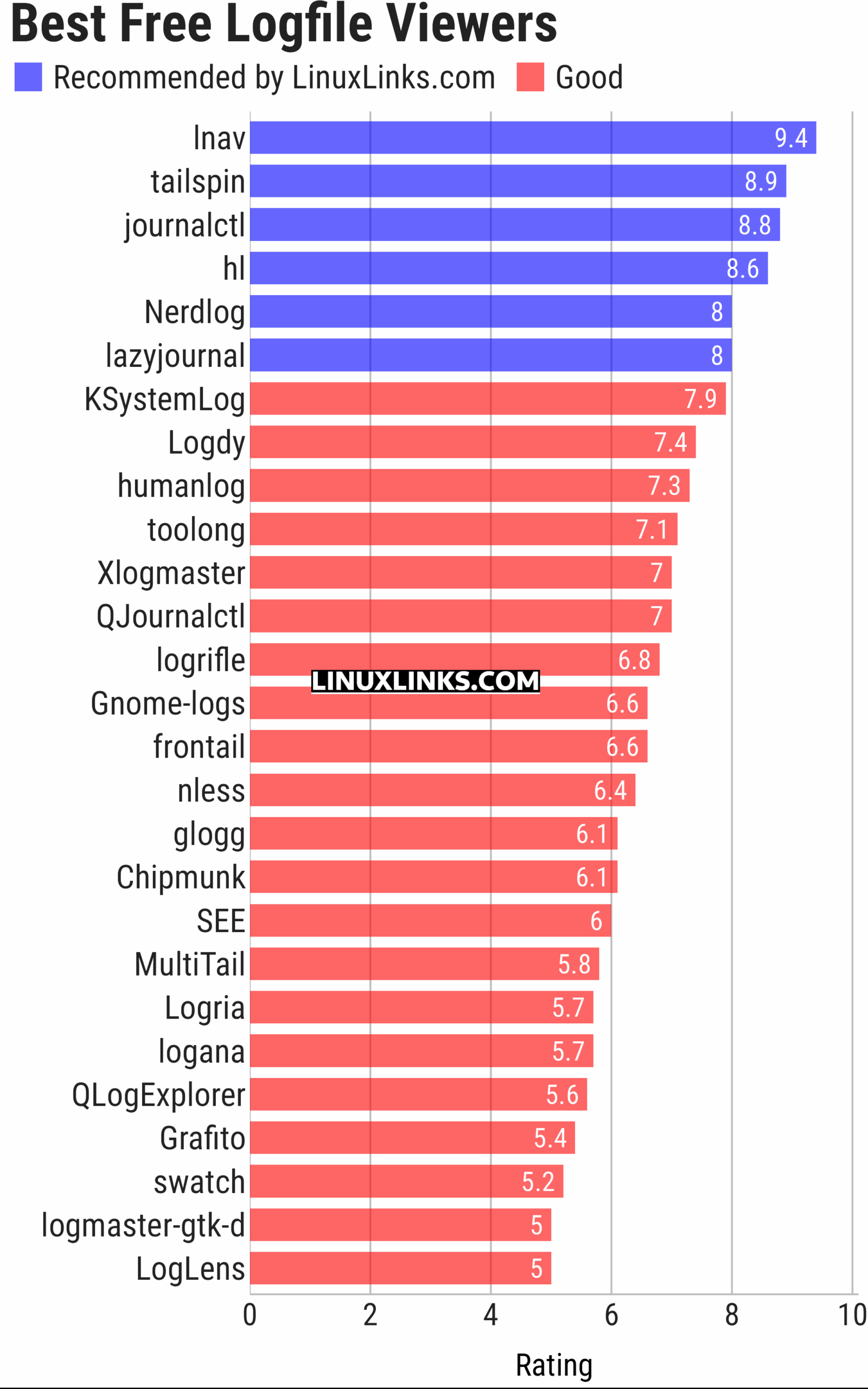
Let’s explore the 27 logfile viewers at hand. For each title we have compiled its own portal page, a full description with an in-depth analysis of its features, a screenshot of the software in action, together with links to relevant resources.
| LogFile Viewers | |
|---|---|
| lnav | Curses-based utility for viewing and analyzing log files. |
| tailspin | Terminal log file highlighter designed for inspecting log output in the shell |
| journalctl | Query and display messages from the journal |
| hl | Inspect structured logs from the terminal |
| Nerdlog | Remote-first terminal log viewer |
| lazyjournal | Inspect logs from multiple sources |
| KSystemLog | System log viewer for KDE |
| Logdy | Lightweight log viewer that works just like grep, awk, sed, or jq |
| humanlog | Reads logs from stdin and prints them back to stdout, but prettier. |
| toolong | View, tail, merge, and search log files |
| Xlogmaster | GTK+ based program to keep track of logfiles and devices |
| QJournalctl | Graphical User Interface for systemd’s journalctl |
| logrifle | Designed to "rifle through" large logfiles |
| Gnome-logs | View and search logs with this graphical utility |
| frontail | Stream logs to your web browser |
| nless | Pager for exploring structured and semi-structured data |
| glogg | Qt graphical log explorer |
| Chipmunk | Fast logfile viewer that can deal with huge logfiles (>10 GB) |
| SEE | Inspect logs from systemd services |
| MultiTail | View multiple logfiles windowed on the console |
| Logria | Log aggregation tool |
| logana | Work efficiently with very large log files, including multi-GB logs |
| QLogExplorer | Qt-based tool for exploring log files |
| Grafito | Simple, self-contained web-based log viewer for journalctl |
| swatch | Logfile viewer with regexp matching, highlighting & hooks |
| logmaster-gtk-d | Log viewer for Linux built with GTK and D |
| LogLens | Linux equivalent to Windows Event Viewer |
This article has been updated to reflect the changes outlined in our recent announcement.
 Explore our comprehensive directory of recommended free and open source software. Our carefully curated collection spans every major software category. Explore our comprehensive directory of recommended free and open source software. Our carefully curated collection spans every major software category.This directory is part of our ongoing series of informative articles for Linux enthusiasts. It features hundreds of detailed reviews, along with open source alternatives to proprietary solutions from major corporations such as Google, Microsoft, Apple, Adobe, IBM, Cisco, Oracle, and Autodesk. You’ll also find interesting projects to try, hardware coverage, free programming books and tutorials, and much more. Know a useful open source Linux program that we haven’t covered yet? Let us know by completing this form. |
Please read our Comment Policy before commenting.