

grim is a command-line tool for taking screenshots on compatible Wayland compositors. It works with compositors implementing the Wayland screencopy protocol, and can be used to capture an entire desktop, a specific display output or a rectangular portion of the screen.
The utility is well suited to scripts and compositor keyboard shortcuts. It can save images directly to files or write them to standard output, making it easy to connect a capture to clipboard tools, image converters and other command-line applications.
For interactive region selection, grim is commonly paired with slurp. More selective window and output capture is possible when appropriate compositor information or foreign-toplevel identifiers are available.
This is free and open source software.
Key Features
- Captures all outputs or a single named display output using a command-line option.
- Accepts region geometry directly, or reads the selected geometry from standard input.
- Integrates with slurp for interactive region selection without a built-in GUI.
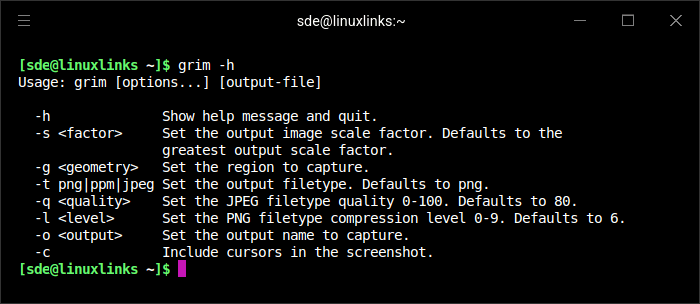
- Supports PNG, JPEG and PPM output, with options for JPEG quality and PNG compression level.
- Controls screenshot scaling and accommodates fractional scaling on compositors supporting xdg-output.
- Can include the mouse cursor in screenshots.
- Supports capture of a foreign toplevel identified by its compositor-provided handle.
- Uses a timestamped default filename, respecting GRIM_DEFAULT_DIR and the XDG pictures directory where available.
- Writes directly to standard output when the output filename is a hyphen, allowing commands such as grim – | wl-copy.
- Works with Sway and other compatible Wayland compositors; the necessary screencopy support is compositor-dependent.
Website: gitlab.freedesktop.org/emersion/grim
Support:
Developer: emersion
License: MIT License
grim is written in C. Learn C with our recommended free books and free tutorials.
Related Software
| CLI Screen Capture Tools | |
|---|---|
| maim | Make Image aims to improve on scrot |
| scrot | SCReenshOT is a simple command line screen capture utility |
| slop | Queries for a selection from the user and prints the region to stdout |
| wayshot | Screenshot tool for wayland compositors |
| termframe | Terminal output SVG screenshot tool |
| grim | Utility to take screenshots of Wayland desktops |
| shotman | Uncompromising screenshot tool for Wayland compositors |
| shotgun | Minimal screenshot utility |
| ImageMagick | Create, edit, and compose bitmap images |
| HyprCap | Capture screenshots and screen recordings on Hyprland |
| lqth | Simple but fast screenshot utility inspired by xscreenshot |
Read our verdict in the software roundup.
 LinuxLinks helps you discover the best free and open source software for Linux. Explore our extensive collection of recommended applications, including alternatives to popular proprietary software. LinuxLinks helps you discover the best free and open source software for Linux. Explore our extensive collection of recommended applications, including alternatives to popular proprietary software.We also publish software reviews, Linux tutorials, hardware reviews, free programming books and articles covering the wider open source community. Browse our Linux resources to discover more. Know a useful free and open source Linux application we haven't covered? Suggest a program for inclusion. Has your software been featured on LinuxLinks? Display one of our Featured on LinuxLinks badges on your website or GitHub README. |
Please read our Comment Policy before commenting.