

Last Updated on April 5, 2026
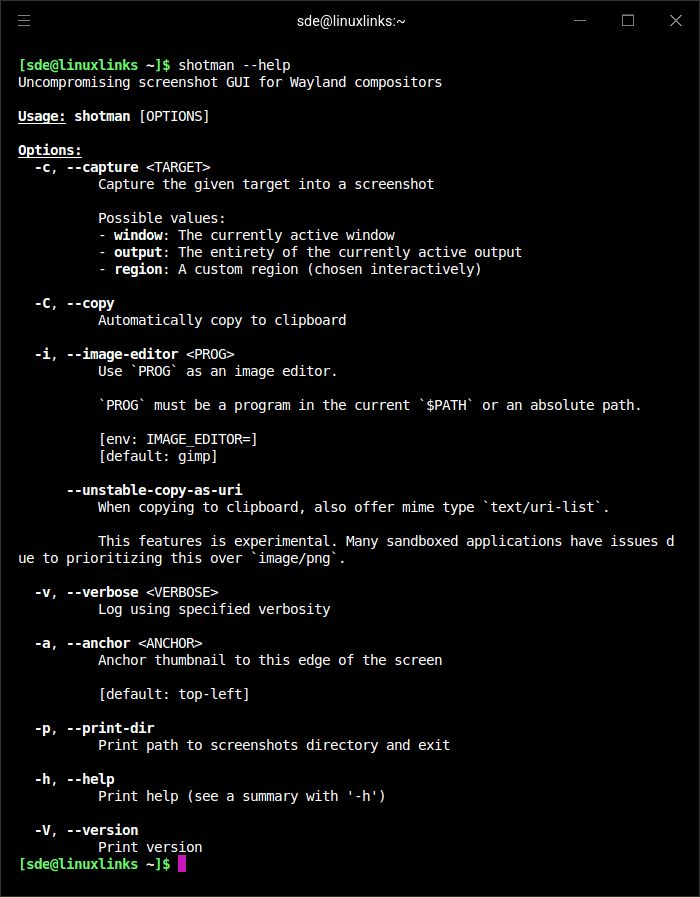
shotman is billed as uncompromising screenshot GUI for Wayland compositors. It is designed for interactive usage.
shotman takes a screenshot and shows it in a small floating thumbnail window. The screenshot can then copied with ctrl+c, deleted with d, or dismissed with Esc. Screenshots are saved immediately.
shotman is designed to run in response to some global hotkey (e.g.: Super+P, PrintScreen, etc). It is designed for interactive usage.
It requires a compositor that supports wlr_screencopy and wlr_layer_shell.
This is free and open source software.
Key Features
- Fast (less than 80ms to render the screenshot window on a 2018 laptop).
- Simple design (delegates as much as possible to the compositor; avoids unnecessary work).
- Only saves the screenshot to disk, and will copy it into the clipboard when manually requested by the user. No internet access is involved.
Website: git.sr.ht/~whynothugo/shotman
Support:
Developer: Hugo O. Barrera
License: ISC License
shotman is written in Rust. Learn Rust with our recommended free books and free tutorials.
Related Software
| CLI Screen Capture Tools | |
|---|---|
| maim | Make Image aims to improve on scrot |
| scrot | SCReenshOT is a simple command line screen capture utility |
| slop | Queries for a selection from the user and prints the region to stdout |
| wayshot | Screenshot tool for wayland compositors |
| termframe | Terminal output SVG screenshot tool |
| grim | Utility to take screenshots of Wayland desktops |
| shotman | Uncompromising screenshot tool for Wayland compositors |
| shotgun | Minimal screenshot utility |
| ImageMagick | Create, edit, and compose bitmap images |
| HyprCap | Capture screenshots and screen recordings on Hyprland |
| lqth | Simple but fast screenshot utility inspired by xscreenshot |
Read our verdict in the software roundup.
| Screen Capture Tools | |
|---|---|
| Spectacle | Simple KDE application for capturing desktop screenshots |
| Ksnip | Qt-based cross-platform tool that provides many annotation features |
| flameshot | Complete screen capture and snipping tool with unique features |
| Shutter | Feature-rich screenshot program |
| ScreenGrab | Competent Qt-based tool |
| Satty | Modern screenshot annotation utility with a clean interface |
| swappy | Wayland native snapshot editing tool |
| CoreShot | Simple lightweight screen capture utility for C-Suite |
| gscreenshot | Graphical interface and command line frontend for multiple backends |
| GIMP | The GNU Image Manipulation Program |
| shotman | Lightweight screenshot tool designed for Wayland desktops |
| GNOME Screenshot | Screen capture tool for GNOME |
| xfce4-screenshooter | Flexible screenshot utility for the Xfce desktop environment |
| wayscrollshot | Scrolling screenshot tool for Wayland |
| SnipText | Screen capture OCR tool |
| Perl Screenshot Tool | Works best on X11. It also supports Gnome Wayland |
Read our verdict in the software roundup.
 Explore our comprehensive directory of recommended free and open source software. Our carefully curated collection spans every major software category. Explore our comprehensive directory of recommended free and open source software. Our carefully curated collection spans every major software category.This directory is part of our ongoing series of informative articles for Linux enthusiasts. It features hundreds of detailed reviews, along with open source alternatives to proprietary solutions from major corporations such as Google, Microsoft, Apple, Adobe, IBM, Cisco, Oracle, and Autodesk. You’ll also find interesting projects to try, hardware coverage, free programming books and tutorials, and much more. Discovered a useful open source Linux program that we haven’t covered yet? Let us know by completing this form. |
Please read our Comment Policy before commenting.