

HyprCap is a screenshot and screen-recording utility designed for the Hyprland Wayland compositor. It brings several capture methods together behind a consistent command-line interface, while also allowing interactive mouse selection and menu-based operation.
The program uses grim for still images and wf-recorder for video. Users can invoke it directly in a terminal or assign its commands to Hyprland keyboard shortcuts, selecting a particular window, region or monitor without navigating a traditional screenshot application.
HyprCap is particularly useful for combining capture actions with clipboard handling, custom filenames and desktop notifications. Its recording controls also allow a running capture to be started, stopped or toggled.
This is free and open source software.
Key Features
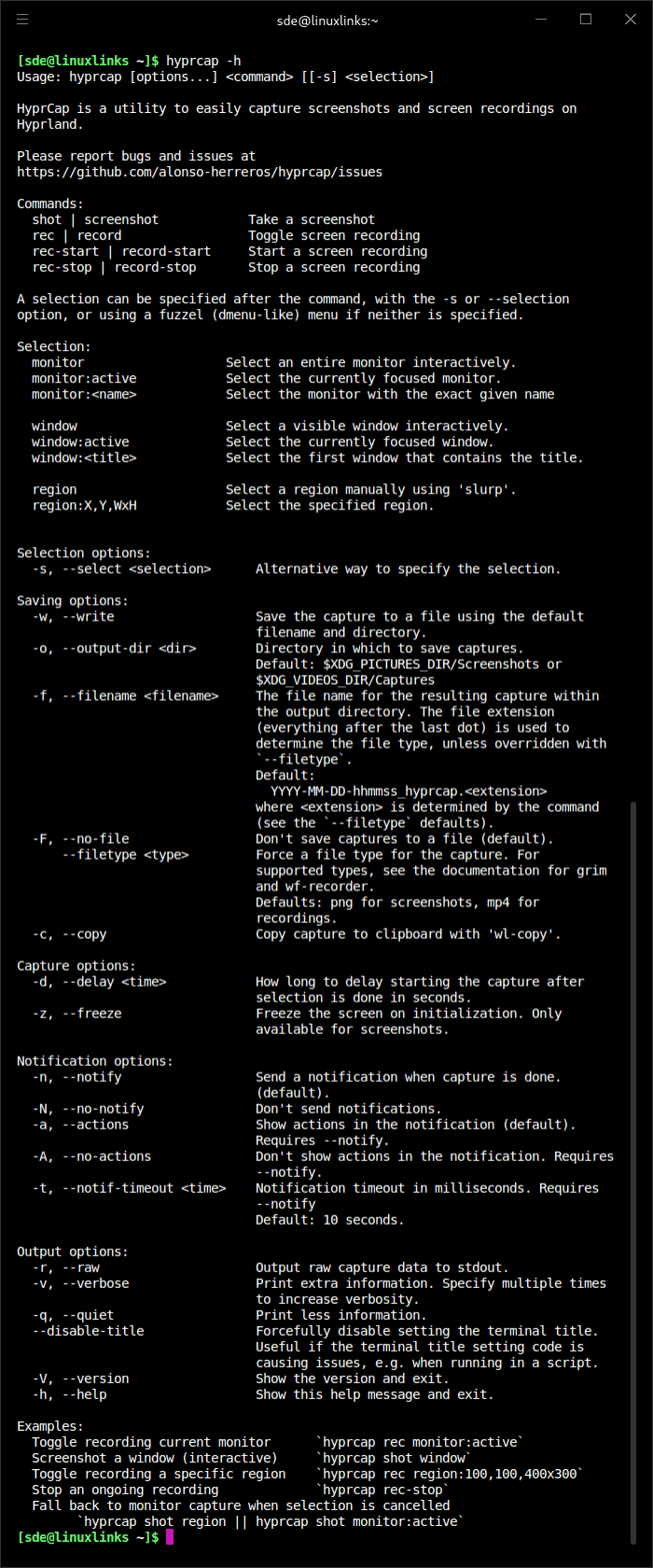
- Captures an interactively selected window, monitor or region, as well as the currently focused window or monitor.
- Accepts explicit selections such as a monitor name, window title or region coordinates for scripted captures.
- Provides screenshot commands alongside separate controls to start, stop or toggle video recordings.
- Can copy captured images to the Wayland clipboard using wl-copy.
- Offers configurable output directories, filenames and file types, with an explicit option to save captures.
- Supports a timed capture delay and a frozen-screen selection mode for screenshots.
- Displays desktop notifications, with controls for enabling actions and adjusting their timeout.
- Can emit raw capture data to standard output for use in command pipelines.
- Integrates with an optional fuzzel menu for choosing capture modes interactively.
- Passes additional arguments directly to grim or wf-recorder when more detailed backend configuration is needed.
- Provides command examples suitable for Hyprland keybindings.
Website: github.com/alonso-herreros/hyprcap
Support:
Developer: Alonso Herreros
License: GNU General Public License v3.0
Related Software
| Screen Capture GUI Tools for Hyprland | |
|---|---|
| HyprQuickFrame | Native screenshot utility for Hyprland built with Quickshell |
| HyprCap | Capture screenshots and screen recordings on Hyprland |
| hyprsnap | Script-based screenshot utility |
| HyprSnipper | Qt-based screenshot tool designed specifically for Hyprland |
| HyprQuickshot | Screenshot utility for Hyprland built with Quickshell |
| grimblast | Helper for screenshots within Hyprland |
| FramR | Annotate, record and upload captures from Wayland desktops |
| Scran | Capture images and videos on supported Wayland compositors |
Read our verdict in the software roundup.
| CLI Screen Capture Tools | |
|---|---|
| maim | Make Image aims to improve on scrot |
| scrot | SCReenshOT is a simple command line screen capture utility |
| slop | Queries for a selection from the user and prints the region to stdout |
| wayshot | Screenshot tool for wayland compositors |
| termframe | Terminal output SVG screenshot tool |
| grim | Utility to take screenshots of Wayland desktops |
| shotman | Uncompromising screenshot tool for Wayland compositors |
| shotgun | Minimal screenshot utility |
| ImageMagick | Create, edit, and compose bitmap images |
| HyprCap | Capture screenshots and screen recordings on Hyprland |
| lqth | Simple but fast screenshot utility inspired by xscreenshot |
Read our verdict in the software roundup.
 Explore our carefully curated directory of recommended free and open source software, covering every major software category. Explore our carefully curated directory of recommended free and open source software, covering every major software category.The directory forms part of our extensive collection of articles for Linux enthusiasts. It includes hundreds of detailed reviews, together with free and open source alternatives to proprietary software from companies such as Google, Microsoft, Apple, Adobe, IBM, Cisco, Oracle, and Autodesk. LinuxLinks also covers interesting projects worth exploring, Linux-compatible hardware, free programming books and tutorials, and much more. Know a useful free and open source Linux application that we haven’t covered? Tell us about it using our submission form. |
Please read our Comment Policy before commenting.