

hyprsnap is a unified, script-based screenshot utility designed specifically for the Wayland/Hyprland environment.
It acts as a comprehensive wrapper around existing Wayland tools, providing a seamless workflow. Instead of remembering multiple keybindings or command-line flags for different screenshot modes (window, region, monitor), hyprsnap allows you to press a single key and handle everything through a unified GUI menu.
This is free and open source software.
Key Features
- Unified Workflow: Trigger one command for all use cases. No need for separate bindings for regions, windows, or full-screen captures.
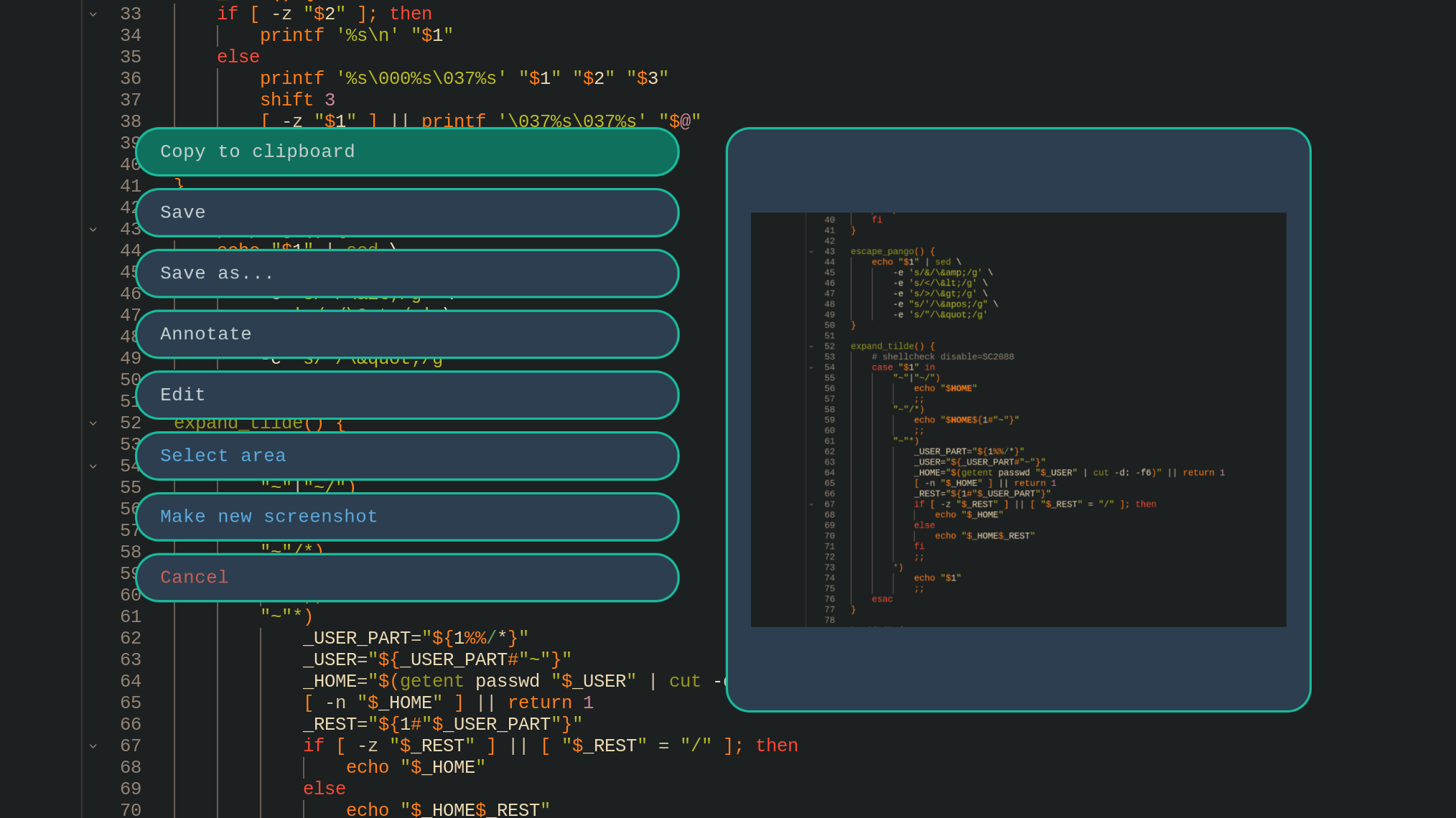
- Screen Freezing: The screen is frozen immediately upon launch (using hyprpicker), allowing you to capture transient menus, popups, and video frames easily.
- Post-Capture Actions: extensive options after selecting a region:
- Copy to clipboard.
- Save to a default location (~/Pictures/Screenshots/).
- Save as… (custom filename).
- Annotate (using satty).
- Edit (using pinta).
- Smart Selection: Easily switch between capturing a specific region, a window, the desktop (without panels), a single screen, or all monitors.
- Zero Configuration: A minimal, functional interface with no config files required.
Website: github.com/chpock/hyprsnap
Support:
Developer: Kostiantyn Kushnir
License: GNU General Public License v3.0
Related Software
| Screen Capture GUI Tools for Hyprland | |
|---|---|
| HyprQuickFrame | Native screenshot utility for Hyprland built with Quickshell |
| HyprCap | Capture screenshots and screen recordings on Hyprland |
| hyprsnap | Script-based screenshot utility |
| HyprSnipper | Qt-based screenshot tool designed specifically for Hyprland |
| HyprQuickshot | Screenshot utility for Hyprland built with Quickshell |
| grimblast | Helper for screenshots within Hyprland |
| FramR | Annotate, record and upload captures from Wayland desktops |
| Scran | Capture images and videos on supported Wayland compositors |
Read our verdict in the software roundup.
 Explore our carefully curated directory of recommended free and open source software, covering every major software category. Explore our carefully curated directory of recommended free and open source software, covering every major software category.The directory forms part of our extensive collection of articles for Linux enthusiasts. It includes hundreds of detailed reviews, together with free and open source alternatives to proprietary software from companies such as Google, Microsoft, Apple, Adobe, IBM, Cisco, Oracle, and Autodesk. LinuxLinks also covers interesting projects worth exploring, Linux-compatible hardware, free programming books and tutorials, and much more. Know a useful free and open source Linux application that we haven’t covered? Tell us about it using our submission form. |
Please read our Comment Policy before commenting.