
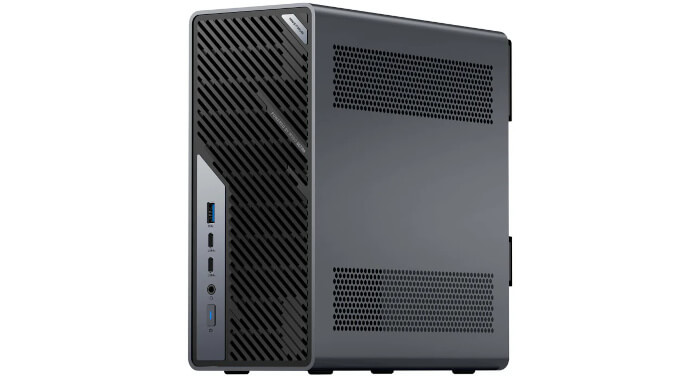
This is a new series looking at the Minisforum MS-02 Ultra 285HX Mini Workstation running Linux. In this series, I put this machine through its paces from a Linux perspective, comparing it with other systems, including desktops, to show how it really stacks up.
The Minisforum MS-02 Ultra is very different from a conventional mini PC. It’s a compact workstation and mini-server-class machine built around the Intel Core Ultra 9 285HX processor. The model I’m testing offers far more expansion than a typical mini PC, including PCIe expansion, four M.2 NVMe slots, an internal 350 W power supply, 10GbE and 2.5GbE networking, and dual 25GbE.
The machine came with 32GB of RAM as a single SO-DIMM stick. There is one practical argument in favour of a single stick: it leaves three slots free for expansion. A buyer can add more RAM later without discarding a module. From an upgradeability perspective, 1 x 32GB is more flexible than 2 x 16GB.
But for out-of-the-box performance, two modules would have been the better default configuration. It would enable dual-channel operation immediately and give the system a fairer chance to show what the platform can actually do. For workloads such as compiling, compression, virtualisation, containers, databases, and other parallel tasks, the single-stick setup risks making the machine look slower than it really is.
I initially benchmarked the MS-02 Ultra with 1 x 32GB RAM, then repeated the exercise by replacing it with 2 x 16GB RAM (I didn’t have a spare 32GB stick available).
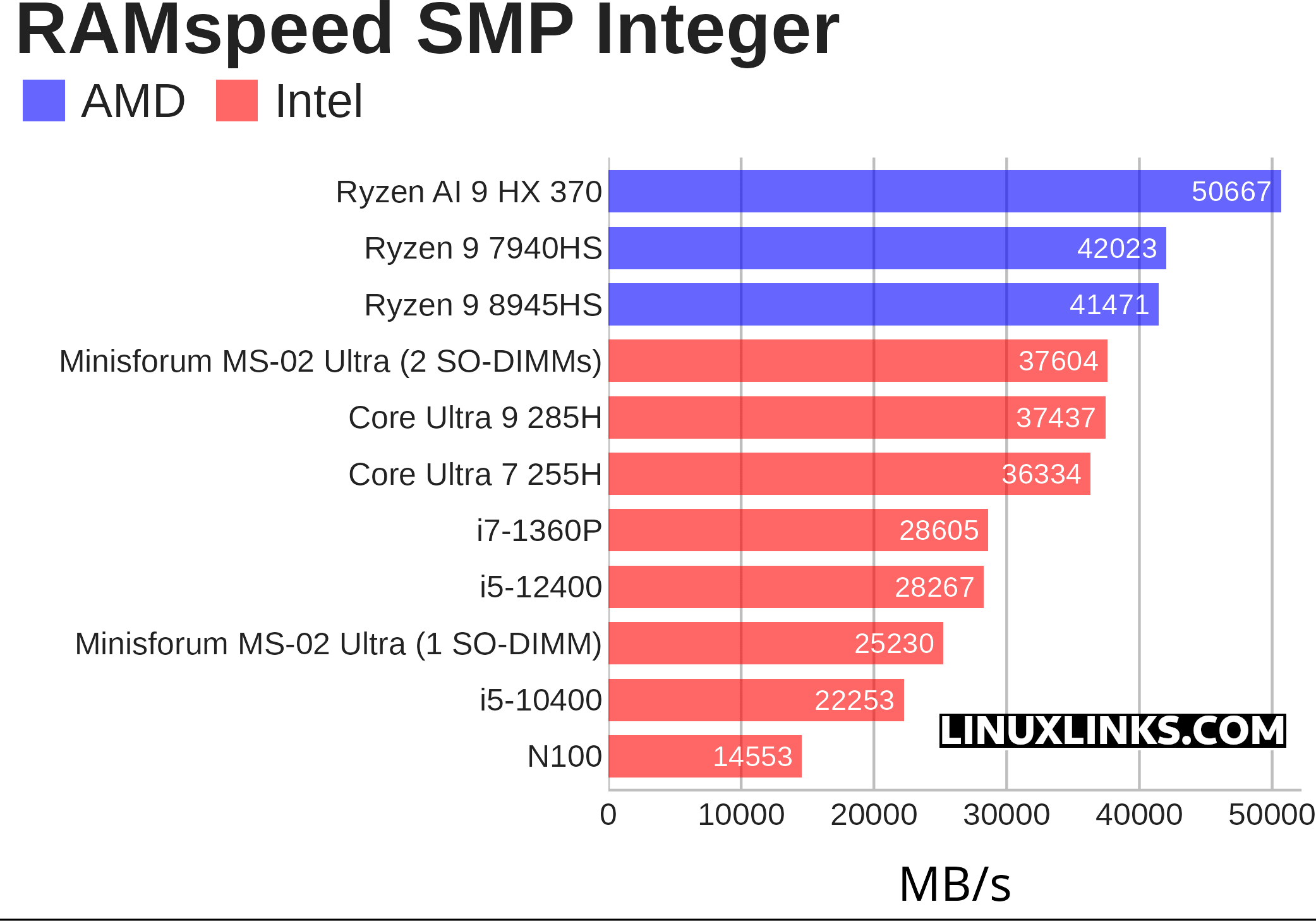
For the pure CPU benchmarks, the results were almost identical with one or two modules installed. They weren’t affected by the lack of dual-channel operation. I did expect the memory benchmarks to be inferior with 1 x 32GB verses 2 x 16GB. And I was right, as illustrated in the chart below.
But synthetic benchmarks only go so far. To understand the real-world impact of single-channel memory paired with the powerful Ultra 9 285HX CPU, I wanted to see how the MS-02 Ultra’s memory configuration affects real-world performance.
To assess this, I compiled fooyin, a music player, on the MS-02 Ultra using different CPU core combinations. The tests were run first with the system fitted with a single SO-DIMM, then repeated with two SO-DIMMs installed. This let me compare single-channel and dual-channel memory operation across lightly threaded and heavily parallel compile workloads. I used taskset to force the compilation onto specific cores. Here are the results.
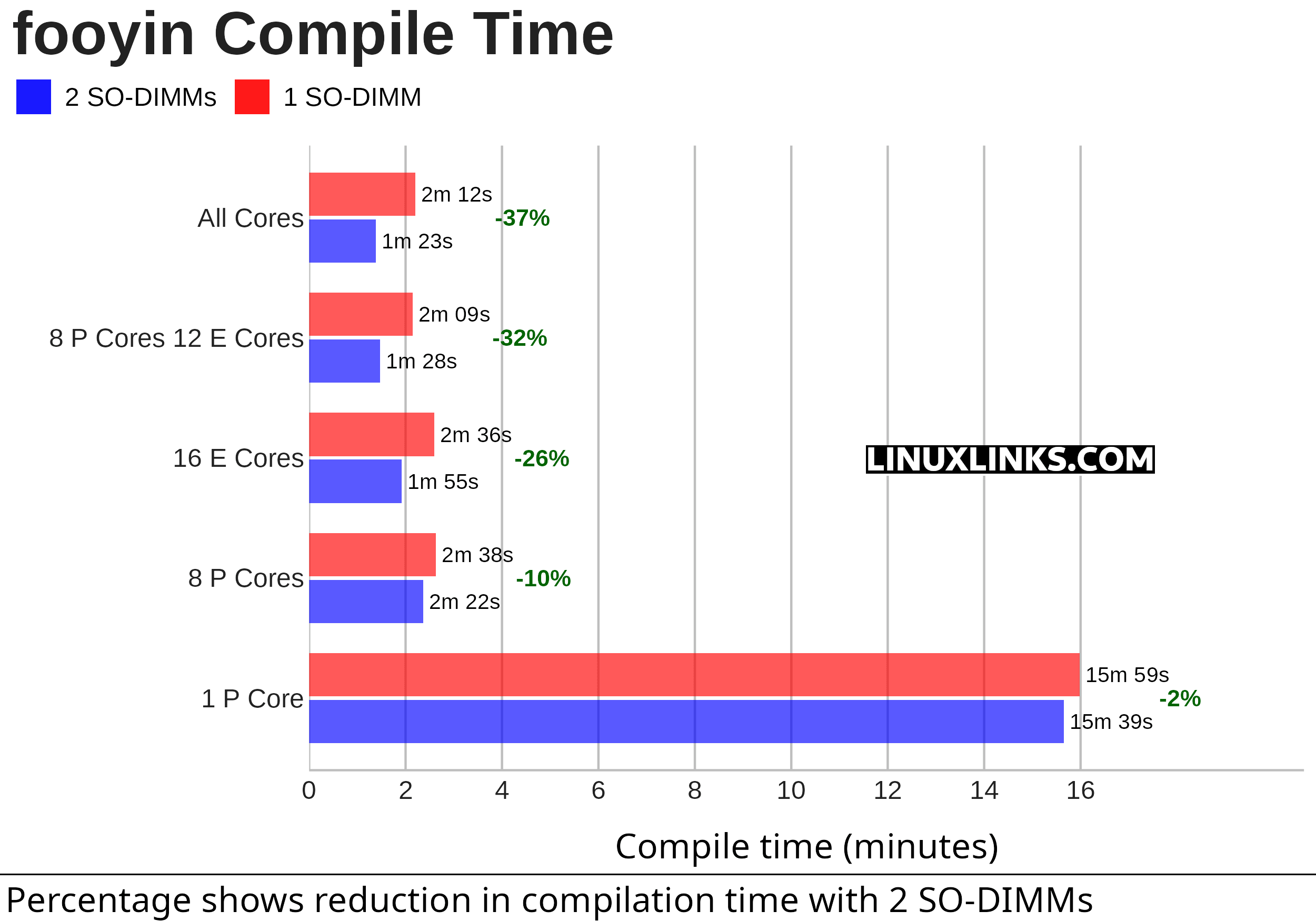
The percentage reduction is much bigger with more cores because the workload shifts from being mostly CPU-limited to being increasingly memory-bandwidth-limited.
With 1 P-core, the difference is tiny: 15m 59s with 1 SO-DIMM versus 15m 39s with 2 SO-DIMMs, only a 2% reduction. A single compile job can’t saturate the memory subsystem, so the extra memory channel barely helps. The bottleneck is mainly the core doing the work.
Once more cores are used, the picture changes. A parallel compile launches many compiler processes at once. Each one is reading source files and headers, parsing code, allocating memory, generating intermediate data, writing object files, and accessing cached filesystem data. Individually these tasks aren’t extreme memory hogs, but collectively they create a lot of memory traffic.
That’s where the single SO-DIMM configuration hurts. With one module, the system is effectively running in single-channel memory mode. All active cores have to share much less memory bandwidth. With two SO-DIMMs, the MS-02 Ultra can use dual-channel memory, giving the CPU much more bandwidth to feed multiple compile jobs at once.
The 8 P-core result improves by only 10%, which suggests eight performance cores are still not completely starved by single-channel memory. But once the build uses the E-cores too, the number of active worker threads rises sharply. The memory subsystem then becomes a much more significant limiting factor.
The 16 E-core result is also revealing. Even though E-cores are individually slower than P-cores, using sixteen of them creates enough parallel memory demand that dual-channel memory cuts compile time by 26%. That shows the benefit isn’t just about peak CPU speed. It’s about feeding many simultaneous compiler jobs.
The largest gain comes with All Cores, where compile time drops from 2m 12s to 1m 23s. That’s a 37% reduction, which is a very large real-world improvement. It suggests that with all cores active, the 1 SO-DIMM setup is heavily constraining the CPU package. Adding the second SO-DIMM removes much of that bottleneck.
Summary
The results show that memory configuration has little impact when fooyin is compiled on a single P-core, with the second SO-DIMM reducing build time by only 2%. But as more cores are used, the compile becomes much more sensitive to memory bandwidth. A parallel build launches many compiler jobs at once, and those jobs compete for memory bandwidth while parsing source, processing headers, allocating memory, and writing object files. With only one SO-DIMM installed, the MS-02 Ultra runs in single-channel mode, leaving all active cores sharing a narrower memory path. Installing a second SO-DIMM enables dual-channel operation and gives the CPU much more bandwidth. That’s why the reduction grows from 10% with 8 P-cores to 32% with 8 P-cores plus 12 E-cores, and reaches 37% when all cores are used.
The second SO-DIMM doesn’t make a single compile job much faster, but it makes a heavily parallel compile far more efficient.
Complete list of articles in this series:
| Minisforum MS-02 Ultra 285HX | |
|---|---|
| Introduction | Introduction to the series and interrogation of the machine |
| Benchmarks | Benchmarking the Minisforum MS-02 Ultra 285HX Mini Workstation |
| Power | Testing and comparing the power consumption |
| Dual channel memory | Assessing the impact of adding a second SO-DIMM |
| Cores | Benchmarking cores under Linux |
| BIOS | In the world of computing, BIOS, which stands for Basic Input/Output System, plays a crucial role |
| Btrfs | Advanced, modern copy-on-write (CoW) file system for Linux |
| Intel processors | P-Cores, E-Cores and LP E-Cores Compared Across 4 Intel Processors |
| More articles will be published next week | |
Please read our Comment Policy before commenting.
wow, 37% faster with dual channel memory when compiling. Why are they selling the machine with a single 32GB RAM module when performance is so impacted.
This also shows the danger of reviewing a machine exactly as shipped without digging deeper. A single-stick configuration could make a very capable system look less impressive than it really is.