
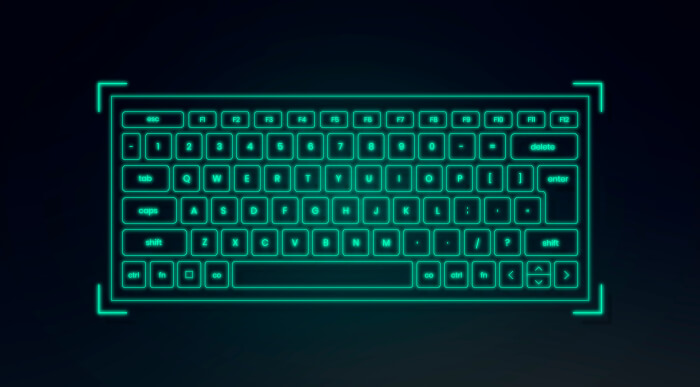
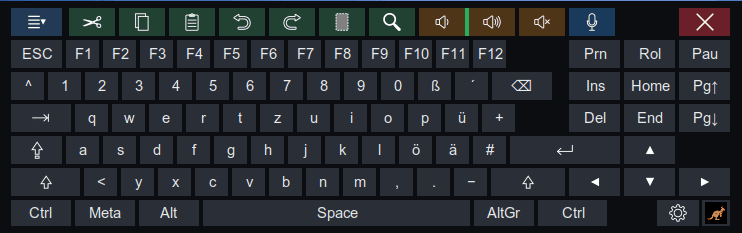
Wallaby-VK is a virtual on-screen keyboard for Linux systems with Wayland support.
It appears as a floating keyboard at the bottom of the screen without taking focus from the active application.
Besides text entry, the application offers reusable text snippets, offline speech recognition, clipboard history and an optional input display for screencasts and tutorials. Wallaby-VK is written as a single Python file and distributed as an AppImage.
This is free and open source software.
Key Features
- Provides a full German QWERTZ layout with ä, ö, ü and ß.
- Supports acute dead-key combinations such as ´ + e to produce é.
- Offers 40 customizable text snippets with date and time variables.
- Provides local offline speech recognition using faster-whisper.
- Maintains a 10-entry multi-copy buffer with an event-based clipboard watcher.
- Supports one-shot and locked states for Shift, Ctrl, Alt and AltGr.
- Implements Meta as a quasi-modifier for KDE Plasma shortcuts.
- Includes controls for changing and muting the system volume.
- Offers an optional KeyCast display for showing keystrokes, modifier combinations, mouse buttons and scroll-wheel events.
- Is suitable for producing screencasts, demonstrations and tutorials.
- Runs from an x86-64 AppImage with guided desktop integration and an update mechanism.
- Has been tested on Kubuntu, Ubuntu, Linux Mint and TUXEDO OS.
Website: bekudio.de/wallaby-vk.html
Support:
Developer: Bernd Kunath
License: MIT License
Wallaby-VK is written in Python. Learn Python with our recommended free books and free tutorials.
This entry was written with the assistance of Bernd Kunath who completed the software form.
Related Software
| Virtual Keyboards | |
|---|---|
| Florence | Extensible scalable virtual keyboard |
| Maliit | Virtual keyboard implemented as a plug-in for Maliit Framework |
| squeekboard | Keyboard-shaped input method supporting Wayland |
| GOK | GNOME On Screen Keyboard |
| CoreKeyboard | Simple virtual keyboard with word suggestions |
| Onboard | Useful for tablet PC users and for mobility impaired users |
| xvkbd | Virtual (graphical) keyboard program |
| wvkbd | On-screen keyboard for wlroots |
| Wkeys | Wayland-focused keyboard offering compact controls for direct text entry |
| Plasma Keyboard | Adaptive Plasma input panel designed for touchscreens and tablets |
| QingBoard | Qt-based on-screen typing tool with configurable layouts and themes |
| MaiN_Keyboard | Flexible desktop input panel with layouts suited to accessibility needs |
| Sysboard | Minimal Wayland typing interface built for simple, lightweight operation |
| QVKbd | Virtual keyboard written in C++ and QML |
| qtvkbd | Fork of kvkbd with all KDE4 dependencies replaced with Qt components |
| eekboard | Easy to use virtual keyboard toolkit |
Read our verdict in the software roundup.
 Explore our carefully curated directory of recommended free and open source software, covering every major software category. Explore our carefully curated directory of recommended free and open source software, covering every major software category.The directory forms part of our extensive collection of articles for Linux enthusiasts. It includes hundreds of detailed reviews, together with free and open source alternatives to proprietary software from companies such as Google, Microsoft, Apple, Adobe, IBM, Cisco, Oracle, and Autodesk. LinuxLinks also covers interesting projects worth exploring, Linux-compatible hardware, free programming books and tutorials, and much more. Know a useful free and open source Linux application that we haven’t covered? Tell us about it using our submission form. |
Please read our Comment Policy before commenting.