

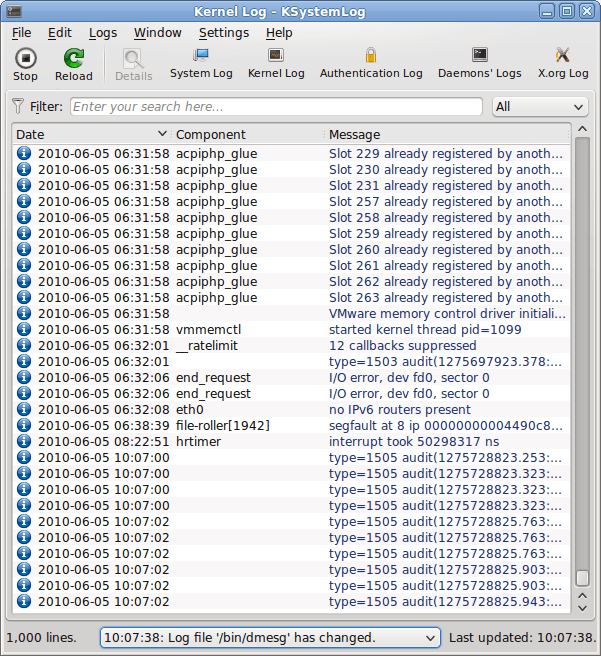
KSystemLog is a graphical utility for inspecting messages generated by the Linux operating system and its services. Developed as part of the KDE ecosystem, it provides a convenient way to investigate system activity and identify problems without manually opening individual files.
The application organises information into categories, including general system activity, authentication, kernel messages and other available sources. Depending on the system configuration, it can also examine messages produced by services such as Apache and CUPS.
Its tabbed interface makes it possible to work with several sources simultaneously. Colour-coded severity levels help identify important events, while filtering and detailed views simplify troubleshooting. The application can also display newly generated entries automatically.
KSystemLog is actively maintained as part of KDE Gear.
This is free and open source software.
Key Features
- Browse system messages grouped into categories.
- View authentication, kernel and other available diagnostic sources.
- Inspect messages from supported system services.
- Display several sources simultaneously using tabs.
- Colour-code entries according to severity.
- Automatically display newly generated messages.
- Filter displayed entries to locate relevant information.
- Inspect individual entries in greater detail.
Website: apps.kde.org/ksystemlog
Support:
Developer: KDE Community
License: GNU General Public License v2.0
KSystemLog is written in C++. Learn C++ with our recommended free books and free tutorials.
Related Software
| Linux System Log and systemd Journal Viewers | |
|---|---|
| journalctl | Command-line access to system events and diagnostic messages |
| KDE Journald Browser | KDE application for filtering messages by service and priority |
| KSystemLog | KDE utility for reviewing activity across system services |
| GNOME Logs | GNOME desktop tool for browsing and searching system events |
| QJournalctl | Qt interface for filtering and examining system events |
| SEE | Keyboard-driven service inspection with vi-style navigation |
| Journal Viewer | Desktop dashboard with activity graphs and detailed filters |
| Deepin Log Viewer | Graphical diagnostic viewer with search, export and themes |
| Grafito | Self-hosted web interface with live updates and filtering |
| systemd_commander | Graphical interface for managing services and their status |
| LogLens | Interactive terminal interface with advanced event filtering |
Read our verdict in the software roundup.
 LinuxLinks helps you discover the best free and open source software for Linux. Explore our extensive collection of recommended applications, including alternatives to popular proprietary software. LinuxLinks helps you discover the best free and open source software for Linux. Explore our extensive collection of recommended applications, including alternatives to popular proprietary software.We also publish software reviews, Linux tutorials, hardware reviews, free programming books and articles covering the wider open source community. Browse our Linux resources to discover more. Know a useful free and open source Linux application we haven't covered? Suggest a program for inclusion. Has your software been featured on LinuxLinks? Display one of our Featured on LinuxLinks badges on your website or GitHub README. |
Please read our Comment Policy before commenting.