

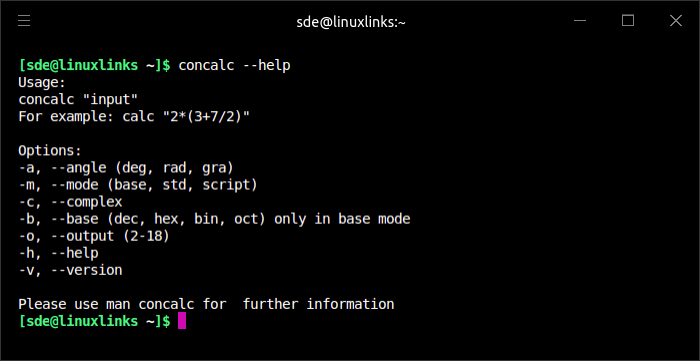
concalc is a console-based scientific calculator derived from the mathematical expression parser used by Extcalc. It provides the calculation engine without Extcalc’s graphical interface, allowing mathematical expressions to be evaluated directly from a Linux terminal. The program accepts an expression, evaluates it and returns the result as text, making it useful for calculations performed from a shell.
The calculator is not limited to individual arithmetic expressions. It includes a C-like scripting language for sequences of calculations and supports variables and more advanced mathematical operations. This makes it possible to use concalc for calculations that would be cumbersome to enter repeatedly by hand. Its close relationship with Extcalc means it shares mathematical functionality with the graphical program while retaining a simpler console-oriented interface.
This is free and open source software.
Key Features
- Mathematical expression evaluation using the Extcalc parsing engine.
- Standard arithmetic and scientific mathematical operators.
- Extended mathematical expression parser.
- Support for variables in calculations.
- Complex number arithmetic.
- Numerical differentiation and integration.
- Execute scripts written in a C-like programming language.
- Read mathematical input and commands from files.
- Evaluate expressions supplied from the command line.
- Combine multiple mathematical expressions in a calculation.
- Display calculated results as text suitable for terminal use.
Website: extcalc-linux.sourceforge.net
Support:
Developer: Rainer Strobel
License: GNU General Public License v2.0
concalc is written in C++. Learn C++ with our recommended free books and free tutorials.
Related Software
| Terminal-Based Calculators | |
|---|---|
| Genius | Desktop calculator, an educational tool in mathematics, and for research |
| Numbat | High precision scientific calculator supporting physical units |
| kalker | Calculator with math syntax |
| qalc | Symbolic maths, arbitrary precision and unit conversion |
| calc | C-style arbitrary precision calculator |
| concalc | Parser-algorithm of extcalc |
| wcalc | Uses intuitive expressions and implicit multiplication |
| pcalc | Terminal calculator made for programmers |
| bcal | Storage expression calculator |
| numr | Text calculator for natural language expressions |
| kalc | Complex numbers, 2d/3d graphing, arbitrary precision calculator |
| clac | Stack-based calculator with postfix notation |
| CalcPy | Calculator and advanced math solver using Python, IPython and SymPy |
| fortbite | Powerful mathematical calculator leveraging Fortran’s strengt |
| abacus | Simple interactive calculator CLI |
| Daisy | General-purpose TUI scientific calculator |
| Quich | Just an advanced terminal calculator |
| orpie | curses-based RPN calculator |
| val | Arbitrary-precision language with variables, functions and complex numbers |
| Squiid | Advanced calculator supporting both RPN and algebraic input |
| mucalc | Convenient calculator for the command line |
| HIP35 | HP-35 RPN calculator emulator |
| csc | Scientific maths using 64-bit floating-point arithmetic |
| RCalc | Reverse Polish Notation calculator |
| ec | RPN calculator with array operations and quotations |
| coriolinus-calc | CLI calculator app and library |
| spigot | Streaming exact real calculator |
| Rink | Provides unit conversions, arbitrary precision and dimensional analysis |
Read our verdict in the software roundup.
 LinuxLinks helps you discover the best free and open source software for Linux. Explore our extensive collection of recommended applications, including alternatives to popular proprietary software. We also publish software reviews, Linux tutorials, hardware reviews, free programming books and articles covering the wider open source community. Browse our Linux resources to discover more. Know a useful free and open source Linux application we haven't covered? Suggest a program for inclusion. Has your software been featured on LinuxLinks? Display one of our Featured on LinuxLinks badges on your website or GitHub README. |
Please read our Comment Policy before commenting.