

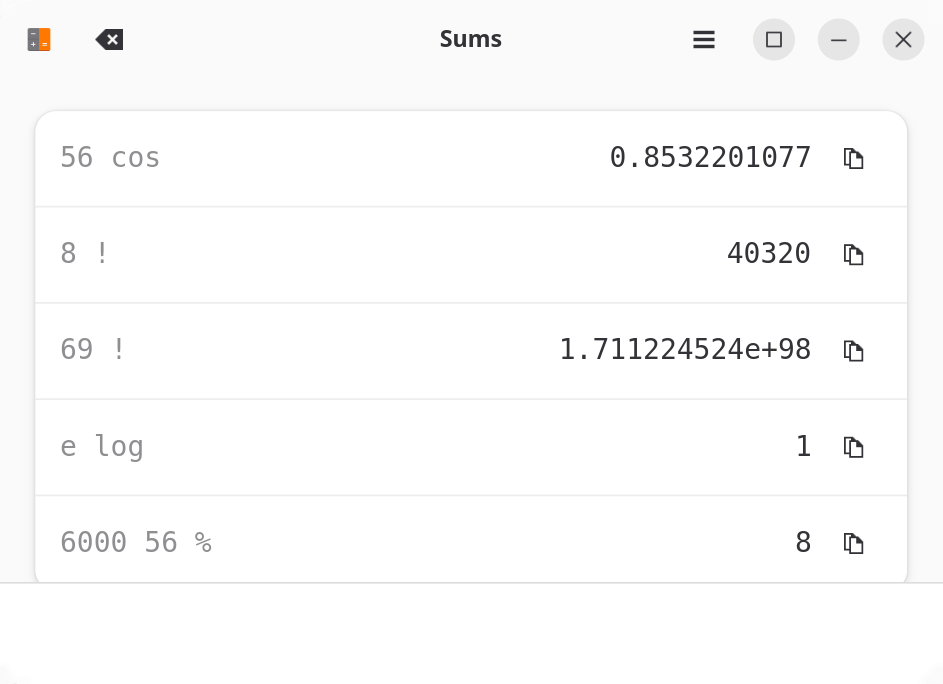
Sums is a postfix calculator designed for quick mathematical calculations using a keyboard-oriented interface. It follows GNOME’s human-interface guidelines and concentrates on simplicity rather than providing a large collection of calculator buttons.
Postfix notation places operations after their operands. For example, instead of entering an expression in conventional algebraic form, users enter the relevant values followed by the operation to apply to them.
Sums recognises English-language names for mathematical operations and constants. This allows expressions to be entered using familiar words rather than requiring users to remember a large set of mathematical symbols.
The application also converts recognised terms into mathematical notation as expressions are typed. For example, the word pi can be displayed using the Greek letter π, while a summation operation can be represented by Σ.
A calculation history allows users to navigate between previous operations, making it easy to review an earlier result. Results can also be copied to the clipboard for use in other applications.
This is free and open source software.
Key Features
- Postfix expression evaluation.
- Keyboard-oriented interface.
- Recognises English-language names for mathematical operations.
- Supports mathematical constants.
- Automatically converts recognised expressions into mathematical symbols.
- Two-way navigation through calculation history.
- Copy calculation results to the clipboard.
- Interface designed around GNOME human-interface guidelines.
Website: gitlab.com/leesonwai/sums
Support:
Developer: Joshua Lee
License: GNU General Public License v3.0
Sums is written in C. Learn C with our recommended free books and free tutorials.
Related Software
| Calculators | |
|---|---|
| Qalculate! | Powerful and easy to use multi-purpose desktop calculator |
| Genius | Desktop calculator, an educational tool in mathematics, and for research |
| SpeedCrunch | High precision and powerful desktop calculator |
| KCalc | Scientific calculator designed for KDE |
| Calculator | Simple and easy to use calculator |
| KAlgebra | Replace your graphing calculator |
| rpCalc | Simple RPN calculator |
| Kalk | Cross-platform application built with the Kirigami framework |
| Modular Calculator | Aimed at scientific, engineering or computing work |
| Nonpareil | High-Fidelity calculator simulator |
| Wombat | High-precision scientific calculator |
| Uno Calculator | Port of Windows calculator |
| SwitchCalc | GTK4 calculator |
| Schulrechner | Calculator you know from school |
| Pebbles | GTK-based app |
| Cuneo | Widget-like calculator and conversion tool |
| RCalc | RPN calculator |
| galculator | RPN and algebraic calculator |
| gdcalc | Financial, scientific, statistical and programming calculator |
| Sums | Postfix calculator designed for quick calculations |
| JRPN | RPN programmer's calculator inspired by the classic HP-16C |
| Free42 | HP-42S calculator simulator |
| COSMIC Calculator | Native COSMIC desktop calculator with calculation history |
| Yutovo | Visual calculator combining mathematical notation and editable text |
| Yesser Calculator | Extensible calculator |
| xcalc | Simple scientific calculator that can emulate a TI-30 or an HP-10C |
| x48ng | Reboot of the HP 48 emulator |
| tCalc | Simple calculator written in core Tcl/Tk |
| OxiCalc | Small, simple calculator. It uses GTK4. |
| NumNum | Calculator supporting variables, units and currencies |
| MCalc | Perform simple mathematical operations |
| Eigen | GTK4 matrix calculator |
Read our verdict in the software roundup.
 LinuxLinks helps you discover the best free and open source software for Linux. Explore our extensive collection of recommended applications, including alternatives to popular proprietary software. LinuxLinks helps you discover the best free and open source software for Linux. Explore our extensive collection of recommended applications, including alternatives to popular proprietary software.We also publish software reviews, Linux tutorials, hardware reviews, free programming books and articles covering the wider open source community. Browse our Linux resources to discover more. Know a useful free and open source Linux application we haven't covered? Suggest a program for inclusion. Has your software been featured on LinuxLinks? Display one of our Featured on LinuxLinks badges on your website or GitHub README. |
Please read our Comment Policy before commenting.
My favorite calculator for a long time now is SpeedCunch.
Yes great software along with Qalculate!