

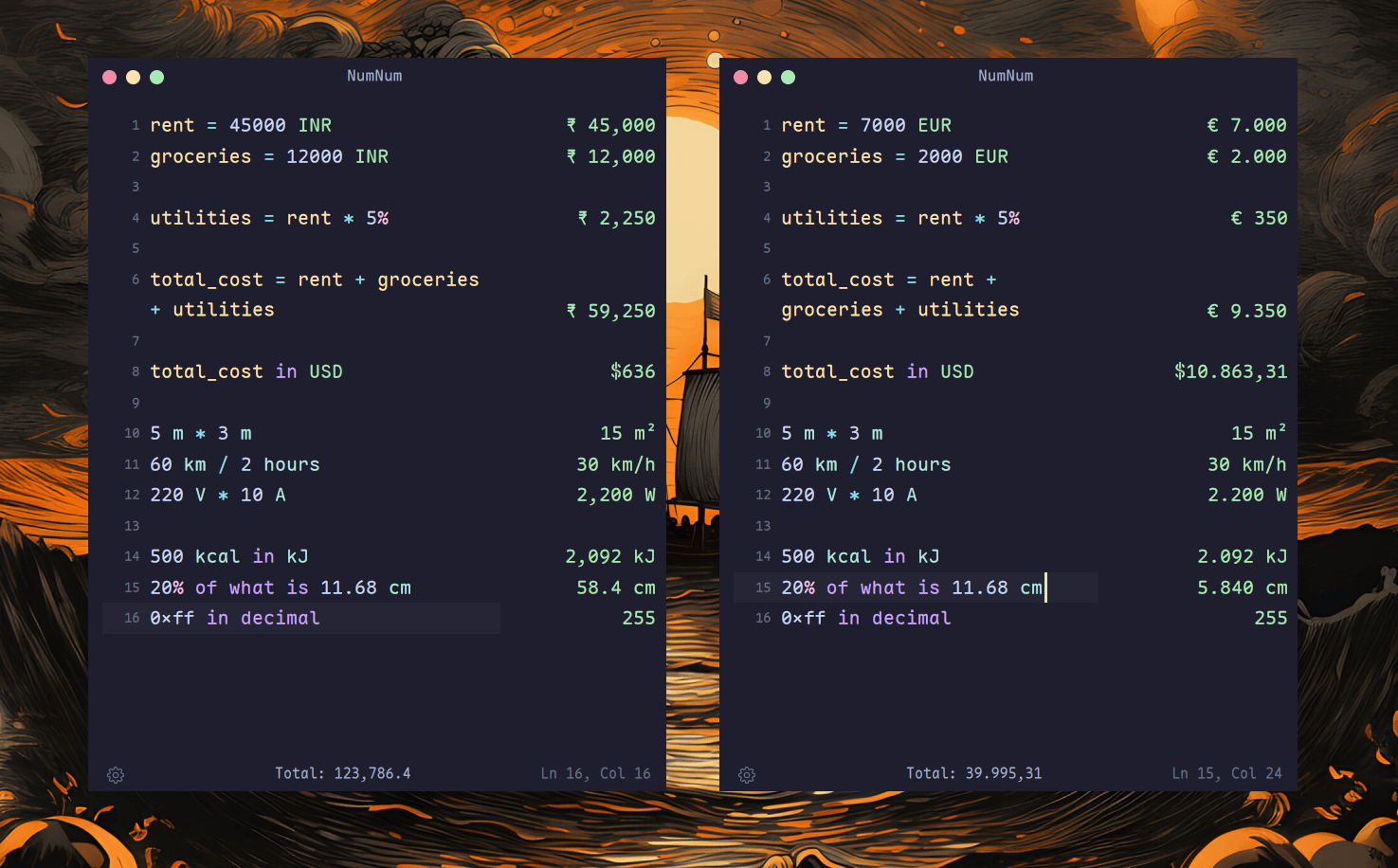
NumNum takes a different approach to the conventional desktop calculator. Instead of presenting a grid of calculator buttons, it gives you a text editor where calculations can be entered naturally, with the corresponding results displayed alongside them.
Expressions can span multiple lines and variables defined on one line can be referenced later. Change the value of a variable and calculations depending on it are updated, making NumNum useful for working through a collection of related figures rather than performing isolated calculations one at a time.
The program understands arithmetic, parentheses and mathematical functions together with percentages, currencies and physical units. You can perform calculations such as adding a percentage to a value, converting between currencies or combining compatible units. NumNum supports more than 100 units and more than 170 currencies, with exchange rates retrieved online and cached for later use.
It also understands several representations of numbers, including hexadecimal, binary and scientific notation. Functions are available for common mathematical operations, while aggregation facilities let you calculate values such as sums and averages.
NumNum behaves like a proper text editor rather than simply an expression field. It includes syntax highlighting, autocomplete, undo and redo, text selection, line wrapping and configurable fonts. Calculations can be separated into named sessions, and sessions are automatically saved so work can be restored after restarting the application.
The result is particularly appealing for calculations where keeping the surrounding working visible is useful.
This is free and open source software.
Key Features
- Calculations are entered in a text editor with results shown alongside them.
- Supports variables that can be reused across calculations.
- Understands arithmetic, mathematical functions and percentages.
- Supports more than 100 units and more than 170 currencies.
- Handles hexadecimal, binary and scientific notation.
- Offers syntax highlighting and autocomplete.
- Provides named sessions with automatic persistence.
- Includes configurable themes, fonts and appearance settings.
Website: github.com/rudrabhoj/numnum
Support:
Developer: Rudrabhoj Bhati
License: GNU General Public License v2.0
NumNum is written in Rust. Learn Rust with our recommended free books and free tutorials.
Related Software
| Calculators | |
|---|---|
| Qalculate! | Powerful and easy to use multi-purpose desktop calculator |
| Genius | Desktop calculator, an educational tool in mathematics, and for research |
| SpeedCrunch | High precision and powerful desktop calculator |
| KCalc | Scientific calculator designed for KDE |
| Calculator | Simple and easy to use calculator |
| KAlgebra | Replace your graphing calculator |
| rpCalc | Simple RPN calculator |
| Kalk | Cross-platform application built with the Kirigami framework |
| Modular Calculator | Aimed at scientific, engineering or computing work |
| Nonpareil | High-Fidelity calculator simulator |
| Wombat | High-precision scientific calculator |
| Uno Calculator | Port of Windows calculator |
| SwitchCalc | GTK4 calculator |
| Schulrechner | Calculator you know from school |
| Pebbles | GTK-based app |
| Cuneo | Widget-like calculator and conversion tool |
| RCalc | RPN calculator |
| galculator | RPN and algebraic calculator |
| Extcalc | Multifunctional scientific graphic calculator |
| gdcalc | Financial, scientific, statistical and programming calculator |
| Sums | Postfix calculator designed for quick calculations |
| Free42 | HP-42S calculator simulator |
| Yesser Calculator | Extensible calculator |
| xcalc | Simple scientific calculator that can emulate a TI-30 or an HP-10C |
| x48ng | Reboot of the HP 48 emulator |
| tCalc | Simple calculator written in core Tcl/Tk |
| OxiCalc | Small, simple calculator. It uses GTK4. |
| MCalc | Perform simple mathematical operations |
| Eigen | GTK4 matrix calculator |
Read our verdict in the software roundup.
 Explore our carefully curated directory of recommended free and open source software, covering every major software category. Explore our carefully curated directory of recommended free and open source software, covering every major software category.The directory forms part of our extensive collection of articles for Linux enthusiasts. It includes hundreds of detailed reviews, together with free and open source alternatives to proprietary software from companies such as Google, Microsoft, Apple, Adobe, IBM, Cisco, Oracle, and Autodesk. LinuxLinks also covers interesting projects worth exploring, Linux-compatible hardware, free programming books and tutorials, and much more. Know a useful free and open source Linux application that we haven’t covered? Tell us about it using our submission form. |
Please read our Comment Policy before commenting.