

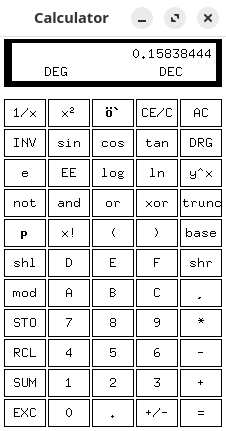
xcalc is a scientific calculator for the X Window System. It is one of the traditional X11 desktop utilities, providing a compact calculator that can be controlled using the mouse or keyboard.
The application offers two calculator layouts modelled on the Texas Instruments TI-30 and Hewlett-Packard HP-10C. The TI-30 layout provides conventional algebraic entry, while the HP-10C layout uses Reverse Polish Notation (RPN).
Both layouts provide mathematical functions beyond basic arithmetic. The HP-style interface is particularly useful for people familiar with stack-based calculators, where operands are entered before the operations performed on them.
xcalc supports keyboard shortcuts for common operations, and the calculator display can be selected to copy results into other applications. Its interface uses traditional X11 widgets rather than a modern desktop toolkit.
This is free and open source software.
Key Features
- Provides TI-30 and HP-10C calculator layouts.
- Supports conventional algebraic calculations and Reverse Polish Notation.
- Perform scientific calculations using mathematical functions and constants.
- Control operations using the mouse or keyboard shortcuts.
- Select and copy calculation results for use in other applications.
- Uses a lightweight interface based on traditional X11 widgets.
Website: cgit.freedesktop.org/xorg/app/xcalc
Support:
Developer: X Consortium
License: X Consortium License
xcalc is written in C. Learn C with our recommended free books and free tutorials.
This article was written with the help of a site visitor who completed this form. Help the site by suggesting new open source software.
Related Software
| Calculators | |
|---|---|
| Qalculate! | Powerful and easy to use multi-purpose desktop calculator |
| Genius | Desktop calculator, an educational tool in mathematics, and for research |
| SpeedCrunch | High precision and powerful desktop calculator |
| KCalc | Scientific calculator designed for KDE |
| Calculator | Simple and easy to use calculator |
| KAlgebra | Replace your graphing calculator |
| rpCalc | Simple RPN calculator |
| Kalk | Cross-platform application built with the Kirigami framework |
| Modular Calculator | Aimed at scientific, engineering or computing work |
| Nonpareil | High-Fidelity calculator simulator |
| Wombat | High-precision scientific calculator |
| Uno Calculator | Port of Windows calculator |
| SwitchCalc | GTK4 calculator |
| Schulrechner | Calculator you know from school |
| Pebbles | GTK-based app |
| Cuneo | Widget-like calculator and conversion tool |
| RCalc | RPN calculator |
| galculator | RPN and algebraic calculator |
| gdcalc | Financial, scientific, statistical and programming calculator |
| Sums | Postfix calculator designed for quick calculations |
| JRPN | RPN programmer's calculator inspired by the classic HP-16C |
| Free42 | HP-42S calculator simulator |
| COSMIC Calculator | Native COSMIC desktop calculator with calculation history |
| Yutovo | Visual calculator combining mathematical notation and editable text |
| Yesser Calculator | Extensible calculator |
| xcalc | Simple scientific calculator that can emulate a TI-30 or an HP-10C |
| x48ng | Reboot of the HP 48 emulator |
| tCalc | Simple calculator written in core Tcl/Tk |
| OxiCalc | Small, simple calculator. It uses GTK4. |
| NumNum | Calculator supporting variables, units and currencies |
| MCalc | Perform simple mathematical operations |
| Eigen | GTK4 matrix calculator |
Read our verdict in the software roundup.
 LinuxLinks helps you discover the best free and open source software for Linux. Explore our extensive collection of recommended applications, including alternatives to popular proprietary software. We also publish software reviews, Linux tutorials, hardware reviews, free programming books and articles covering the wider open source community. Browse our Linux resources to discover more. Know a useful free and open source Linux application we haven't covered? Suggest a program for inclusion. Has your software been featured on LinuxLinks? Display one of our Featured on LinuxLinks badges on your website or GitHub README. |
Please read our Comment Policy before commenting.