

In Operation
Papers sports an attractive user interface with a sidebar that can be hidden.
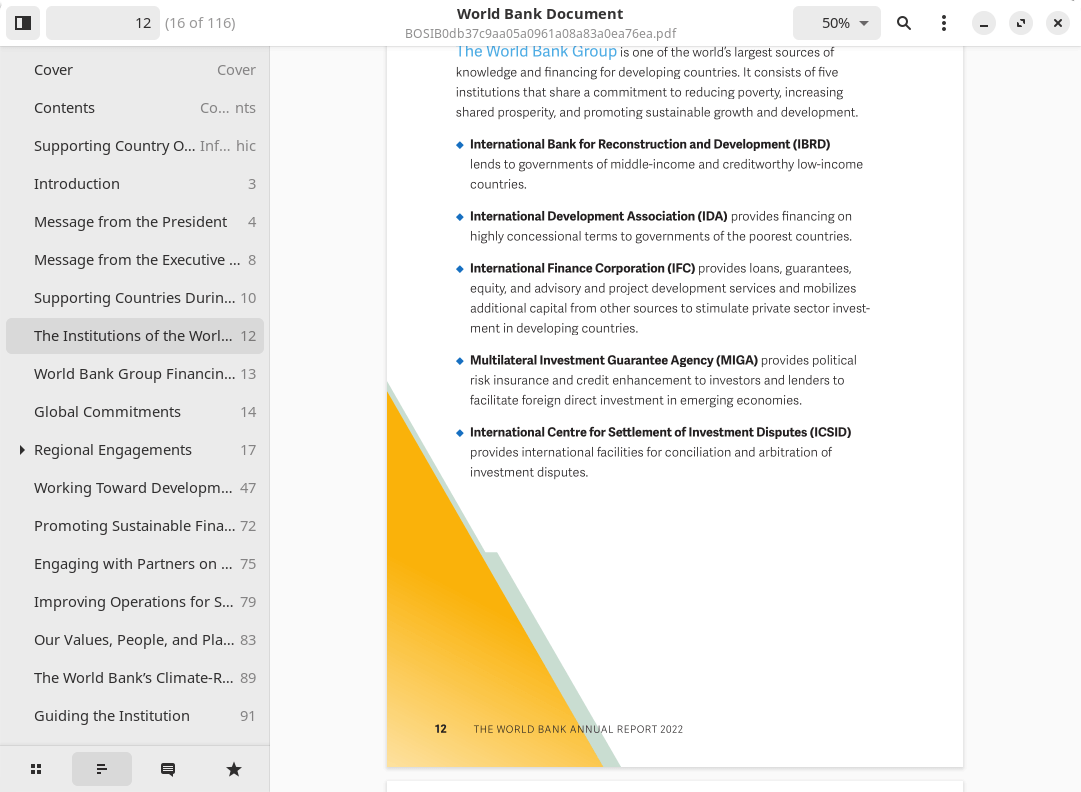
There’s good support for thumbnails, outline, annotations, and bookmarks.
Other features include:
- Configurable zoom, fit page, and fit width.
- Supports advanced highlighting and annotation.
- Supports documents in: PDF, PS, EPS, XPS, DjVu, TIFF formats
- Supports Comic Books archives (CBR, CBT, CBZ, CB7).
- Search in documents.
- Night mode.
- Continuous scrolling
- Dual Page.
- Rotation.
- Supports right to left documents.
- Keyboard shortcuts.
Summary
Papers is a good document viewer. It’s a fork of Evince. Sadly DVI support has been dropped.
Papers faces strong competition from many other high quality PDF viewers and comic book viewers.
Website: apps.gnome.org/Papers
Support: GitLab Code Repository
Developer: Pablo Correa Gomez, Qiu Wenbo
License: GNU General Public License v2.0
Papers is written in C. Learn C with our recommended free books and free tutorials.
Pages in this article:
Page 1 – Introduction and Installation
Page 2 – In Operation and Summary
Related Software
| PDF Viewers | |
|---|---|
| KOReader | Document viewer for a wide variety of file formats including PDF |
| Okular | Universal document viewer supporting advanced document features |
| MuPDF | Lightweight PDF and XPS viewer |
| Sioyek | Designed for viewing research papers and technical books |
| PDF.js | JavaScript library that renders Portable Document Format files |
| Koodo Reader | All-in-one ebook reader and PDF viewer |
| Papers | Fork of Evince |
| Evince | Multi-page document viewer |
| Atril | A simple multi-page document viewer for MATE |
| tdf | TUI-based PDF viewer |
| Zathura | Highly customizable and functional document viewer |
| Xreader | Simple multi-page document viewer |
| qpdfview | Tabbed document viewer. It uses Poppler for PDF support |
| Xpdf | PDF viewer and toolkit |
| PreviewQt | Preview all kinds of files |
| llpp | Fast and featureful PDF, EPUB, XPS and CBZ viewer |
| JFBView | PDF and image viewer for the Linux framebuffer |
| hygg | Minimalistic Vim-like TUI document reader |
| fancy-cat | PDF reader for terminal emulators |
| apvlv | PDF/EPUB/TXT/FB2/MOBI/CBZ/HTML …viewer |
| CorePDF | Simple lightweight PDF viewer |
| Jumpdf | Keyboard-focused PDF viewer |
| Shelf | Browse and view documents |
| MeowPDF | PDF viewer for the Kitty terminal with Vim-style navigation |
| npdfr | Command-line PDF reader prioritizing fast searches |
| miro | Native PDF viewer |
| Kiview | Quick file preview |
| Lektra | Fast and configurable PDF viewer |
Read our verdict in the software roundup.
 LinuxLinks helps you discover the best free and open source software for Linux. Explore our extensive collection of recommended applications, including alternatives to popular proprietary software. LinuxLinks helps you discover the best free and open source software for Linux. Explore our extensive collection of recommended applications, including alternatives to popular proprietary software.We also publish software reviews, Linux tutorials, hardware reviews, free programming books and articles covering the wider open source community. Browse our Linux resources to discover more. Know a useful free and open source Linux application we haven't covered? Suggest a program for inclusion. Has your software been featured on LinuxLinks? Display one of our Featured on LinuxLinks badges on your website or GitHub README. |
Pages: 1 2
Please read our Comment Policy before commenting.