

Okular is KDE’s versatile document viewer. It handles far more than PDF files, with support for ebooks, comics, images, Markdown and a variety of specialist document formats.
The interface combines a central document view with thumbnails, contents, bookmarks, annotations and other contextual panels. Documents can be opened in tabs, viewed continuously or page by page, searched, magnified and displayed in a dedicated presentation mode.
PDF support is particularly comprehensive. Okular can fill forms, inspect embedded files, annotate documents, verify existing digital signatures and sign PDFs using certificates available on the system.
This is free and open source software.
Key Features
- View PDF, EPUB, DjVu, PostScript, TIFF, DVI, XPS, ODT, FictionBook, comic-book and image formats, together with Markdown and others.
- Thumbnail and table-of-contents panels provide quick navigation through large documents.
- Search and select text, rectangular areas and tables, with convenient copying to the clipboard.
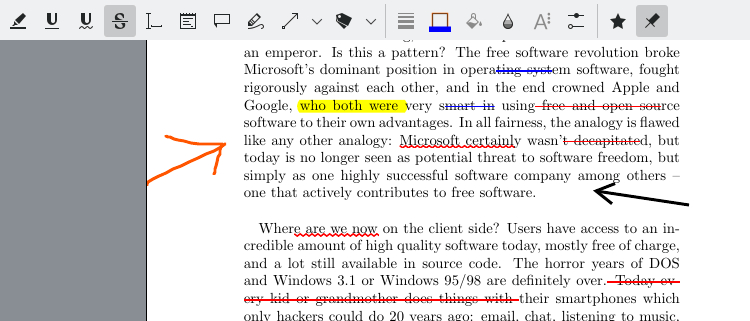
- Annotate documents with highlights, underlining, notes, freehand drawing, shapes, stamps and typewriter text.
- Save annotations directly into supported PDF files or preserve them with a document in Okular’s archive format.
- Fill interactive PDF forms and access files embedded inside documents.
- View, inspect and validate PDF digital signatures and their certificates.
- Digitally sign PDF documents using suitable PKCS certificates available on the system.
- Presentation mode provides full-page viewing, automatic page advancement, transitions, drawing tools and multi-monitor support.
- Bookmarks provide persistent shortcuts to important pages and document locations.
- Open multiple documents in tabs and automatically reload files when they change on disk.
- Text-to-speech support can read the current page or complete document when a system speech service is available.
- Configurable accessibility options, background colours, scrolling behaviour and reading direction.
- Supports inverse search with LaTeX editors using SyncTeX and related mechanisms.
- Command-line options can open documents at specific pages, start presentations, search text or print files directly.
- Cross-platform support – runs on Linux, macOS, and Windows.
Website: okular.kde.org
Support:
Developer: Okular developers
License: GNU General Public License v2.0 / v3.0
okular is written in C++. Learn C++ with our recommended free books and free tutorials.
Related Software
| PDF Viewers | |
|---|---|
| KOReader | Document viewer for a wide variety of file formats including PDF |
| Okular | Universal document viewer supporting advanced document features |
| MuPDF | Lightweight PDF and XPS viewer |
| Sioyek | Designed for viewing research papers and technical books |
| PDF.js | JavaScript library that renders Portable Document Format files |
| Koodo Reader | All-in-one ebook reader and PDF viewer |
| Papers | Fork of Evince |
| Evince | Multi-page document viewer |
| Atril | A simple multi-page document viewer for MATE |
| tdf | TUI-based PDF viewer |
| Zathura | Highly customizable and functional document viewer |
| Xreader | Simple multi-page document viewer |
| qpdfview | Tabbed document viewer. It uses Poppler for PDF support |
| Xpdf | PDF viewer and toolkit |
| PreviewQt | Preview all kinds of files |
| llpp | Fast and featureful PDF, EPUB, XPS and CBZ viewer |
| JFBView | PDF and image viewer for the Linux framebuffer |
| hygg | Minimalistic Vim-like TUI document reader |
| fancy-cat | PDF reader for terminal emulators |
| apvlv | PDF/EPUB/TXT/FB2/MOBI/CBZ/HTML …viewer |
| CorePDF | Simple lightweight PDF viewer |
| Jumpdf | Keyboard-focused PDF viewer |
| Shelf | Browse and view documents |
| MeowPDF | PDF viewer for the Kitty terminal with Vim-style navigation |
| npdfr | Command-line PDF reader prioritizing fast searches |
| miro | Native PDF viewer |
| Kiview | Quick file preview |
| Lektra | Fast and configurable PDF viewer |
Read our verdict in the software roundup.
 LinuxLinks helps you discover the best free and open source software for Linux. Explore our extensive collection of recommended applications, including alternatives to popular proprietary software. We also publish software reviews, Linux tutorials, hardware reviews, free programming books and articles covering the wider open source community. Browse our Linux resources to discover more. Know a useful free and open source Linux application we haven't covered? Suggest a program for inclusion. Has your software been featured on LinuxLinks? Display one of our Featured on LinuxLinks badges on your website or GitHub README. |
Please read our Comment Policy before commenting.