
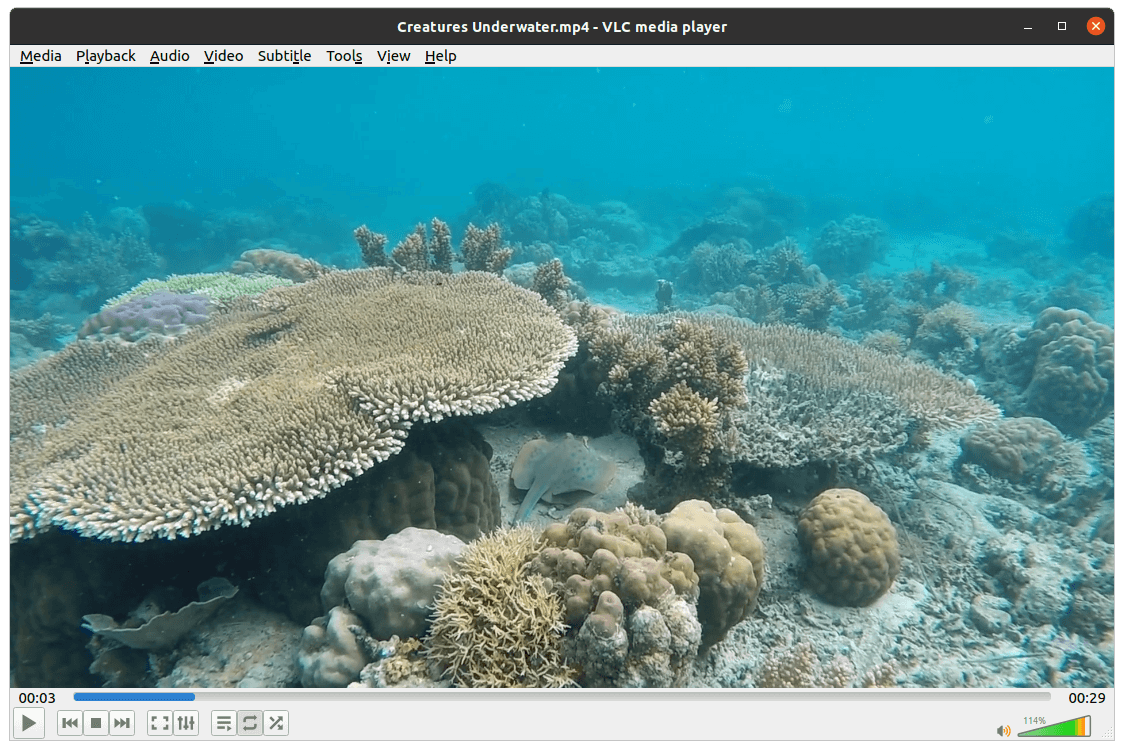
VLC is a multimedia player and playback framework developed as part of the VideoLAN project.
It is designed to handle a broad range of local files, optical media, network streams and capture sources without requiring users to assemble separate playback components. VLC is also more than a conventional desktop player: it can convert media, transmit streams across a network and expose its playback engine through libVLC for use by other applications.
This is free and open source software.
Key Features
- Plays a very wide range of audio and video container formats and codecs.
- Handles local files, DVDs, Audio CDs, network streams and numerous capture sources.
- Provides playback controls for subtitles, audio tracks, chapters and playback speed.
- Supports network protocols for receiving and transmitting multimedia streams.
- Can transcode media between supported formats using its conversion facilities.
- Offers audio and video filters for adjusting playback and processing media.
- Includes playlist management for local and network-based media.
- Provides synchronisation controls for correcting audio, video and subtitle timing.
- Supports hardware-assisted decoding on compatible systems.
- Can capture frames from video and record compatible input streams.
- Exposes the libVLC engine for embedding playback and streaming capabilities in other software.
- Supports extensions and configurable interfaces for specialised workflows.
- Provides command-line options for automation and advanced playback control.
- Includes broad subtitle format support and configurable subtitle rendering.
- Offers an audio equaliser and additional audio processing controls.
- Supports bookmarks for returning to selected positions in media.
- Can send playback to compatible network renderers.
- Cross-platform support – runs on Linux and many other desktop and mobile platforms.
Website: github.com/videolan/vlc
Support:
Developer: VideoLAN and contributors
License: GNU General Public License v2.0
VLC is primarily written in C. Learn C with our recommended free books and free tutorials.
Related Software
| Media Players | |
|---|---|
| VLC | Cross-platform multimedia player and framework |
| mpv | Media player for the command line. libmpv is used by many front-ends |
| QMPlay2 | Qt based video and audio player |
| MPlayer | Movie player which runs on many systems |
| SMPlayer | Qt based MPlayer front-end |
| GridPlayer | Play multiple videos simultaneously |
| Parole | Modern simple media player based on the GStreamer framework |
| MPC-QT | Clone of Media Player Classic |
| clapper | GNOME media player built using GJS with GTK4 toolkit |
| Totem | Movie player for the GNOME desktop based on GStreamer |
| Dragon Player | Multimedia player with a focus on simplicity rather than features |
| xine | Video player for playing CDs, DVDs, BluRays and VCDs. |
| Showtime | GNOME media player |
| Glide | Simple and minimalistic media player |
| Phantom Player | Simple video player |
| Daikhan | Media player for the modern desktop |
| QtAV | Cross-platform multimedia framework based on Qt and FFmpeg |
| SparkPlayer | Terminal-based media player for local music and video collections |
| Rage | Simple video and audio player |
| Kaffeine | Simple, easy to use, full featured media player |
Read our verdict in the software roundup.
| Video Converters | |
|---|---|
| HandBrake | Multithreaded cross-platform media transcoding application |
| FFmpeg | Multimedia player, server and encoder |
| Shutter Encoder | Graphical frontend to FFmpeg with editing features |
| FastFlix | GUI for H.264, HEVC and AV1 hardware and software encoding |
| Videomass | Cross-platform GUI for FFmpeg and youtube-dl |
| avconv | Part of libav-tools; fork of FFmpeg |
| VLC | Vdeo player which also converts multimedia to different formats |
| mpv | Cross-platform media player with video encoding support |
| ab-av1 | AV1 encoder with automatic quality selection through sample testing |
| MEncoder | MEncoder is included in MPlayer |
| FFQueue | Graphical frontend to FFmpeg written in C++ |
| Edconv | User-friendly FFmpeg GUI |
| transcode | Utility to encode raw video/audio streams |
| OmniGet | Uses FFmpeg to perform the video conversion |
| MystiQ | GUI for FFmpeg, a powerful media converter |
| Frame | Desktop media conversion utility |
| ffdash | VP9 video encoder |
| Constrict | Compress videos to target sizes |
| Leonardo | Media conversion application |
| Ciano | Easy way to convert your multimedia files to the most popular formats |
| Recoder | GTK4 video transcoding application |
| VidCom | Simple utility for video archiving and compression |
Read our verdict in the software roundup.
 Explore our carefully curated directory of recommended free and open source software, covering every major software category. Explore our carefully curated directory of recommended free and open source software, covering every major software category.The directory forms part of our extensive collection of articles for Linux enthusiasts. It includes hundreds of detailed reviews, together with free and open source alternatives to proprietary software from companies such as Google, Microsoft, Apple, Adobe, IBM, Cisco, Oracle, and Autodesk. LinuxLinks also covers interesting projects worth exploring, Linux-compatible hardware, free programming books and tutorials, and much more. Know a useful free and open source Linux application that we haven’t covered? Tell us about it using our submission form. |
Please read our Comment Policy before commenting.