

HandBrake is an open-source, GPL-licensed, multiplatform, multithreaded DVD to MPEG-4 converter. This software application therefore lets you compress DVDs so that they take less space on a hard disk.
HandBrake takes videos you already have and makes new ones that work on your mobile phone, tablet, TV media player, game console, computer, or web browser—nearly anything that supports modern video formats.
HandBrake works with most common video files and formats, including ones created by consumer and professional video cameras, mobile devices such as phones and tablets, game and computer screen recordings, and DVD and Blu-ray discs. HandBrake leverages tools such as FFmpeg, x264, and x265 to create new MP4 or MKV video files from these Sources.
Key Features
- Supported sources:
- Any DVD-like source: VIDEO_TS folder, DVD image or real DVD (encrypted or unencrypted, but protection methods other than CSS are not supported and must be handled externally with third-party software), and some .VOB and .TS files.
- PAL or NTSC.
- AC-3, DTS, LPCM or MPEG audio tracks.
- Outputs:
- File format: MP4, MKV, AVI or OGM.
- Video: MPEG-4 or H.264 (1 or 2 passes or constant quantizer/rate encoding).
- Audio: AAC, MP3, Vorbis or AC-3 pass-through (supports encoding of several audio tracks).
- Misc features:
- Chapter selection.
- Basic subtitle support (burned into the picture).
- Integrated bitrate calculator.
- Picture deinterlacing, cropping and scaling.
- Grayscale encoding.
Website: handbrake.fr
Support: GitHub Code Repository
Developer: Eric Petit, Laurent Aimar, John Allen, Joe Crain, Damiano Galassi, and others.
License: GNU General Public License v2.0
HandBrake is written in Objective-C, C, and C#. Learn C with our recommended free books and free tutorials. Learn C# with our recommended free books and free tutorials.
Related Software
| Video Converters | |
|---|---|
| HandBrake | Multithreaded cross-platform media transcoding application |
| FFmpeg | Multimedia player, server and encoder |
| Shutter Encoder | Graphical frontend to FFmpeg with editing features |
| FastFlix | GUI for H.264, HEVC and AV1 hardware and software encoding |
| Videomass | Cross-platform GUI for FFmpeg and youtube-dl |
| avconv | Part of libav-tools; fork of FFmpeg |
| VLC | Vdeo player which also converts multimedia to different formats |
| mpv | Cross-platform media player with video encoding support |
| MEncoder | MEncoder is included in MPlayer |
| FFQueue | Graphical frontend to FFmpeg written in C++ |
| Edconv | User-friendly FFmpeg GUI |
| transcode | Utility to encode raw video/audio streams |
| OmniGet | Uses FFmpeg to perform the video conversion |
| MystiQ | GUI for FFmpeg, a powerful media converter |
| Frame | Desktop media conversion utility |
| ffdash | VP9 video encoder |
| Constrict | Compress videos to target sizes |
| Leonardo | Media conversion application |
| Ciano | Easy way to convert your multimedia files to the most popular formats |
| Recoder | GTK4 video transcoding application |
| VidCom | Simple utility for video archiving and compression |
Read our verdict in the software roundup.
 Explore our comprehensive directory of recommended free and open source software. Our carefully curated collection spans every major software category. Explore our comprehensive directory of recommended free and open source software. Our carefully curated collection spans every major software category.This directory is part of our ongoing series of informative articles for Linux enthusiasts. It features hundreds of detailed reviews, along with open source alternatives to proprietary solutions from major corporations such as Google, Microsoft, Apple, Adobe, IBM, Cisco, Oracle, and Autodesk. You’ll also find interesting projects to try, hardware coverage, free programming books and tutorials, and much more. Discovered a useful open source Linux program that we haven’t covered yet? Let us know by completing this form. |
Please read our Comment Policy before commenting.
What good is this information, I am looking for apps to download.
What apps are you looking to download?
This article seems outdated because the GUI for handbrake has been available for Linux and other OSes for a while now.
Regards.
Gerald.
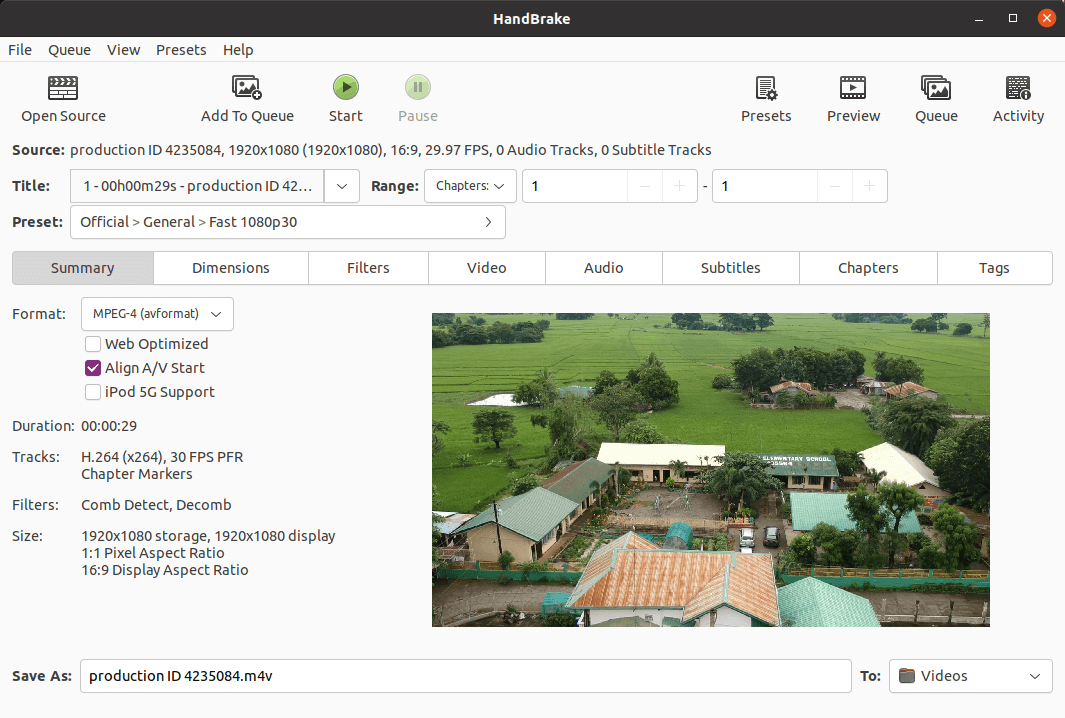
Yes, the article had an outdated sentence, which has been updated. We’ve shown an image of the GUI for some time.