

In March 2011 some of the FFmpeg developers forked the project under the name “Libav”.
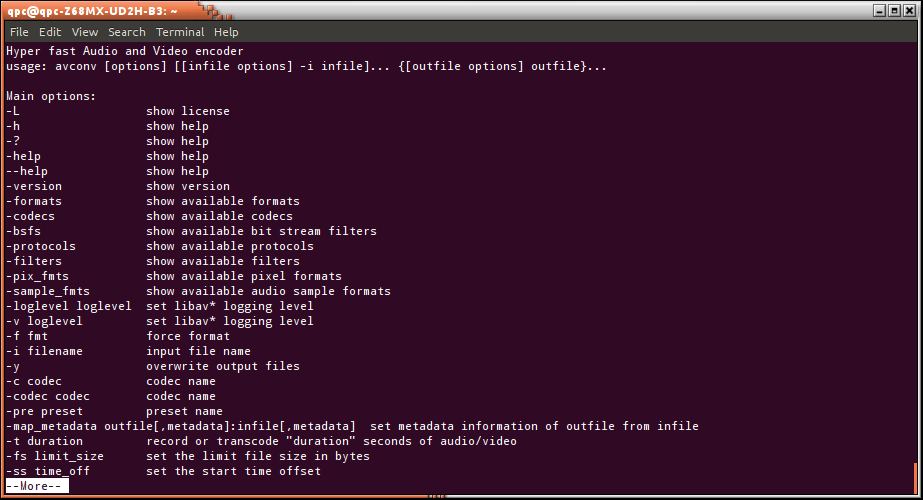
Libav is a complete, cross-platform solution to record, convert and stream audio and video. It includes libavcodec – the leading audio/video codec library. One of the components of libav is avconv, a fast open source video and audio converter that can also grab from a live audio/video source. The command-line tool can also convert between arbitrary sample rates and resize video on the fly with a high quality polyphase filter.
Besides avconv, the libav-tools package offers the avplay multimedia player, the avserver streaming server, and the avprobe stream analyzer. The tooks support most existing file formats (AVI, MPEG, OGG, Matroska, ASF…) and encoding formats (MPEG, DivX, MPEG4, AC3, DV…).
Key Features
- Grabs video and audio.
- Can also grab the X11 display.
- Convert from one audio and video format to another format in real time.
- Streams several formats at several bit rates and resolutions simultaneously.
- Handles thousands of concurrent users.
- Uses the HTTP protocol to be compatible with all major players including Icecast (aka mpg123, xmms, winamp), MTV (to play streaming MPEG video and audio), “Real” compatible players and Windows Media Player.
- Allows time shifting of live streams.
- One instance can stream from multiple live encoding sources and/or multiple static files.
- avprobe tool.
- VorbisComment writing for FLAC, Ogg FLAC and Ogg Speex files.
- Video filters: blackframe, bloxblur, copy, crop, cropdetect, delogo, drawbox, drawtext, fade, fieldorder, fifo, format, frei0r, gradfun, hflip, hqdn3d, lut, lutrgb, lutyuv, negate, null, ocv, overlay, pad, pixdesctest, scale, select, setdar, setpts, setsar, settb, showinfo, slicify, transpose, unsharp, vflip, and yadif.
- Picks the “best” stream of each type present in input files and add them to each output file.
Website: github.com/libav/libav
Support:
Developer: Libav developers
License: GNU LGPL v2.1 or higher
avconv is written in C. Learn C with our recommended free books and free tutorials.
Related Software
| Video Converters | |
|---|---|
| HandBrake | Multithreaded cross-platform media transcoding application |
| FFmpeg | Multimedia player, server and encoder |
| Shutter Encoder | Graphical frontend to FFmpeg with editing features |
| FastFlix | GUI for H.264, HEVC and AV1 hardware and software encoding |
| Videomass | Cross-platform GUI for FFmpeg and youtube-dl |
| avconv | Part of libav-tools; fork of FFmpeg |
| VLC | Vdeo player which also converts multimedia to different formats |
| mpv | Cross-platform media player with video encoding support |
| MEncoder | MEncoder is included in MPlayer |
| FFQueue | Graphical frontend to FFmpeg written in C++ |
| Edconv | User-friendly FFmpeg GUI |
| transcode | Utility to encode raw video/audio streams |
| OmniGet | Uses FFmpeg to perform the video conversion |
| MystiQ | GUI for FFmpeg, a powerful media converter |
| Frame | Desktop media conversion utility |
| ffdash | VP9 video encoder |
| Constrict | Compress videos to target sizes |
| Leonardo | Media conversion application |
| Ciano | Easy way to convert your multimedia files to the most popular formats |
| Recoder | GTK4 video transcoding application |
| VidCom | Simple utility for video archiving and compression |
Read our verdict in the software roundup.
 Explore our comprehensive directory of recommended free and open source software. Our carefully curated collection spans every major software category. Explore our comprehensive directory of recommended free and open source software. Our carefully curated collection spans every major software category.This directory is part of our ongoing series of informative articles for Linux enthusiasts. It features hundreds of detailed reviews, along with open source alternatives to proprietary solutions from major corporations such as Google, Microsoft, Apple, Adobe, IBM, Cisco, Oracle, and Autodesk. You’ll also find interesting projects to try, hardware coverage, free programming books and tutorials, and much more. Discovered a useful open source Linux program that we haven’t covered yet? Let us know by completing this form. |
Please read our Comment Policy before commenting.