

This is a series where I hand-pick an open source Linux application each week that has not previously been covered on LinuxLinks. Each application must meet a very high standard.
OmniGet is a desktop application built with Tauri that lets you download media and other files from a broad range of online sources.
Update – September 2026: OmniGet has changed significantly since my original review in April. The course downloader, Telegram downloader and plugin system have been removed. The current release, version 0.10.1, focuses on downloading media and files, while also adding integration with AI coding agents.
This is free and open source software.
Installation
I originally evaluated OmniGet with CachyOS, an Arch-based distribution, using the binary package available from the AUR.
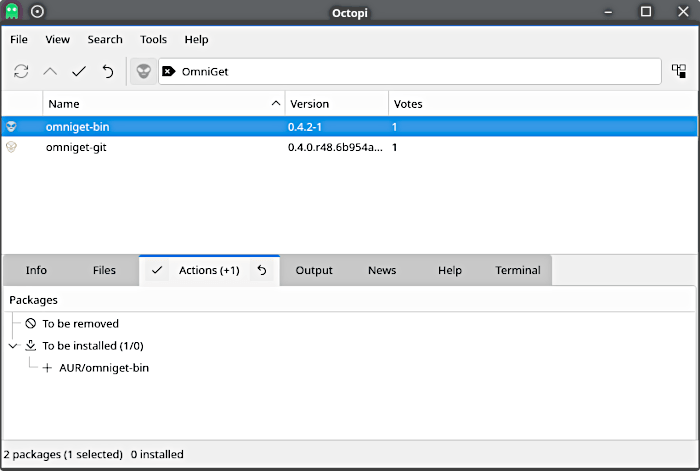
The project now also provides official Linux builds as DEB, RPM and AppImage packages, with both x86_64 and ARM64 architectures supported.
OmniGet relies heavily on yt-dlp and FFmpeg. One welcome feature is that the application can install these tools itself and keep them updated, reducing the amount of manual setup required.
In action
The core of OmniGet remains straightforward. Paste a supported URL and the software handles the download through a single queue.
YouTube, Instagram, TikTok, X, Reddit, Twitch and Bilibili are among the directly useful services, with many more sites available through yt-dlp. Video can be downloaded at resolutions up to 4K, while an audio-only option is available when video is unnecessary.
Image galleries are handled through gallery-dl. OmniGet also supports torrent files and magnet links.
Downloads are gathered into a common queue where jobs can be paused, resumed or retried.
One of the biggest changes since my original review is OmniGet’s new AI functionality.
The program includes an MCP server which is disabled by default and listens only on 127.0.0.1. This allows tools such as Claude Code, Cursor and Codex to interact with OmniGet, for example by adding downloads to the queue and reporting failed jobs.
OmniGet can also run coding agents directly inside its desktop interface. Claude Code, Codex and Gemini CLI are supported, together with local models through Ollama without requiring an API key. Changes are presented as a diff before anything is written, giving the user an opportunity to inspect them first.
Key Features
- Downloads video and other media from YouTube, Instagram, TikTok, X, Reddit, Twitch, Bilibili and sites supported by yt-dlp.
- Video downloads at resolutions up to 4K, together with audio-only downloads.
- Downloads image galleries through gallery-dl.
- Built-in support for torrent files and magnet links.
- Single download queue with pause, resume and retry functionality.
- Automatically installs and updates yt-dlp and FFmpeg.
- Optional local MCP server for integration with Claude Code, Cursor, Codex and other compatible tools.
- Can run Claude Code, Codex, Gemini CLI and local Ollama models from its desktop interface.
- Displays proposed coding changes as a diff before files are written.
- Linux builds available as DEB, RPM and AppImage packages for x86_64 and ARM64.
- Cross-platform support for Linux, macOS and Windows.
Summary
OmniGet has changed considerably since I first looked at it in April 2026. The course downloader, Telegram integration and plugin system covered in the original review have disappeared, so anyone coming to the software specifically for those features should be aware that they are no longer available.
As a downloader, however, OmniGet still offers a broad range of functionality. yt-dlp provides support for a huge number of video and audio sites, gallery-dl extends that to image galleries, and torrents and magnet links are handled within the same application.
The addition of MCP support and a desktop environment for coding agents takes OmniGet in a rather different direction. These features aren’t necessary if all you want is a graphical downloader, but they make the current OmniGet considerably broader in scope than the application I originally reviewed.
Naturally, you should make sure your use of this tool complies with the copyright laws in your country.
Website: GitHub link needs correcting
Support:
Developer: Antonio
License: GNU General Public License v3.0
OmniGet is written in Rust. Learn Rust with our recommended free books and free tutorials.
Related Software
| YouTube Tools | |
|---|---|
| FreeTube | Privacy-based YouTube app |
| Media Downloader | Frontend for youtube-dl, gallery-dl, Lux, you-get, ... |
| OmniGet | Download media and files from a broad range of online sources |
| pipe-viewer | Lightweight YouTube client without requiring an API key |
| Piped | Uses NewPipe Extractor, a library for extracting |
| Open Video Downloader | Easy-to-use graphical frontend for downloading online videos |
| Tartube | Video downloader and browser built around yt-dlp |
| AudioTube | Qt-based music streamer |
| Videomass | Download, convert and processing media |
| ClipGrab | Downloader for YouTube and other sites |
| Minitube | Application for watching YouTube without using Flash |
| Materialious | Fontend for YouTube and Invidious |
| youtube-local | Browser-based YouTube client |
| SMTube | Search, play and download YouTube videos |
| Pipeline | Watch YouTube and PeerTube videos |
| MellowPlayer | Multi-platform cloud music integration |
| ytdl-gui | Graphical interface for yt-dlp |
| Youwee | Built with Tauri and React |
| PlasmaTube | Designed to be integrated with KDE Plasma |
| PsTube | Flutter-based video client |
| Video Downloader | Download videos from YouTube and other websites |
| VacuumTube | Unofficial wrapper of YouTube Leanback |
| NeoDLP | Feature-rich video/audio downloader based on yt-dlp |
| Mixtapes | Modern, Linux-first YouTube Music player |
| GDownloader | GUI for downloading videos, audio and galleries |
| Sunder | Built with Tauri v2 and Rust |
| SpMp | YouTube music client with a focus on customization |
| Pulsar | yt-dlp GUI |
| NouTube | YouTube and YouTube Music in a single app |
Read our verdict in the software roundup.
| Video Converters | |
|---|---|
| HandBrake | Multithreaded cross-platform media transcoding application |
| FFmpeg | Multimedia player, server and encoder |
| Shutter Encoder | Graphical frontend to FFmpeg with editing features |
| FastFlix | GUI for H.264, HEVC and AV1 hardware and software encoding |
| Videomass | Cross-platform GUI for FFmpeg and youtube-dl |
| avconv | Part of libav-tools; fork of FFmpeg |
| VLC | Vdeo player which also converts multimedia to different formats |
| mpv | Cross-platform media player with video encoding support |
| ab-av1 | AV1 encoder with automatic quality selection through sample testing |
| MEncoder | MEncoder is included in MPlayer |
| FFQueue | Graphical frontend to FFmpeg written in C++ |
| Edconv | User-friendly FFmpeg GUI |
| transcode | Utility to encode raw video/audio streams |
| OmniGet | Uses FFmpeg to perform the video conversion |
| MystiQ | GUI for FFmpeg, a powerful media converter |
| Frame | Desktop media conversion utility |
| ffdash | VP9 video encoder |
| Constrict | Compress videos to target sizes |
| Leonardo | Media conversion application |
| Ciano | Easy way to convert your multimedia files to the most popular formats |
| Recoder | GTK4 video transcoding application |
| VidCom | Simple utility for video archiving and compression |
Read our verdict in the software roundup.
 Explore our carefully curated directory of recommended free and open source software, covering every major software category. Explore our carefully curated directory of recommended free and open source software, covering every major software category.The directory forms part of our extensive collection of articles for Linux enthusiasts. It includes hundreds of detailed reviews, together with free and open source alternatives to proprietary software from companies such as Google, Microsoft, Apple, Adobe, IBM, Cisco, Oracle, and Autodesk. LinuxLinks also covers interesting projects worth exploring, Linux-compatible hardware, free programming books and tutorials, and much more. Know a useful free and open source Linux application that we haven’t covered? Tell us about it using our submission form. |
Please read our Comment Policy before commenting.