

MEncoder is a command-line video encoding application distributed with MPlayer. It uses MPlayer’s multimedia decoding capabilities to process files and streams, then creates encoded output using the selected video and audio codecs.
The application supports numerous multimedia formats, including MPEG, AVI, Matroska, MOV, DVD video, and other formats handled by MPlayer. It provides options for controlling video compression, selecting audio codecs, and modifying media during conversion. Although particularly associated with AVI-based encoding workflows, its capabilities extend to other combinations supported by the underlying codec libraries.
MEncoder shares MPlayer’s filtering architecture. Users can resize or crop footage, change frame rates, adjust audio properties, and apply processing filters before encoding. These facilities are controlled through command-line options and can be incorporated into scripts. MEncoder continues to be distributed as part of MPlayer, including recent development snapshots, although its interface reflects an older generation of multimedia conversion software.
This is free and open source software.
Key Features
- Encode video and audio from formats supported by MPlayer.
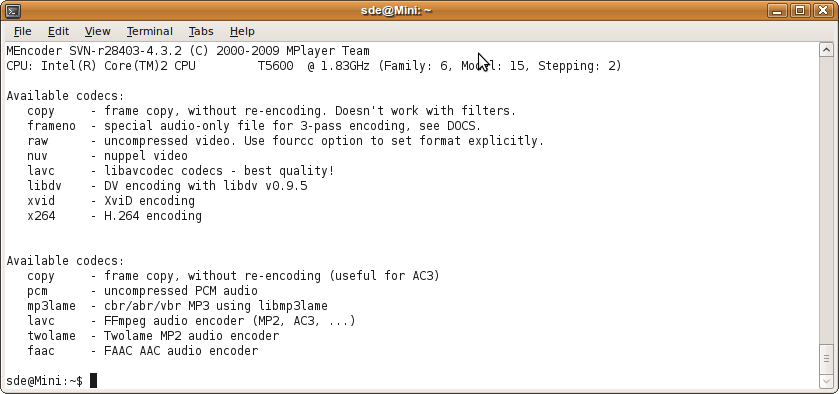
- MPEG-1, MPEG-2, MPEG-4 ASP, H.264, and other supported video codecs.
- Audio encoding with MP3, AAC, AC3, Vorbis, PCM, and other available codecs.
- Copy compatible audio or video streams without re-encoding.
- Single-pass and multi-pass encoding modes.
- Crop, resize, rotate, and flip video.
- Apply deinterlacing, denoising, sharpening, and post-processing filters.
- Video colour and pixel-format conversions.
- Adjust frame rates and audio synchronisation.
- Extract and process sections of multimedia sources.
- DVD and other disc-based source processing.
- Support for external subtitle handling through MPlayer capabilities.
- Command-line controls suitable for automated conversion workflows.
Website: www.mplayerhq.hu
Support:
Developer: Sergio Costas
License: GNU General Public License v3.0
Mencoder is written in C. Learn C with our recommended free books and free tutorials.
Related Software
| Video Converters | |
|---|---|
| HandBrake | Multithreaded cross-platform media transcoding application |
| FFmpeg | Multimedia player, server and encoder |
| Shutter Encoder | Graphical frontend to FFmpeg with editing features |
| FastFlix | GUI for H.264, HEVC and AV1 hardware and software encoding |
| Videomass | Cross-platform GUI for FFmpeg and youtube-dl |
| avconv | Part of libav-tools; fork of FFmpeg |
| VLC | Vdeo player which also converts multimedia to different formats |
| mpv | Cross-platform media player with video encoding support |
| ab-av1 | AV1 encoder with automatic quality selection through sample testing |
| MEncoder | MEncoder is included in MPlayer |
| FFQueue | Graphical frontend to FFmpeg written in C++ |
| Edconv | User-friendly FFmpeg GUI |
| transcode | Utility to encode raw video/audio streams |
| OmniGet | Uses FFmpeg to perform the video conversion |
| MystiQ | GUI for FFmpeg, a powerful media converter |
| Frame | Desktop media conversion utility |
| ffdash | VP9 video encoder |
| Constrict | Compress videos to target sizes |
| Leonardo | Media conversion application |
| Ciano | Easy way to convert your multimedia files to the most popular formats |
| Recoder | GTK4 video transcoding application |
| VidCom | Simple utility for video archiving and compression |
Read our verdict in the software roundup.
 LinuxLinks helps you discover the best free and open source software for Linux. Explore our extensive collection of recommended applications, including alternatives to popular proprietary software. We also publish software reviews, Linux tutorials, hardware reviews, free programming books and articles covering the wider open source community. Browse our Linux resources to discover more. Know a useful free and open source Linux application we haven't covered? Suggest a program for inclusion. Has your software been featured on LinuxLinks? Display one of our Featured on LinuxLinks badges on your website or GitHub README. |
Please read our Comment Policy before commenting.