

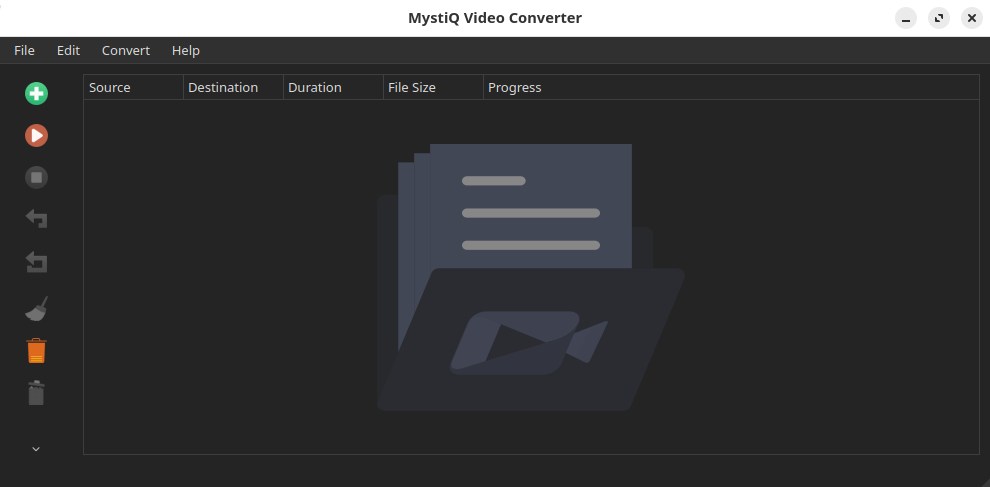
MystiQ is a graphical frontend for FFmpeg that allows users to convert audio and video files without working directly with command-line options. It provides a conventional desktop interface for selecting source files, choosing output formats, and configuring conversion tasks.
The application includes predefined encoding presets for common conversion requirements. Each preset defines parameters passed to FFmpeg, allowing frequently used configurations to be applied without repeatedly entering codec and quality settings. Users who need different results can modify those parameters for an individual conversion, including video bitrate and audio settings.
MystiQ accepts multiple source files and manages their conversion through a task-oriented interface. It is intended for people who want access to FFmpeg’s media handling capabilities through graphical controls, while still being able to adjust the settings behind a preset when necessary. Its desktop interface uses the Qt toolkit and supports a range of audio and video formats through FFmpeg.
This is free and open source software.
Key Features
- Graphical interface for FFmpeg-based audio and video conversion.
- Convert media between formats supported by the installed FFmpeg configuration.
- Predefined encoding profiles for common output formats.
- Customisable conversion settings for individual tasks.
- Configure video bitrate and quality parameters.
- Adjust audio encoding options, including volume.
- Open multiple input files for conversion.
- Task-based interface for managing media conversion jobs.
- Graphical selection of source and output files.
- Qt-based desktop interface.
Website: github.com/swl-x/MystiQ
Support:
Developer: SWL-X Project
License: GNU General Public License v3.0
MystiQ is written in C++. Learn C++ with our recommended free books and free tutorials.
This article was written with the help of a site visitor who completed this form. Help the site by suggesting new open source software.
Related Software
| Video Converters | |
|---|---|
| HandBrake | Multithreaded cross-platform media transcoding application |
| FFmpeg | Multimedia player, server and encoder |
| Shutter Encoder | Graphical frontend to FFmpeg with editing features |
| FastFlix | GUI for H.264, HEVC and AV1 hardware and software encoding |
| Videomass | Cross-platform GUI for FFmpeg and youtube-dl |
| avconv | Part of libav-tools; fork of FFmpeg |
| VLC | Vdeo player which also converts multimedia to different formats |
| mpv | Cross-platform media player with video encoding support |
| ab-av1 | AV1 encoder with automatic quality selection through sample testing |
| MEncoder | MEncoder is included in MPlayer |
| FFQueue | Graphical frontend to FFmpeg written in C++ |
| Edconv | User-friendly FFmpeg GUI |
| transcode | Utility to encode raw video/audio streams |
| OmniGet | Uses FFmpeg to perform the video conversion |
| MystiQ | GUI for FFmpeg, a powerful media converter |
| Frame | Desktop media conversion utility |
| ffdash | VP9 video encoder |
| Constrict | Compress videos to target sizes |
| Leonardo | Media conversion application |
| Ciano | Easy way to convert your multimedia files to the most popular formats |
| Recoder | GTK4 video transcoding application |
| VidCom | Simple utility for video archiving and compression |
Read our verdict in the software roundup.
 LinuxLinks helps you discover the best free and open source software for Linux. Explore our extensive collection of recommended applications, including alternatives to popular proprietary software. We also publish software reviews, Linux tutorials, hardware reviews, free programming books and articles covering the wider open source community. Browse our Linux resources to discover more. Know a useful free and open source Linux application we haven't covered? Suggest a program for inclusion. Has your software been featured on LinuxLinks? Display one of our Featured on LinuxLinks badges on your website or GitHub README. |
Please read our Comment Policy before commenting.
The link to the website is wrong.
Thanks, link corrected.
Thanks to you for the good work! I am going to try this one. One of my favorite converter remain one which hasn’t been update since 2017, Selene