
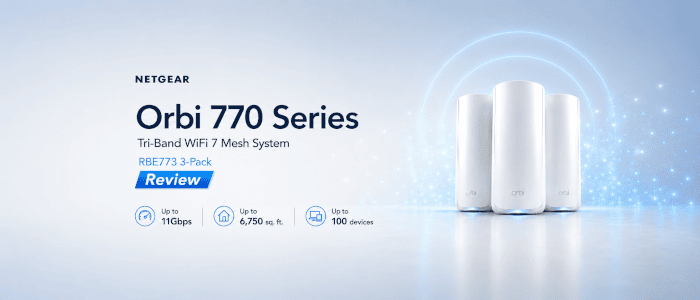
My review of the NETGEAR Orbi 770 Series prompted an interesting question from a reader: are the Guest and IoT wireless networks actually segregated from the main LAN, or are they simply additional SSIDs?
The distinction is important. Giving a wireless network a different SSID and password does not necessarily prevent devices connected to it from communicating with computers, NAS devices and other hardware on the main network. NETGEAR describes the Orbi 770 as providing three Wi-Fi networks: Main, IoT and Guest. Its product page goes further, describing these as “Separate WiFi Networks for secure access”.
The Orbi 770 user manual describes the Guest network as allowing visitors to connect without compromising the security of the other Wi-Fi networks. The IoT network has a somewhat different purpose. It lets you select the 2.4 GHz and/or 5 GHz bands and use a different SSID, security setting and password from the main network. NETGEAR’s support documentation also describes the Wi-Fi 7 Orbi IoT network primarily as a compatibility feature for printers, smart devices and older hardware that might have difficulty with the security configuration of the main Wi-Fi network.
What isn’t immediately obvious from those descriptions is exactly what devices attached to each network can actually reach.
Let’s find out.
Test setup
I’m using the NETGEAR Orbi 770 Series system reviewed previously on LinuxLinks.
At the time of testing, the router was running:
Firmware: V10.5.20.10_2.2.51
My main LAN uses:
LAN subnet: 192.168.1.0/24
I used a Linux system connected by Ethernet to the Orbi as the target machine. Using a wired system avoids introducing another wireless network into the test. Its address is:
192.168.1.174
On this machine I started a simple HTTP server. I used a dedicated temporary directory so that only a test file was exposed:
mkdir -p /tmp/orbi-test
echo "Orbi network test" > /tmp/orbi-test/index.html
python3 -m http.server 8000 --bind 0.0.0.0 --directory /tmp/orbi-test
This gives me a known listening TCP service on the target machine. I first verified that it was reachable from the main network before using it to test the Guest and IoT networks.
I used a machine running CachyOS as the wireless client.
Before testing network access, I recorded the IPv4 address and routing configuration assigned by each Orbi SSID with:
ip -4 addr
ip route
Main network
Connected to the normal Orbi Wi-Fi network, the client received:
IP address: 192.168.1.214
Default gateway: 192.168.1.1
Subnet: 192.168.1.0/24
As a baseline I confirmed that the HTTP service on my wired LAN system could be reached:
curl --connect-timeout 5 http://192.168.1.174:8000
Result: Successful. The connection returned content from the HTTP server, confirming that the wired LAN system and the known TCP service were reachable from the normal Orbi Wi-Fi network.
Internet access was also working normally.
This is the expected behaviour and establishes the baseline for the Guest and IoT tests.
Guest network
I next disconnected the client from the main network and connected it to the Orbi Guest network.
The client received:
IP address: 192.168.2.214
Default gateway: 192.168.2.1
Subnet: 192.168.2.0/24
The Guest network therefore uses a separate IPv4 subnet from the main LAN. The main network is 192.168.1.0/24, while Guest clients are placed on 192.168.2.0/24.
Internet access continued to work normally from the Guest network.
First I checked basic ICMP connectivity to my machine on the main LAN:
ping -c 3 192.168.1.174
Result: The ping failed. All three packets were rejected by the Guest network gateway at 192.168.2.1, which returned “Destination Port Unreachable”. No replies were received from the LAN system.
A failed ping isn’t sufficient to demonstrate network isolation. A firewall can block ICMP while still permitting TCP connections, so I next attempted to reach the known HTTP service:
curl --connect-timeout 5 http://192.168.1.174:8000
Result: The TCP connection failed. curl reported “Could not connect to server”, even though the same service had been confirmed as reachable from the normal Orbi Wi-Fi network.
Together with the ping result, this is good evidence that the Orbi Guest network is segregated from the main IPv4 LAN rather than simply being placed on a different subnet.
I also checked several commonly used TCP ports:
nmap -Pn --reason -p 22,80,443,445,8000 192.168.1.174
Result: From the Guest network, all five TCP ports were reported as closed with a “conn-refused” reason. Crucially, this included port 8000, which I knew was listening and had already confirmed was reachable from the main Wi-Fi network. The result therefore reflects the Guest network preventing access to the listening service rather than port 8000 actually being closed on the target machine.
Can a Guest client access my NAS?
A NAS provides a more representative real-world test than a temporary HTTP server. Mine resides on the main LAN at:
192.168.1.65
From the Guest network I attempted to reach its SMB service:
smbclient -L //192.168.1.65 -N
Result: The connection was refused. From the normal network, smbclient connected successfully and enumerated the NAS’s shared storage.
This shows that Guest clients could not access the NAS’s SMB service on the main LAN. My other tests support the broader conclusion that the Guest network was segregated from the main IPv4 LAN in this configuration.
Can a Guest client access the router?
I also tested whether a Guest client could reach the Orbi’s own management interface at 192.168.1.1.
Result: Connections to both HTTP port 80 and HTTPS port 443 failed. A normal HTTPS GET request failed in the same way.
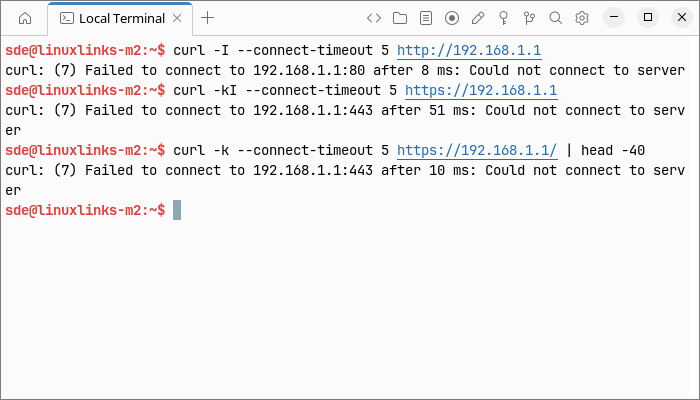
This indicates that the router’s local web administration interface was not accessible from the Guest network.
IoT network
I repeated the tests after connecting the Linux client to the dedicated IoT SSID.
The client received:
IP address: 192.168.1.214
Default gateway: 192.168.1.1
Subnet: 192.168.1.0/24
The IoT client is therefore on the same IPv4 subnet as the main LAN.
Interestingly, it received the same 192.168.1.214 address that it had used on the Main SSID. The important point isn’t the reuse of that particular address, however, but that the IoT client was placed on the same 192.168.1.0/24 subnet.
Internet access also worked normally from the IoT network.
I first tested ICMP connectivity to the NAS:
ping -c 3 192.168.1.65
Result: Successful. All three packets received replies, with 0% packet loss.
Unlike the Guest network, the IoT client could therefore communicate directly with a device on the main LAN using ICMP.
I then tested the HTTP service running on my wired LAN system:
curl --connect-timeout 5 http://192.168.1.174:8000
Result: Successful. The IoT client retrieved content from the HTTP server.
This demonstrates application-level TCP connectivity from the dedicated IoT SSID to a service running on a device on the main LAN.
Next I ran the same TCP port scan:
nmap -Pn --reason -p 22,80,443,445,8000 192.168.1.174
Result: The host was reachable, with SSH (22), SMB (445) and my temporary HTTP service (8000) all reported as open. Ports 80 and 443 were closed because no services were listening on those ports.
The contrast with the Guest-network scan is clear. From the IoT SSID, services exposed by the main-LAN host remained directly reachable.
I then attempted to access the NAS:
smbclient -L //192.168.1.65 -N
Result: Successful. The IoT client connected to the NAS’s Samba service and enumerated its available shares, including NVMe-System, NVMe-Data, Disk1 and Disk2.
This provides further evidence that the dedicated IoT SSID does not segregate connected devices from systems on the main LAN.
Finally, I tested whether the IoT client could access the Orbi administration interface at 192.168.1.1.
Result: Successful. The Orbi administration interface was accessible from the IoT network.
A separate SSID isn’t necessarily a separate network
This is the important distinction.
An IoT SSID can still be useful even if it isn’t isolated from the main LAN. For example, the Orbi allows the IoT network to operate only on 2.4 GHz, which can simplify connecting smart-home hardware that doesn’t cope particularly well with modern multi-band wireless networks.
Indeed, NETGEAR explicitly documents the Wi-Fi 7 Orbi IoT network as a way of connecting printers, smart devices and older equipment and lets users select which wireless bands it operates on.
But that’s a different function from putting potentially untrusted IoT hardware behind a firewall or on an isolated VLAN.
A discussion specifically concerning the Orbi 770 on NETGEAR’s community forum describes the IoT network as remaining accessible to the main network so that applications running on phones and tablets can communicate with IoT devices. The same discussion describes the Guest network as the isolated network. That’s community information rather than definitive product documentation, which is one reason I wanted to verify the behaviour myself.
My testing supports that distinction. The Guest and IoT SSIDs behave very differently. Guest clients were placed on a separate IPv4 subnet and were unable to reach my wired LAN system, its HTTP service, my NAS’s SMB service or the Orbi web administration interface. By contrast, the IoT client remained on the same subnet as the main LAN and could communicate directly with systems and services on it, including the NAS and the Orbi administration interface.
Results
Once all of the tests were complete, this was the behaviour I observed:
| Test | Main | Guest | IoT |
|---|---|---|---|
| Internet access | Yes | Yes | Yes |
| Reach main LAN host | Yes | No | Yes |
| Connect to LAN TCP service | Yes | No | Yes |
| Reach NAS | Yes | No | Yes |
| Reach Orbi admin interface | Yes | No | Yes |
| Separate IPv4 subnet | — | Yes | No |
Both additional SSIDs provided normal Internet access, but their access to the local network was markedly different.
The Guest network provided effective IPv4 segregation from the main LAN in my tests. It used a separate 192.168.2.0/24 subnet, and attempts to reach the 192.168.1.0/24 LAN failed. Even a TCP service that I knew was listening and accessible from the main network could not be reached from Guest Wi-Fi. The NAS’s SMB service and the Orbi’s local administration interface were also inaccessible.
The IoT SSID behaved very differently. The client received an address on the main 192.168.1.0/24 subnet, successfully communicated with a main-LAN system, accessed its HTTP server and could reach its SSH, SMB and HTTP services. It could also connect to my NAS at 192.168.1.65 and enumerate its Samba shares. The Orbi administration interface at 192.168.1.1 was accessible as well.
The IoT SSID therefore provides a distinct wireless network name and separately configurable wireless settings, but it does not provide isolation from the main LAN in the configuration and firmware I tested.
Conclusion
My testing shows that the NETGEAR Orbi 770 treats its Guest and IoT networks very differently.
The important lesson is that a separate wireless SSID should not automatically be interpreted as network segregation. What matters from a security perspective is whether traffic is allowed to cross from that SSID to devices on the main LAN.
The Guest network passed my IPv4 segregation tests. Guest clients retained Internet access but were placed on a separate subnet and could not reach my wired LAN host, its known TCP service, my NAS’s SMB service or the Orbi’s local administration interface.
The dedicated IoT SSID did not provide comparable isolation. My IoT client retained Internet access but remained on the same subnet as the main LAN and could directly communicate with the LAN systems and services I tested, including the NAS and the Orbi administration interface.
For users who specifically want to place untrusted smart-home devices on a network that cannot communicate freely with PCs, NAS systems and other LAN hardware, the Orbi 770’s dedicated IoT SSID does not provide that segregation in my tests with firmware V10.5.20.10_2.2.51.
The Guest network does provide meaningful IPv4 LAN isolation in the configuration I tested, but the IoT network should not be assumed to offer the same protection.
Please read our Comment Policy before commenting.