

WFM is a lightweight web-based file and content manager that runs as a self-contained server.
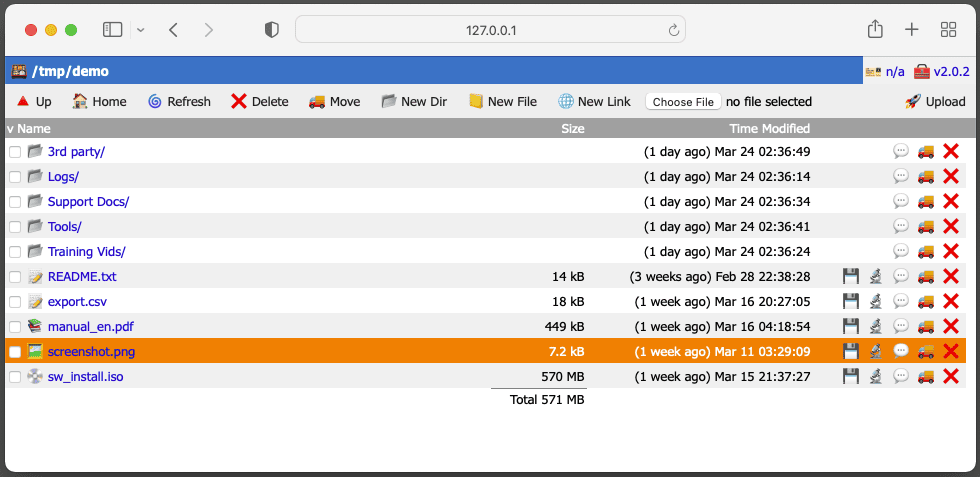
It can provide browser access to a NAS, document tree or personal file store without requiring Apache, Nginx, PHP, a database or a JavaScript application framework. Core file operations are available directly from the browser, while text files can be edited in place.
The program is unusually flexible about how storage is exposed. Multiple filesystem roots can be mapped to URL prefixes, user-specific home directories can be kept private, and managed locations can also be exposed through WebDAV. WFM can serve selected directories as read-only websites alongside authenticated file-manager paths.
This is free and open source software.
Key Features
- Upload, download, create, rename, move and delete files and directories from a browser.
- Edit text, configuration, Markdown and other text-based files directly in the browser.
- Map multiple filesystem locations to separate URL prefixes.
- Provide private home directories for individual users.
- Configure read-only and read-write user accounts with HTTP Basic authentication.
- Allow anonymous read-only access while retaining authenticated write access.
- Expose managed locations and user home directories through WebDAV.
- Operate as a conventional static web server as well as a file manager.
- Use chroot and privilege dropping to restrict the service to the intended filesystem tree.
- Support TLS using supplied certificates or automatic certificate management.
- Run under systemd, sysvinit, launchd, FreeBSD rc or Docker.
- Provide a minimal interface for clients such as curl, wget, Kodi and iPXE.
Website: github.com/tenox7/wfm
Support:
Developer: Antoni Sawicki
License: Apache License 2.0
WFM is written in Go. Learn Go with our recommended free books and free tutorials.
Related Software
| Web-Based File Managers | |
|---|---|
| copyparty | Portable file server |
| Filestash | Dropbox-like file manager |
| AList | File list program that supports multiple storages |
| File Browser | Provides a file managing interface within a specified directory |
| Tiny File Manager | Versatile web-based PHP file manager |
| Cloudreve | Self-hosted file management system with multi-cloud support |
| FileGator | Powerful multi-user file manager |
| Dufs | Fle server that supports static serving |
| kodbox | Self-hosted document management and collaboration platform |
| Cloud Commander | For the web with console and editor |
| Directory Lister | Browse and share folders |
| SFTPGo | WebAdmin UI lets you manage users, folders, and more |
| TagSpaces | Offline, open source, personal data manager |
| Nextcloud | Personal cloud storage, text editor, photo gallery, file share,... |
| Gossa | Fast and simple multimedia fileserver |
| Surfer | Simple static file server |
| IFM | Improved File Manager |
| OASIS | Self-hosted file server |
| HardBore | Sub-2ms cold start, native OS integration, full keyboard navigation |
| Fint | Keyboard-driven file manager |
Read our verdict in the software roundup.
 Explore our carefully curated directory of recommended free and open source software, covering every major software category. Explore our carefully curated directory of recommended free and open source software, covering every major software category.The directory forms part of our extensive collection of articles for Linux enthusiasts. It includes hundreds of detailed reviews, together with free and open source alternatives to proprietary software from companies such as Google, Microsoft, Apple, Adobe, IBM, Cisco, Oracle, and Autodesk. LinuxLinks also covers interesting projects worth exploring, Linux-compatible hardware, free programming books and tutorials, and much more. Know a useful free and open source Linux application that we haven’t covered? Tell us about it using our submission form. |
Please read our Comment Policy before commenting.