

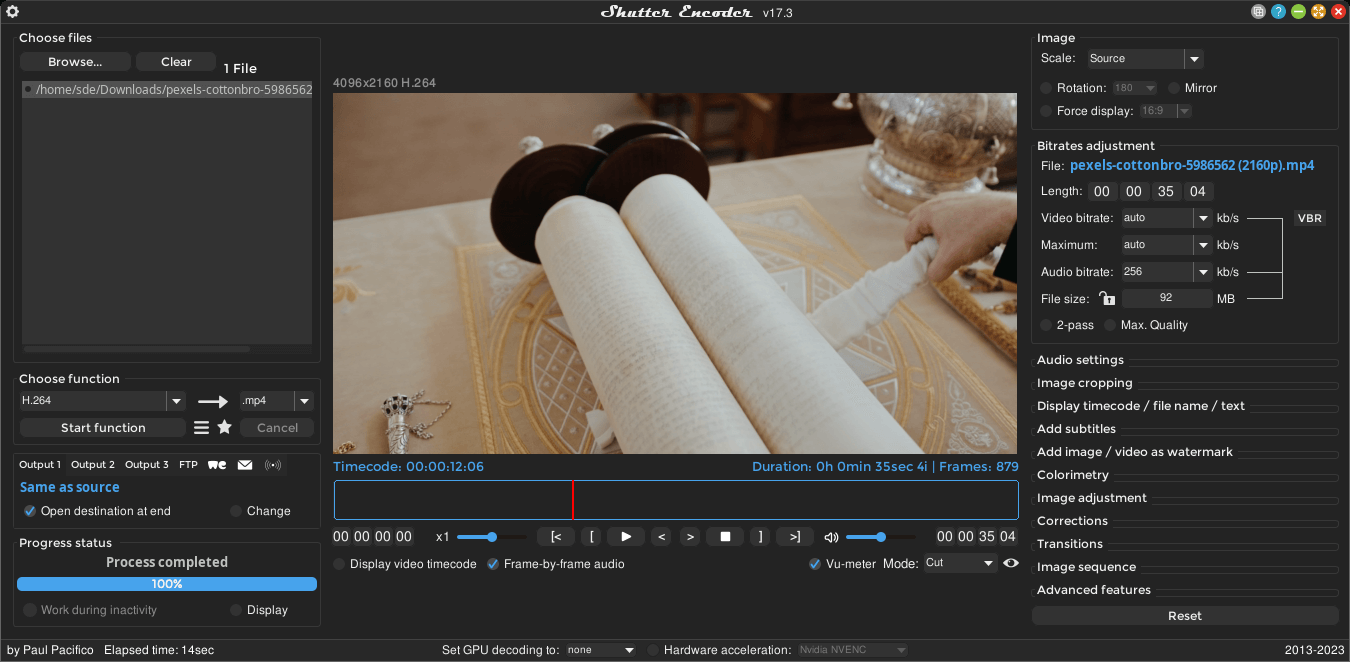
Shutter Encoder is a frontend for FFmpeg.
It has been designed by video editors in order to be as accessible and efficient as possible.
This is free and open source software.
Key Features
- Access to powerful FFmpeg capabilities like duplicate frame detection, framerate interpolation, analytical tools, and deinterlacing with a number of filters available.
- Edit media content – trim and cut videos.
- Powerful image adjustment tab, allowing you to adjust colours, apply LUTs, and convert color spaces right in the application. This feature also supports raw image formats like .nef, .cr2 but also .psd, .pdf, .png, .jpg and more.
- Support for cropping.
- Generate and burn-in clip information.
- Subtitle embedding and burn-in.
- Add logos and watermarks.
- Built-in subtitle editor.
- Automatic cut detection. Create an .edl file to import on most major non-linear editing package to produce an editable sequence.
- Download video directly at the highest possible quality from popular video streaming sites.
- Built-in WeTransfer and FTP server support.
- Cross-platform support – runs under Linux, macOS, and Windows.
Website: www.shutterencoder.com
Support: GitHub Code Repository
Developer: Paul Pacifico
License: GNU General Public License v3.0
Shutter Encoder is written in Java. Learn Java with our recommended free books and free tutorials.
Related Software
| Video Converters | |
|---|---|
| HandBrake | Multithreaded cross-platform media transcoding application |
| FFmpeg | Multimedia player, server and encoder |
| Shutter Encoder | Graphical frontend to FFmpeg with editing features |
| FastFlix | GUI for H.264, HEVC and AV1 hardware and software encoding |
| Videomass | Cross-platform GUI for FFmpeg and youtube-dl |
| avconv | Part of libav-tools; fork of FFmpeg |
| VLC | Vdeo player which also converts multimedia to different formats |
| mpv | Cross-platform media player with video encoding support |
| MEncoder | MEncoder is included in MPlayer |
| FFQueue | Graphical frontend to FFmpeg written in C++ |
| Edconv | User-friendly FFmpeg GUI |
| transcode | Utility to encode raw video/audio streams |
| OmniGet | Uses FFmpeg to perform the video conversion |
| MystiQ | GUI for FFmpeg, a powerful media converter |
| Frame | Desktop media conversion utility |
| ffdash | VP9 video encoder |
| Constrict | Compress videos to target sizes |
| Leonardo | Media conversion application |
| Ciano | Easy way to convert your multimedia files to the most popular formats |
| Recoder | GTK4 video transcoding application |
| VidCom | Simple utility for video archiving and compression |
Read our verdict in the software roundup.
 Explore our comprehensive directory of recommended free and open source software. Our carefully curated collection spans every major software category. Explore our comprehensive directory of recommended free and open source software. Our carefully curated collection spans every major software category.This directory is part of our ongoing series of informative articles for Linux enthusiasts. It features hundreds of detailed reviews, along with open source alternatives to proprietary solutions from major corporations such as Google, Microsoft, Apple, Adobe, IBM, Cisco, Oracle, and Autodesk. You’ll also find interesting projects to try, hardware coverage, free programming books and tutorials, and much more. Discovered a useful open source Linux program that we haven’t covered yet? Let us know by completing this form. |
Please read our Comment Policy before commenting.