

SparkPlayer is a terminal-based media player for local music and video collections. It combines filesystem browsing, playlist management, album artwork, video playback and colourful audio visualisers in a keyboard-driven interface.
This is free and open source software.
Installation
SparkPlayer is straightforward to build. First, clone the project’s GitHub repository.
$ git clone https://github.com/dividebysandwich/sparkplayer.git
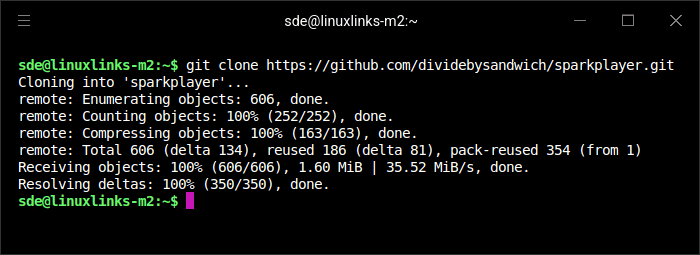
Change into the newly created directory.
$ cd sparkplayer
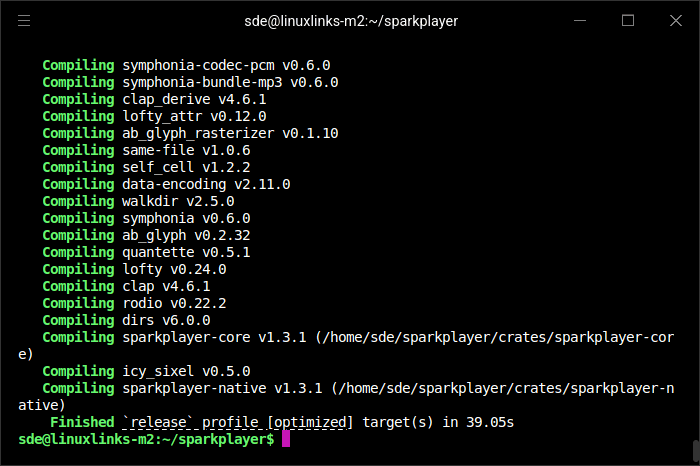
Build the source code.
$ cargo build --release
In Operation
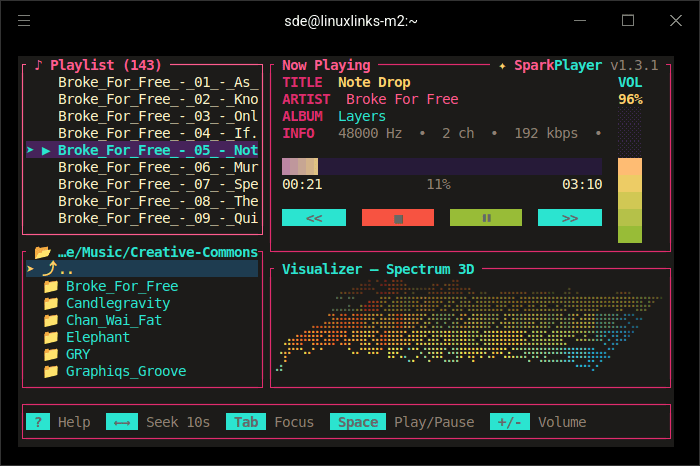
I constrained the terminal size so that the screenshot fits well on LinuxLinks, but this omits some of the buttons and keyboard shortcuts. For most of my testing, I switched to Kitty, as Hyper struggled with the application. The following screenshot shows album artwork and a different visualiser.
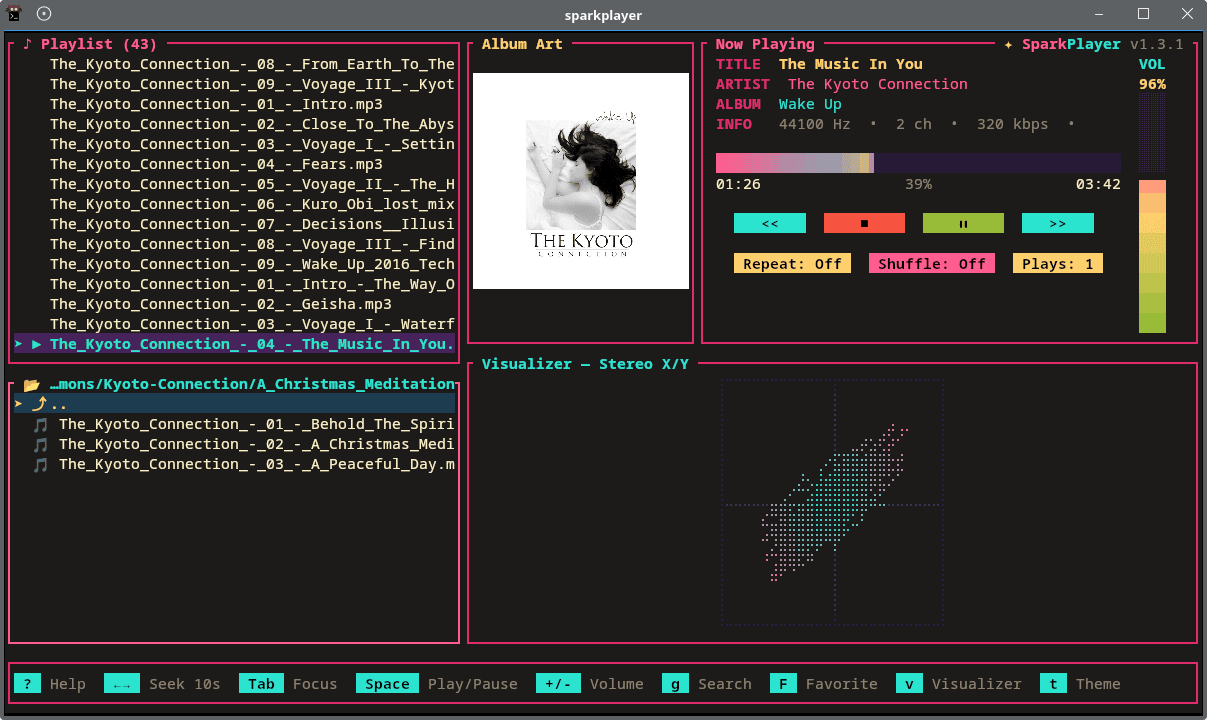
The player supports common audio, video and playlist formats. Terminals implementing the Kitty, Sixel or iTerm2 graphics protocols can display artwork and video as images, while other terminals use a 24-bit colour half-block fallback.
The code waits until the current player reports that it is empty and then calls next_track(). Loading the next track stops the existing player, creates a new one, opens and decodes the next file, and then starts playback. This process introduces a short gap between tracks. If gapless playback is important to you, you will probably want to choose a different media player. Gapless playback would be a welcome addition.
Key Features
- Plays MP3, WAV, Ogg Vorbis, FLAC, M4A, AAC, Opus and WMA audio files.
- Supports MP4, MKV, AVI, MOV, WebM and M4V video files.
- Loads M3U, M3U8 and PLS playlists.
- Provides integrated filesystem browsing and playlist management.
- Displays artwork embedded in audio tags or stored as image files alongside the music.
- Offers video playback with seeking, pausing and full-screen viewing.
- Supports multiple audio and subtitle tracks in video files.
- Provides adjustable audio and video synchronisation.
- Includes 13 audio visualisers, including spectrum, waveform, spectrogram, VU meter, plasma and cassette displays. SparkPlayer has no “Off” visualiser mode; pressing
vonly cycles through the 13 visualiser types. - Includes 41 colour themes: Default Neon, Matrix, Amber CRT, Deep Ocean, Monochrome, Apprentice, Ayu Dark, Catppuccin Mocha, Cobalt2, Deus, Dracula, Everforest Dark, GitHub Dark, Gotham, Gruvbox Dark, Iceberg Dark, Jellybeans, Kanagawa Wave, Lucario, Miasma, Moonfly, Night Owl, Nightfly, Nightfox, Noctis, Nord, Nordic, One Dark, One Half Dark, Panda, Posterpole, Rosé Pine, Seoul256 Dark, Shades of Purple, Solarized Dark, Sonokai, Srcery, Tender, Tokyo Night, Tomorrow Night and Zenbones Zenwritten Dark.
- Filters long file and playlist listings using text searches.
- Restores the previous directory, playlist, track position and playback modes between sessions.
- Supports repeat, shuffle, volume control and keyboard-driven navigation.
- Renders images using the Kitty, Sixel and iTerm2 graphics protocols.
- Falls back to 24-bit colour half-block graphics on other terminals.
- Offers a browser-based WebAssembly version.
Summary
SparkPlayer is a polished terminal media player, particularly for people who value presentation and visual effects.
Its strengths include unusually broad format support, integrated file browsing, playlist handling, album artwork, video playback, subtitles, multiple audio tracks, session restoration, extensive keyboard control, numerous visualisers and a large selection of themes. This is a strong feature set for a relatively lightweight terminal application. Mouse support is also good.
However, I would not call it a great music player yet. The lack of gapless playback is a significant weakness for albums whose tracks flow into one another. The inability to disable the visualiser also makes the interface less flexible than it should be. Its playlist-first, folder-based design is useful, but it lacks the deeper library management and audio-focused options found in more mature players.
Video playback is an interesting addition, but its current implementation is far from ideal. Playback using Kitty’s native image protocol is not smooth, leaving the feature with more novelty value than practical usefulness.
ps_mem reports memory usage of around 29 MB. That’s frugal!
Website: github.com/dividebysandwich/sparkplayer
Support:
Developer: dividebysandwich
License: GNU General Public License v2.0
SparkPlayer is written in Rust. Learn Rust with our recommended free books and free tutorials.
Related Software
| Terminal-Based Music Players | |
|---|---|
| musikcube | Sublime audio engine, library, player and server written in C++ |
| tap | The lightest music player with gapless playback |
| Tizonia | Powerful cloud music player based on OpenMAX IL 1.2 written in C and C++ |
| cmus | Great set of features including the essential gapless playback |
| CLIAMP | Winamp-inspired retro player bursting with nostalgic character |
| termusic | Music Player TUI written in Rust |
| kew | Music player written in C |
| Trix | Straightforward Linux player with a clean design and low overhead |
| koan | Purist audio player created for focused, high-fidelity listening |
| NoctaVox | Atmospheric local library player with fluid, intuitive navigation |
| spectrum | Simple and intuitive music player for tech enthusiasts |
| ncmpc | Frugal Music Player Daemon client |
| ncmpy | Music Player Daemon client |
| MOC | Designed to be powerful and easy to use |
| RMuP | Simple music player lacking gapless playback |
| Siren | Extremely frugal with system resources |
| grump | CLI audio player written in Go |
| SparkPlayer | Eye-catching media player blending rich visuals with easy playback |
| Gomu | Another Go music player |
| BM | Distraction-free player with crisp controls and a deliberately sparse UI |
| mpvc | mpc-like control interface for mpv |
| mplay | No-fuss command-line player for launching tracks in an instant |
| MECOMP | Ambitious library player with flexible playback and organisation |
| tmuzika | Lean, responsive player for browsing albums and queuing tracks |
| RustPlayer | Audio and radio player written in Rust |
| namp | Keyboard-led audio player with playlists and vivid visual effects |
| daph | Sleek text-based player built for speed and effortless control |
Read our verdict in the software roundup.
 Explore our carefully curated directory of recommended free and open source software, covering every major software category. Explore our carefully curated directory of recommended free and open source software, covering every major software category.The directory forms part of our extensive collection of articles for Linux enthusiasts. It includes hundreds of detailed reviews, together with free and open source alternatives to proprietary software from companies such as Google, Microsoft, Apple, Adobe, IBM, Cisco, Oracle, and Autodesk. LinuxLinks also covers interesting projects worth exploring, Linux-compatible hardware, free programming books and tutorials, and much more. Know a useful free and open source Linux application that we haven’t covered? Tell us about it using our submission form. |
Please read our Comment Policy before commenting.
I love how little RAM it uses. Not everyone even has 8GB RAM machines.
My laptop has only 4GB of RAM. It’s enough for my needs. So software like this really makes sense for me. I don’t need a GUI music player that uses 200MB RAM. I just wish more developers tried to reduce memory usage.