

In Operation
There are a wide range of features available with this open source software.
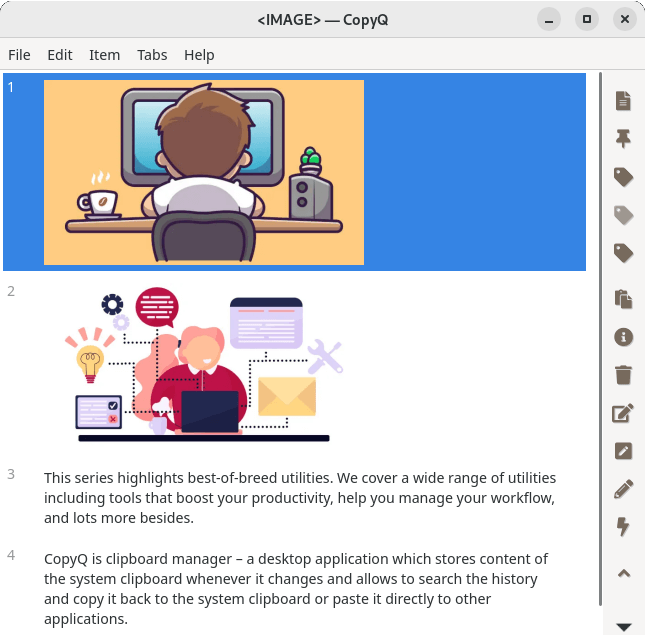
The right-hand section of the interface hosts a convenient toolbar which provides: New item, Pin, Tag as Important, Remove Tag “Important”, Add a Tag, Activate Items, Show Content, Remove, Edit, Edit Notes, Edit with Editor, and Action.
Here’s an image of CopyQ in action.
What does CopyQ offer:
- Store text, HTML, images, and any other custom formats. In the image to the right the clipboard is showing a couple of images as well as some text, easily accessible via CopyQ.
- Quickly browse and filter items in clipboard history.
- Sort, create, edit, remove, copy/paste, drag’n’drop items in tabs.
- Add notes and tags to items.
- System-wide keyboard shortcuts with customizable commands.
- Paste items with keyboard shortcuts, from tray, or from main window.
- Fully customizable appearance.
- Advanced command-line interface and scripting.
- Ignore clipboard copied from specified windows or containing specified text.
- Support for simple Vim-like editor with keyboard shortcuts. There’s Vi style navigation.
Pages in this article:
Page 1 – Introduction / Installation
Page 2 – In Operation
Page 3 – Summary
Complete list of articles in this series:
| Excellent Utilities | |
|---|---|
| AES Crypt | Encrypt files using the Advanced Encryption Standard |
| Ananicy | Shell daemon created to manage processes’ IO and CPU priorities |
| broot | Next gen tree explorer and customizable launcher |
| Cerebro | Fast application launcher |
| cheat.sh | Community driven unified cheat sheet |
| CopyQ | Advanced clipboard manager |
| croc | Securely transfer files and folders from the command-line |
| Deskreen | Live streaming your desktop to a web browser |
| duf | Disk usage utility with more polished presentation than the classic df |
| eza | A turbo-charged alternative to the venerable ls command |
| Extension Manager | Browse, install and manage GNOME Shell Extensions |
| fd | Wonderful alternative to the venerable find |
| fkill | Kill processes quick and easy |
| fontpreview | Quickly search and preview fonts |
| horcrux | File splitter with encryption and redundancy |
| Kooha | Simple screen recorder |
| KOReader | Document viewer for a wide variety of file formats |
| Imagine | A simple yet effective image optimization tool |
| LanguageTool | Style and grammar checker for 30+ languages |
| Liquid Prompt | Adaptive prompt for Bash & Zsh |
| lnav | Advanced log file viewer for the small-scale; great for troubleshooting |
| lsd | Like exa, lsd is a turbo-charged alternative to ls |
| Mark Text | Simple and elegant Markdown editor |
| McFly | Navigate through your bash shell history |
| mdless | Formatted and highlighted view of Markdown files |
| navi | Interactive cheatsheet tool |
| noti | Monitors a command or process and triggers a notification |
| Nushell | Flexible cross-platform shell with a modern feel |
| nvitop | GPU process management for NVIDIA graphics cards |
| OCRmyPDF | Add OCR text layer to scanned PDFs |
| Oh My Zsh | Framework to manage your Zsh configuration |
| Paperwork | Designed to simplify the management of your paperwork |
| pastel | Generate, analyze, convert and manipulate colors |
| PDF Mix Tool | Perform common editing operations on PDF files |
| peco | Simple interactive filtering tool that's remarkably useful |
| ripgrep | Recursively search directories for a regex pattern |
| Rnote | Sketch and take handwritten notes |
| scrcpy | Display and control Android devices |
| Sticky | Simulates the traditional “sticky note” style stationery on your desktop |
| tldr | Simplified and community-driven man pages |
| tmux | A terminal multiplexer that offers a massive boost to your workflow |
| Tusk | An unofficial Evernote client with bags of potential |
| Ulauncher | Sublime application launcher |
| Watson | Track the time spent on projects |
| Whoogle Search | Self-hosted and privacy-focused metasearch engine |
| Zellij | Terminal workspace with batteries included |