

Do you find your Linux desktop background rather mundane but have problems in finding attractive wallpapers?
That’s where automatic wallpaper changes can help. And many wallpaper tools access online sources which make it easy to liven up your desktop. They can find and download awesome wallpapers and change them periodically. Some wallpaper tools even support live wallpapers.
Here’s our verdict captured in a legendary LinuxLinks-style ratings chart. All of the tools are free and open source goodness.
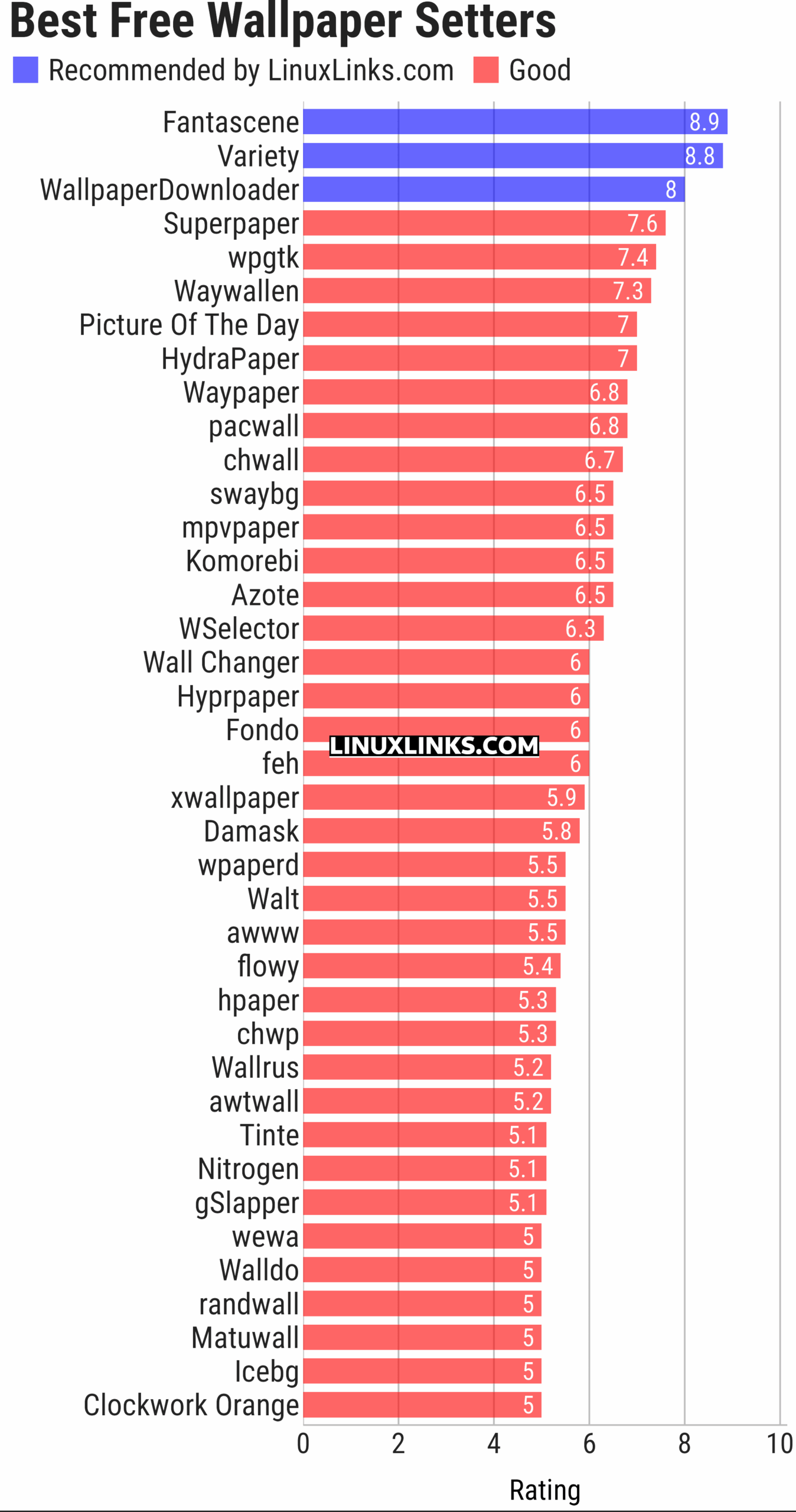
Note some of the software is multi-purpose. For example, feh is primarily an image viewer. While feh is an excellent image viewer, we don’t rate it so highly from a wallpaper setter perspective. The ratings presented in the chart reflect our assessment of each program purely from a wallpaper perspective.
Let’s explore the 39 wallpaper tools at hand. For each title we have compiled its own portal page, providing a screenshot of the software in action, a full description with an in-depth analysis of its features, together with links to relevant resources.
| Wallpaper Setters | |
|---|---|
| Fantascene | Play video wallpapers on your background |
| Variety | Highly configurable utility that offers a great range of features |
| WallpaperDownloader | Download, change, manage wallpapers with this Java tool |
| Superpaper | Advanced multi monitor wallpaper manager |
| wpgtk | Colorscheme, wallpaper and template manager |
| Waywallen | Dynamic wallpaper manager for Wayland desktop environments |
| Picture Of The Day | Grabs a picture of the day from a variety of sources |
| HydraPaper | Gtk utility to set different backgrounds for each monitor on GNOME |
| Waypaper | Lightweight graphical wallpaper manager |
| pacwall | Live wallpaper showing dependency graph and installed packages |
| chwall | Tiny automatic wallpaper changer |
| swaybg | Wallpaper utility for Wayland compositors |
| mpvpaper | Video wallpaper software |
| Komorebi | Fully customisable image, video, and web page wallpapers |
| Azote | GTK+3 based picture browser and background setter |
| WSelector | Wallpaper selector manager |
| Wall Changer | Automatic wallpaper changer |
| Hyprpaper | Wallpaper utility designed for Hyprland |
| Fondo | Quickly find beautiful wallpapers from Unsplash |
| feh | Mode-based image viewer and cataloger aimed at console users |
| xwallpaper | Wallpaper setting utility |
| Damask | Automatically set wallpaper images |
| wpaperd | Lightweight wallpaper daemon with automatic image rotation |
| Walt | Wallpaper manager for Hyprland |
| awww | Wallpaper daemon for Wayland |
| flowy | Lean privacy-preserving dynamic wallpaper changer |
| hpaper | Advanced wallpaper management for Wayland |
| chwp | Changes the wallpaper from the command line |
| Wallrus | Generate colorful abstract wallpapers |
| awtwall | Fast TUI wallpaper picker for Wayland |
| Tinte | Wallpaper utility and theme generator |
| Nitrogen | Background browser and setter |
| gSlapper | Wallpaper utility for Wayland |
| wewa | Renders web content as desktop wallpaper |
| Walldo | Simple graphical wallpaper changer for Linux desktops |
| randwall | Randomly changes the desktop wallpaper |
| Matuwall | Fast graphical wallpaper picker for Wayland desktops |
| Icebg | Lightweight wallpaper setter for Wayland compositors |
| Clockwork Orange | Manage wallpapers and lock screen backgrounds |
This article has been updated to reflect the changes outlined in our recent announcement.
 Explore our carefully curated directory of recommended free and open source software, covering every major software category. Explore our carefully curated directory of recommended free and open source software, covering every major software category.The directory forms part of our extensive collection of articles for Linux enthusiasts. It includes hundreds of detailed reviews, together with free and open source alternatives to proprietary software from companies such as Google, Microsoft, Apple, Adobe, IBM, Cisco, Oracle, and Autodesk. LinuxLinks also covers interesting projects worth exploring, Linux-compatible hardware, free programming books and tutorials, and much more. Know a useful free and open source Linux application that we haven’t covered? Tell us about it using our submission form. |
Please read our Comment Policy before commenting.