
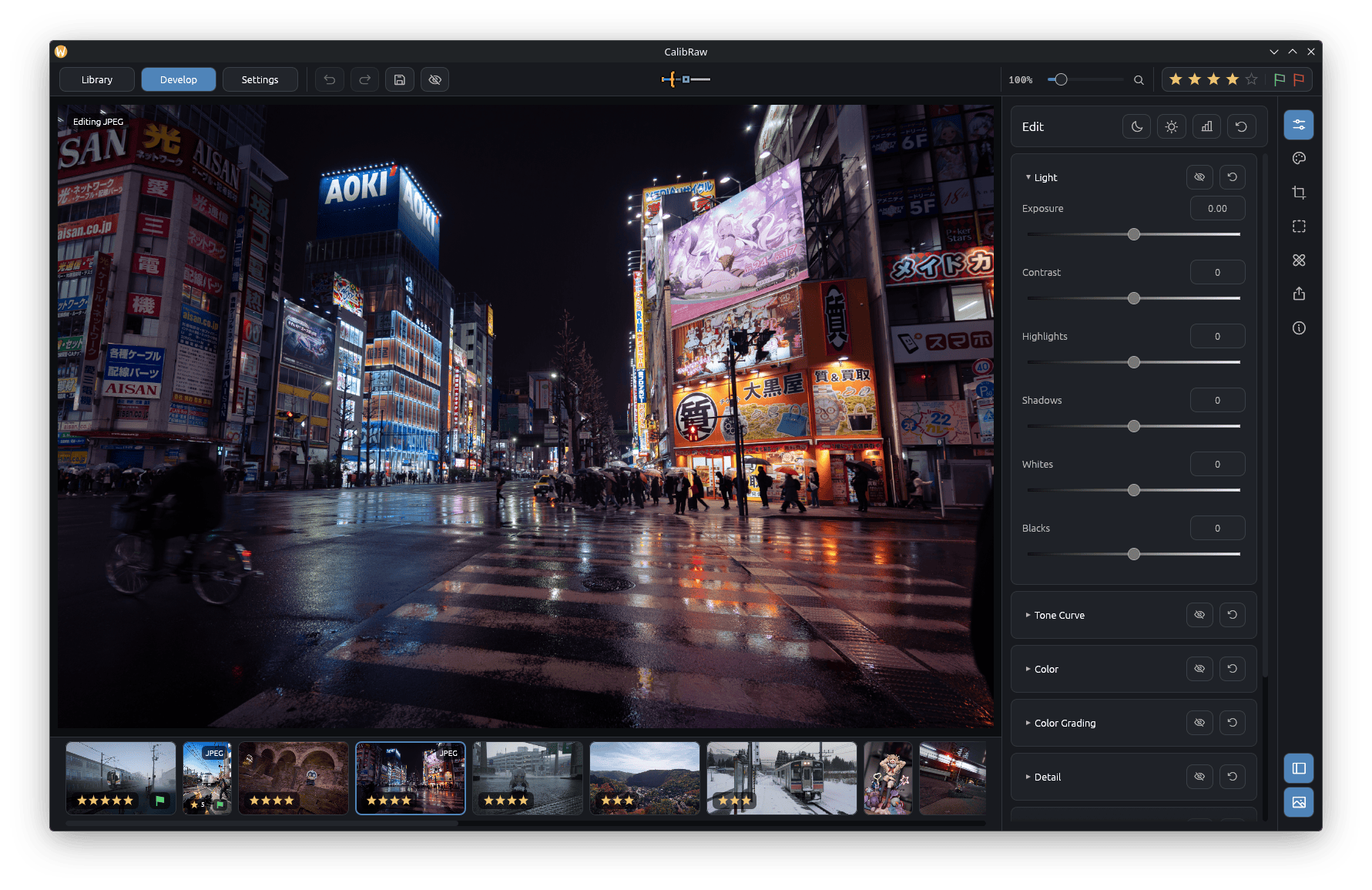
CalibRaw is a GPU-accelerated RAW photo editor designed for photographers who want a non-destructive workflow. It provides tools for adjusting exposure, colour, tone, detail and lens characteristics while preserving the original image files.
The application uses a Rust-based processing engine with GPU compute shaders. It supports numerous camera RAW formats through LibRaw and Rawler, alongside conventional image formats including JPEG, PNG, HEIC and TIFF. Adjustments are saved in sidecar files, allowing photographs to be revisited and edited without altering the originals.
CalibRaw combines traditional photographic adjustments with local AI-powered masking, noise reduction and object removal. It also offers HDR merging, focus stacking, creative effects and tools for organising photo collections. AI processing takes place locally, with models downloaded only after user consent.
This is free and open source software.
Key Features
- GPU-accelerated RAW processing using wgpu and WGSL compute shaders.
- Non-destructive editing with adjustments stored in JSON sidecar files.
- Support numerous camera RAW formats using LibRaw and Rawler.
- Edit JPEG, PNG, HEIC and TIFF images.
- Adjust exposure, contrast, white balance, tone curves and colour grading.
- Eight-band colour mixer and three-way colour grading controls.
- Sigmoid tone mapping and highlight recovery.
- Automatic lens corrections for distortion, chromatic aberration and vignetting.
- Brush, linear gradient, radial gradient and shape masks for selective adjustments.
- Locally processed AI masks for subjects, skies, depth and selected objects.
- AI-powered noise reduction and object removal.
- Clone and heal tools for retouching photographs.
- Merge bracketed RAW exposures into HDR images.
- Focus stacking to combine photographs captured at different focus distances.
- Creative effects including glow, halation, grain, vignette, fog, relighting and selective blur.
- Organise photo collections using ratings, flags and sorting options.
- Create, save and share editing presets.
- Export edited photographs, including lossless JPEG XL output.
- Export MP4 videos replaying the editing process.
- Command-line batch rendering of photographs.
- Cross-platform support – runs on Linux, macOS, Windows and Android.
Website: github.com/Duecki1/CalibRaw
Support:
Developer: Duecki and contributors
License: GNU General Public License v3.0
CalibRaw is written in Rust. Learn Rust with our recommended free books and free tutorials.
Related Software
| RAW Processing Tools | |
|---|---|
| Darktable | Virtual lighttable and darkroom for photographers |
| digiKam | Professional photo management |
| RawTherapee | RAW image processing application |
| LightZone | Professional-level digital darkroom software |
| ART | Fork of RawTherapee |
| ansel | Fork of Darktable |
| RapidRAW | Non-destructive, and GPU-accelerated RAW image editor |
| Filmulator | RAW photo editing application with library management |
| RAWmakase | Develop RAW photographs non-destructively with Vulkan acceleration |
| vkdt | Workflow toolbox for raw stills and video |
| fotocx | Edit, retouch and enhance images while managing large photo collections |
| DNGLab | Camera RAW utility and DNG converter |
| GTKRawGallery | Workflow oriented photo retouching software |
| rawbit | Camera RAW image preprocessor and importer |
| FerrumPix | Organise photo libraries, develop RAW files and edit images with layers |
Read our verdict in the software roundup.
 Explore our carefully curated directory of recommended free and open source software, covering every major software category. Explore our carefully curated directory of recommended free and open source software, covering every major software category.The directory forms part of our extensive collection of articles for Linux enthusiasts. It includes hundreds of detailed reviews, together with free and open source alternatives to proprietary software from companies such as Google, Microsoft, Apple, Adobe, IBM, Cisco, Oracle, and Autodesk. LinuxLinks also covers interesting projects worth exploring, Linux-compatible hardware, free programming books and tutorials, and much more. Know a useful free and open source Linux application that we haven’t covered? Tell us about it using our submission form. |
Please read our Comment Policy before commenting.