
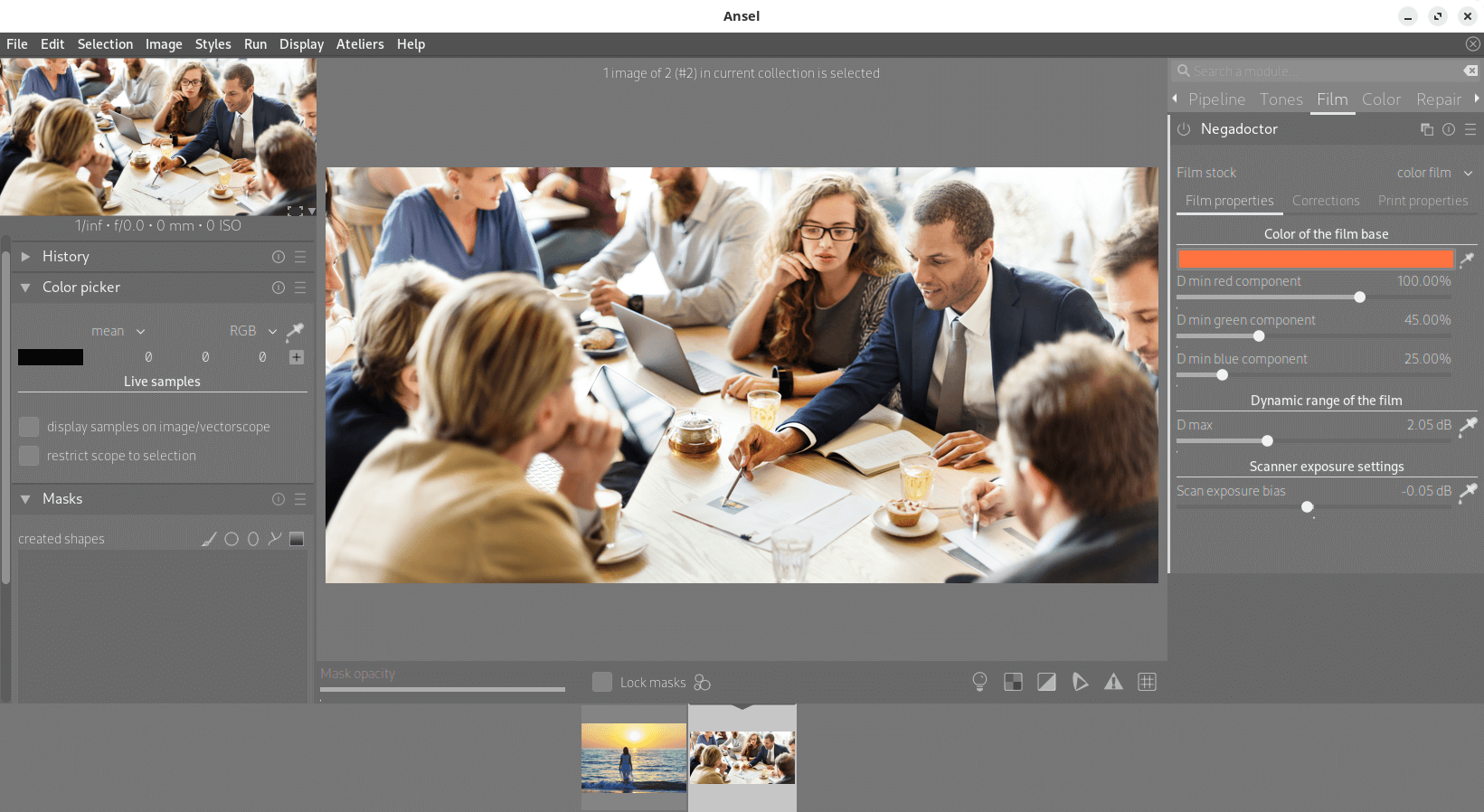
Ansel is a photography workflow and RAW development application aimed at photographers who want precise control over the interpretation of their images. It started from darktable but has substantially reworked major parts of the original codebase.
The project places particular emphasis on scene-referred colour processing, independent colour and luminance controls and a streamlined workflow. Its import system, lighttable, keyboard shortcut system, editing history handling and pipeline cache have all received major redesigns.
Ansel currently follows a rolling development model rather than publishing conventional stable releases. Editing histories are written to disk as changes are made, and compatibility is retained with editing histories created by older darktable releases up to the point from which Ansel was forked.
This is free and open source software.
Key Features
- Colour calibration with chromatic adaptation and support for Color Checker based calibration.
- Colour grading controls using RGB, Ych and HSB representations.
- Colour matching can reproduce a reference colour or match an object sampled from another image.
- Hue, chroma and lightness qualifiers combine with drawn and parametric masks for selective editing.
- HDR tone mapping compresses dynamic range while preserving colour relationships.
- Zone-system editing adjusts exposure ranges while preserving local contrast.
- Image reconstruction tools include lens deblurring, dehazing, denoising and highlight reconstruction.
- Automatic perspective correction detects image geometry and calculates corrective transformations.
- Lighttable filtering combines ratings, colour labels, text searches and other collection criteria.
- Global action search provides searchable access to application commands and keyboard shortcuts.
Website: github.com/aurelienpierreeng/ansel
Support:
Developer: Aurélien Pierre
License: GNU General Public License v3.0
Ansel is written in C. Learn C with our recommended free books and free tutorials.
Related Software
| RAW Processing Tools | |
|---|---|
| Darktable | Virtual lighttable and darkroom for photographers |
| digiKam | Professional photo management |
| RawTherapee | RAW image processing application |
| LightZone | Professional-level digital darkroom software |
| ART | Fork of RawTherapee |
| ansel | Fork of Darktable |
| RapidRAW | Non-destructive, and GPU-accelerated RAW image editor |
| Filmulator | RAW photo editing application with library management |
| RAWmakase | Develop RAW photographs non-destructively with Vulkan acceleration |
| vkdt | Workflow toolbox for raw stills and video |
| fotocx | Edit, retouch and enhance images while managing large photo collections |
| DNGLab | Camera RAW utility and DNG converter |
| GTKRawGallery | Workflow oriented photo retouching software |
| rawbit | Camera RAW image preprocessor and importer |
| FerrumPix | Organise photo libraries, develop RAW files and edit images with layers |
Read our verdict in the software roundup.
 LinuxLinks helps you discover the best free and open source software for Linux. Explore our extensive collection of recommended applications, including alternatives to popular proprietary software. LinuxLinks helps you discover the best free and open source software for Linux. Explore our extensive collection of recommended applications, including alternatives to popular proprietary software.We also publish software reviews, Linux tutorials, hardware reviews, free programming books and articles covering the wider open source community. Browse our Linux resources to discover more. Know a useful free and open source Linux application we haven't covered? Suggest a program for inclusion. Has your software been featured on LinuxLinks? Display one of our Featured on LinuxLinks badges on your website or GitHub README. |
Please read our Comment Policy before commenting.
Ansel is a stripped-down version of darktable, started from the disagreements between Aurélien Pierre, a darktable developper, and the rest of the darktable team (I hope I am not dumbing down too much the situation). I used the then-called Art&Darktable and later renamed Ansel for about a year or a bit more. The program has less lines of code, is supposed to be more efficient and has a “less is more” approach. I recently swiched back to darktable because I missed a few specific stuff that had been removed in Ansel and also because I love to be able to switch between the two tonal range map tools “filmic” and “Sigmoid” (Ansel has only “Filmic”). People may want to try both before setting on one or the other. Darktable is more popular though, and to be honest I didn’t notice on my PC real differences in performance between the two softwares. Whatever, these two softwares are the results of amazing work from the developpers, so thank you to the whole darktable team.
Thanks for explaining, if is “filmic” only then I’ll stay with darktable, as I didn’t get to understand how to work with filmic and use “scene” as a default.