

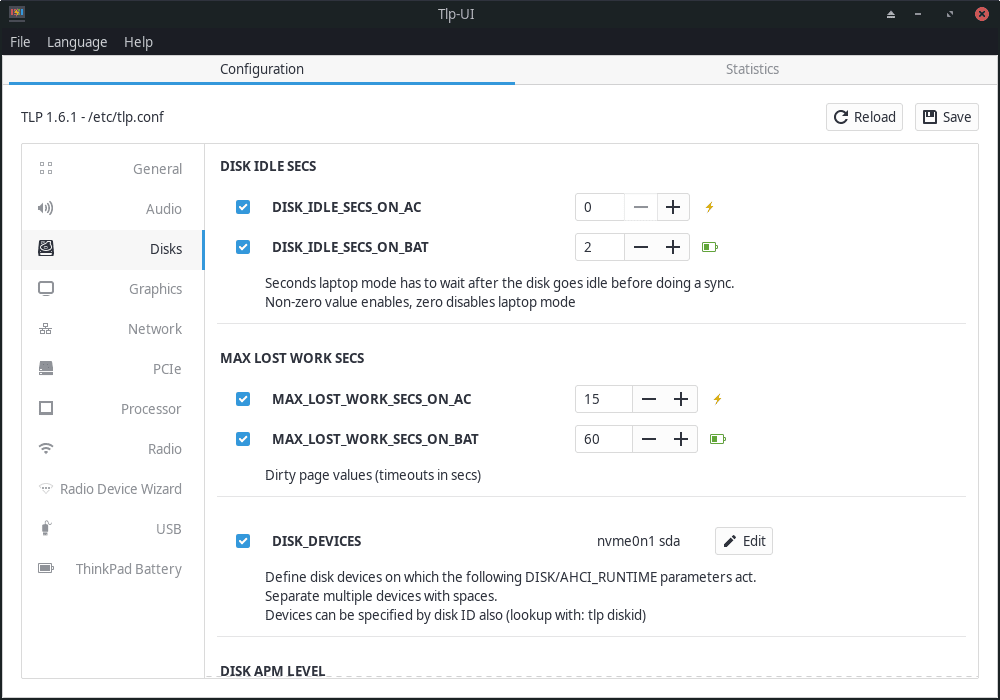
TLPUI is a GTK interface for configuring TLP. It provides a graphical alternative to editing TLP’s configuration files by hand and is intended to make the large number of available power-management settings easier to understand and change.
The application reads the active TLP configuration and presents recognised values through its interface. It also distinguishes between defaults, unsaved changes and values supplied by user or drop-in configuration, helping users see where a setting originates before they alter it. TLPUI remains a frontend to TLP rather than a separate power-management engine.
This is free and open source software.
Key Features
- Read and display TLP configuration through a GTK interface.
- Present valid configuration choices instead of requiring users to remember setting names and values.
- Highlight default values and unsaved changes.
- Show settings originating from user configuration and drop-in configuration files.
- Save changes to the main TLP configuration with ordinary or elevated permissions as required.
- Display tlp-stat information inside the application.
- Offer both a concise and a more complete view of TLP diagnostic information.
- Expose available platform-profile choices reported by the system.
- Use configuration schemas and descriptions to explain the settings presented in the interface.
- Help reduce the risk of malformed configuration by constraining entries to supported values where possible.
- Keep the graphical workflow closely tied to TLP’s underlying configuration model rather than hiding settings behind unrelated presets.
- Make it easier to review a large TLP configuration before committing changes that require administrative privileges.
- Run as a desktop configuration companion while TLP itself continues to perform the actual power-management work.
Website: github.com/d4nj1/TLPUI
Support:
Developer: Daniel Christophis
License: GNU General Public License v2.0
TLPUI is written in Python. Learn Python with our recommended free books and free tutorials.
Related Software
| Power Consumption Tools | |
|---|---|
| TLP | Power management package; features in Essential System Tools |
| auto-cpufreq | Automatic CPU speed and power optimizer |
| PowerTOP | Enable various powersaving modes |
| cpupower | Linux kernel tool |
| power-profiles-daemon | Makes power profiles handling available over D-Bus |
| cpupower-gui | Tool to set CPU frequency limits |
| batctl | Battery charge threshold manager for Linux laptops |
| TuneD | Daemon for monitoring and adaptive tuning of system devices |
| asusctl | Control aspects of ASUS laptops |
| system76-power | Utility for managing graphics and power profiles |
| jolt | Terminal-based battery and energy monitor |
| thermald | Thermal daemon for Intel Architecture |
| powerstat | Measures the power consumption of a laptop |
| LACT | Linux GPU Control Application |
| CPUFreq | System monitor and power manager |
| Wattage | Monitor the health and status of power devices |
| ddogreen | Smart power management tool |
Read our verdict in the software roundup.
 Explore our carefully curated directory of recommended free and open source software, covering every major software category. Explore our carefully curated directory of recommended free and open source software, covering every major software category.The directory forms part of our extensive collection of articles for Linux enthusiasts. It includes hundreds of detailed reviews, together with free and open source alternatives to proprietary software from companies such as Google, Microsoft, Apple, Adobe, IBM, Cisco, Oracle, and Autodesk. LinuxLinks also covers interesting projects worth exploring, Linux-compatible hardware, free programming books and tutorials, and much more. Know a useful free and open source Linux application that we haven’t covered? Tell us about it using our submission form. |
Please read our Comment Policy before commenting.