

auto-cpufreq is an automatic CPU and power optimizer for Linux which actively monitors laptop battery state, CPU usage, CPU temperature, and system load. It’s designed to improve battery life without making compromises.
auto-cpufreq aims to replace TLP in terms of functionality, so after you install auto-cpufreq it’s recommended to remove TLP. Using both for the same functionality (i.e., to set CPU frequencies) will lead to unwanted results.
This is free and open source software.
Key Features
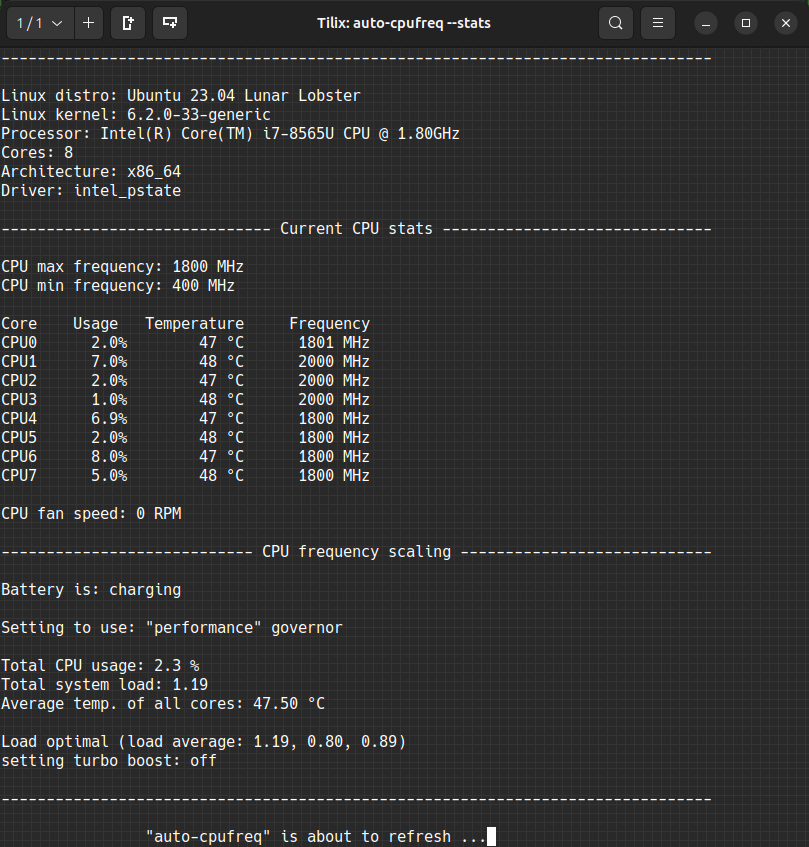
- Monitoring:
- Basic system information.
- CPU frequency (system total & per core).
- CPU usage (system total & per core).
- CPU temperature (total average & per core).
- Battery state.
- System load.
- CPU frequency scaling, governor, and turbo boost management based on:
- Battery state.
- CPU usage (total & per core).
- CPU temperature in combination with CPU utilization/load (to prevent overheating).
- System load.
- Automatic CPU & power optimization (temporary and persistent).
- Settings battery charging thresholds (limited support).
- Conservation mode and support for Lenovo-compatible laptops.
- Support for configuring/overriding “Energy Performance Preference (EPP).
- Battery charge thresholds limit.
- Ability to force use of powersave or performance governors.
Website: github.com/AdnanHodzic/auto-cpufreq
Support:
Developer: Adnan Hodzic and contributors
License: GNU Lesser General Public License v3.0
auto-cpufreq is written in Python. Learn Python with our recommended free books and free tutorials.
Related Software
| Power Consumption Tools | |
|---|---|
| TLP | Power management package; features in Essential System Tools |
| auto-cpufreq | Automatic CPU speed and power optimizer |
| PowerTOP | Enable various powersaving modes |
| cpupower | Linux kernel tool |
| power-profiles-daemon | Makes power profiles handling available over D-Bus |
| cpupower-gui | Tool to set CPU frequency limits |
| batctl | Battery charge threshold manager for Linux laptops |
| TuneD | Daemon for monitoring and adaptive tuning of system devices |
| asusctl | Control aspects of ASUS laptops |
| system76-power | Utility for managing graphics and power profiles |
| jolt | Terminal-based battery and energy monitor |
| thermald | Thermal daemon for Intel Architecture |
| powerstat | Measures the power consumption of a laptop |
| LACT | Linux GPU Control Application |
| CPUFreq | System monitor and power manager |
| Wattage | Monitor the health and status of power devices |
| ddogreen | Smart power management tool |
Read our verdict in the software roundup.
 Explore our comprehensive directory of recommended free and open source software. Our carefully curated collection spans every major software category. Explore our comprehensive directory of recommended free and open source software. Our carefully curated collection spans every major software category.This directory is part of our ongoing series of informative articles for Linux enthusiasts. It features hundreds of detailed reviews, along with open source alternatives to proprietary solutions from major corporations such as Google, Microsoft, Apple, Adobe, IBM, Cisco, Oracle, and Autodesk. You’ll also find interesting projects to try, hardware coverage, free programming books and tutorials, and much more. Discovered a useful open source Linux program that we haven’t covered yet? Let us know by completing this form. |
Please read our Comment Policy before commenting.