

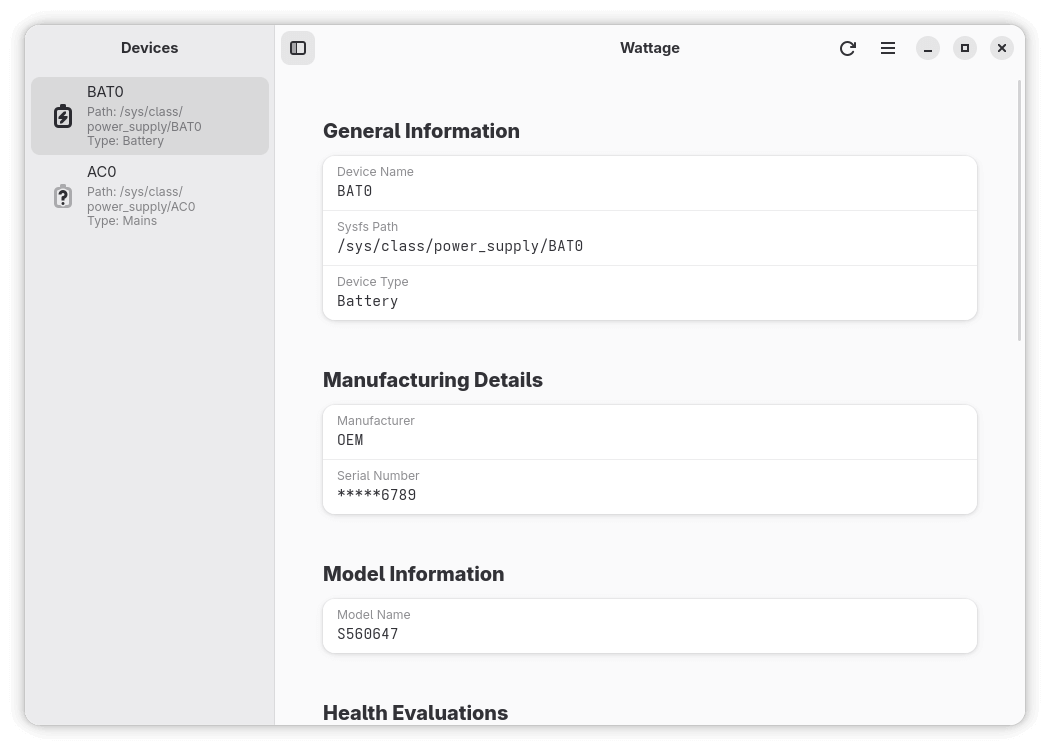
Wattage is a graphical application for inspecting the health and status of power devices connected to a Linux system. It presents battery and energy information through a GTK interface, keeping common status information together in an accessible form.
The application uses UPower over D-Bus to obtain device information. This provides a common interface for laptop batteries, AC supplies and other supported power devices rather than tying the application to a particular hardware interface.
Historical information can also be examined to see how battery and power measurements have changed over time.
This is free and open source software.
Key Features
- Display information reported by UPower for recognized power devices.
- Monitor laptop batteries and other supported battery-powered hardware.
- Show information about AC power sources.
- Recognize additional UPower devices such as supported headsets and styluses.
- Display battery capacity and current charging or discharging status.
- Show battery health information useful for assessing long-term degradation.
- Display voltage and available energy-related measurements.
- Show model and manufacturer information supplied for a device.
- Support systems containing multiple batteries or other power sources.
- Present battery history in a list for examining earlier readings.
- Provide a graphical history view for visualizing changes over time.
- Use D-Bus and UPower as its hardware abstraction layer.
- Use a GTK interface designed to integrate with Linux desktops.
- Provide application preferences for controlling its presentation and behaviour.
- Update displayed information as UPower reports changes in devices and their state.
Website: github.com/v81d/wattage
Support:
Developer: v81d
License: GNU General Public License v3.0
Wattage is written in Vala. Learn Vala with our recommended free books and free tutorials.
Related Software
| Power Consumption Tools | |
|---|---|
| TLP | Power management package; features in Essential System Tools |
| auto-cpufreq | Automatic CPU speed and power optimizer |
| RyzenAdj | Adjusts AMD Ryzen APU thermal, current and wattage limits |
| PowerTOP | Enable various powersaving modes |
| TLP UI | GTK interface to review and modify TLP configuration |
| cpupower | Linux kernel tool |
| power-profiles-daemon | Makes power profiles handling available over D-Bus |
| cpupower-gui | Tool to set CPU frequency limits |
| batctl | Battery charge threshold manager for Linux laptops |
| TuneD | Daemon for monitoring and adaptive tuning of system devices |
| asusctl | Control aspects of ASUS laptops |
| system76-power | Utility for managing graphics and power profiles |
| jolt | Terminal-based battery and energy monitor |
| thermald | Thermal daemon for Intel Architecture |
| powerstat | Measures the power consumption of a laptop |
| LACT | Linux GPU Control Application |
| pstate-frequency | Controls CPU frequencies, governors and turbo boost modes |
| Wattage | Monitor the health and status of power devices |
| Power Options | Graphical profiles for tuning CPU, GPU and device energy use |
| PowerDevil | Controls brightness, battery behaviour and sleep in KDE Plasma |
Read our verdict in the software roundup.
 LinuxLinks helps you discover the best free and open source software for Linux. Explore our extensive collection of recommended applications, including alternatives to popular proprietary software. LinuxLinks helps you discover the best free and open source software for Linux. Explore our extensive collection of recommended applications, including alternatives to popular proprietary software.We also publish software reviews, Linux tutorials, hardware reviews, free programming books and articles covering the wider open source community. Browse our Linux resources to discover more. Know a useful free and open source Linux application we haven't covered? Suggest a program for inclusion. Has your software been featured on LinuxLinks? Display one of our Featured on LinuxLinks badges on your website or GitHub README. |
Please read our Comment Policy before commenting.