

The desktop environment with its bundle of programs sharing a common graphical user interface (GUI) remains a firm favorite with users. Not surprising really given that a good desktop environment makes computing fun and simple. The graphical desktop environment has become so ingrained in almost everyone’s computer activities that it might seem the command line will wither away. Yet, there is still an important role to play for the humble command-line interface (CLI).
 The CLI provides a way of interacting with a computer program where the user (or client) issues commands to the program in the form of successive lines of text (command lines). This way, the user gains full control over the operating system. There are many advantages in using a CLI application. They are generally frugal in using system resources, they are fast in operation, offer great scripting opportunities, and can be extremely powerful and flexible. Typing commands into a terminal or the console may appear mundane, but with the right tools, the command line can be incredibly powerful.
The whole is greater than the sum of its parts is a very famous quote from Aristotle, a Greek philosopher and scientist. This quote is particularly pertinent to Linux. In my view, one of Linux’s biggest strengths is its synergy. The usefulness of Linux doesn’t derive only from the huge raft of open source (command line) utilities. Instead, it’s the synergy generated by using them together, sometimes in conjunction with larger applications.
The cd command is a command-line OS shell command used to change the current working directory. A directory is a logical section of a file system used to hold files. Directories may also contain other directories. The cd command can be used to change into a subdirectory, move back into the parent directory, move all the way back to the root directory or move to any given directory.
The purpose of this article is to identify some tiny but useful tools that complement the cd command. They help users to navigate faster around the filesystem, and increase productivity when using the shell. We feature 35 tools each with their own portal page, a full description with an in-depth analysis of its features, together with links to relevant resources.
We make the following recommendations. Only free and open source software is eligible for inclusion.
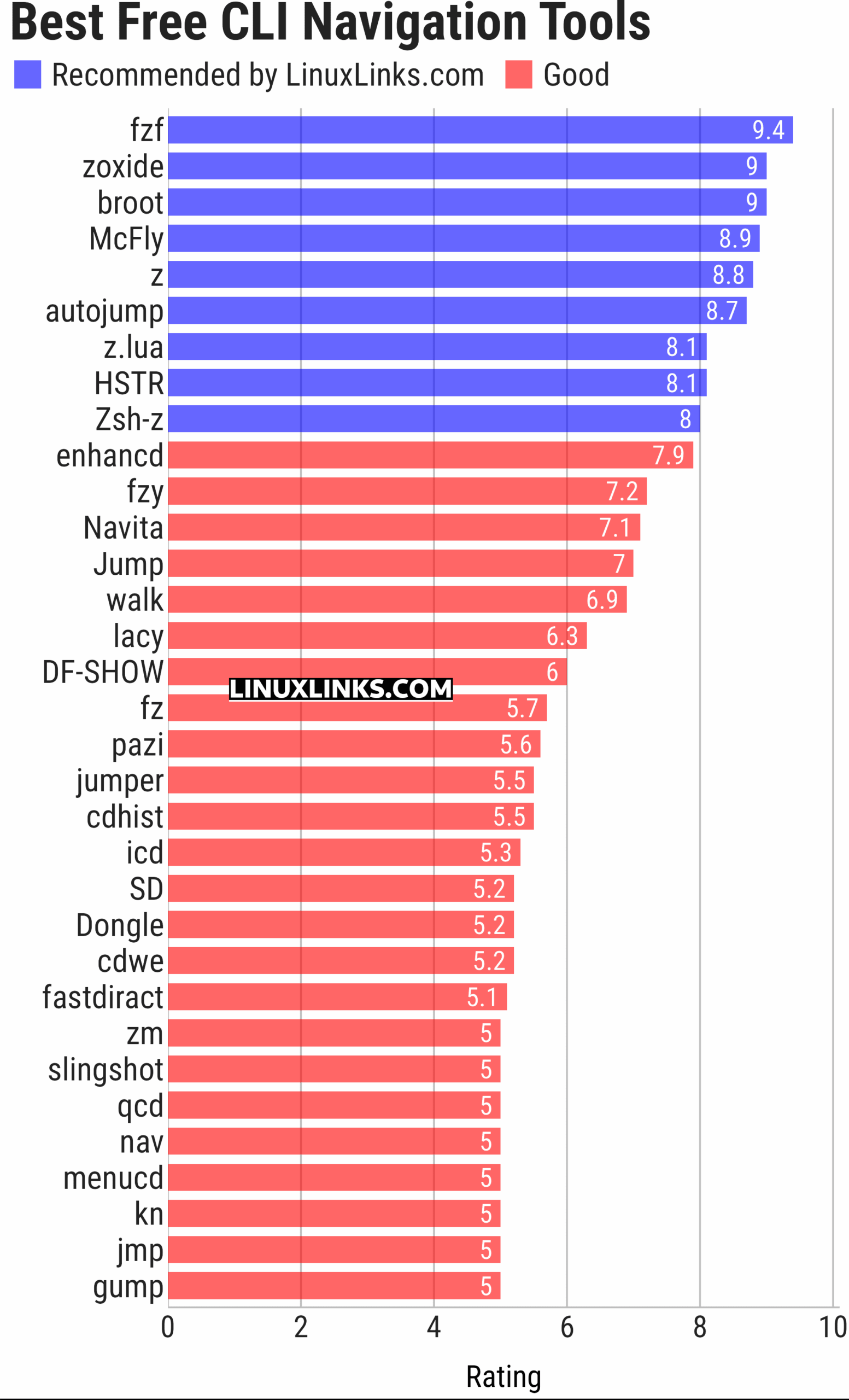
Learn more about each tool. Click the links in the table below to read our reviews, details of features and screenshots, together with other resources.
| Shell tools | |
|---|---|
| fzf | Command-line fuzzy finder for your shell |
| zoxide | Smarter cd command, inspired by z and autojump |
| broot | Reviewed under our Excellent Utilities series |
| McFly | Also reviewed under our Excellent Utilities series |
| z | Maintains a jump-list of the directories you actually use |
| autojump | Offers a fast way to navigate your filesystem |
| z.lua | Helps you navigate faster by learning your habits |
| HSTR | Bash and zsh shell history suggest box |
| Zsh-z | Fast directory jumping based on frecency |
| enhancd | Next-generation cd command |
| fzy | Simple, fast fuzzy finder for the terminal |
| Navita | Rapid directory traversal |
| Jump | Quick and fuzzy directory jumper |
| walk | Simple and minimalistic terminal navigator |
| lacy | cd alternative that makes navigating much more efficient |
| DF-SHOW | Directory File Show |
| fz | Adds fuzzy search to tab completion of z |
| pazi | Fast autojump helper |
| jumper | Files/directories jumper |
| cdhist | Linux shell cd history directory stack |
| icd | Shell utility that makes changing directories quicker and more convenient |
| SD | Dynamic directory navigation from the command line |
| Dongle | Move around deep directory trees |
| cdwe | cd with env vars |
| fastdiract | Quick shell navigation and command execution |
| zm | cd for lazy people |
| slingshot | Lightweight tool to browse files in the terminal |
| qcd | Quickly change directory |
| nav | Quickly navigate through directories |
| menucd | Directory browser and changer |
| kn | Navigate folders quickly |
| jmp | The superior cd |
| gump | Smarter cd command |
This article has been updated to reflect the changes outlined in our recent announcement.
All the CLI tools in this series.
| Alternatives to CLI tools |
|---|
| age // awk // bc // cal // cat // cd // chmod // cksum // cloc // cmp // compress // cp // cron // curl // cut // date // dd // df // diff // dig // du // fdisk // file // find // free // ftp // grep // gzip // hexdump // history // jq // kill // less // locate // ls // lsof // make // man // more // mv / ping // ps // psql // rename // rm // sed // split // ssh // stow // strings // sudo // sysctl // tail // talk // tar // telnet // time // top // touch // traceroute // tree // uname // uniq // uptime // vi // watch // Wget // who // whois // xargs |
 Explore our carefully curated directory of recommended free and open source software, covering every major software category. Explore our carefully curated directory of recommended free and open source software, covering every major software category.The directory forms part of our extensive collection of articles for Linux enthusiasts. It includes hundreds of detailed reviews, together with free and open source alternatives to proprietary software from companies such as Google, Microsoft, Apple, Adobe, IBM, Cisco, Oracle, and Autodesk. LinuxLinks also covers interesting projects worth exploring, Linux-compatible hardware, free programming books and tutorials, and much more. Know a useful free and open source Linux application that we haven’t covered? Tell us about it using our submission form. |
Please read our Comment Policy before commenting.
There’s cdwe, a cd wrapper.
I’m scheduled to complete an update of this roundup in the next week or so. cdwe will be added. Thanks for your suggestion Pierre!
the heck is cdwe??
Click the link to cdwe in the table above and you’ll see what it is.