

DF-SHOW (Directory File Show) is a Unix-like rewrite of some of the applications from Larry Kroeker’s DF-EDIT (Directory File Editor) for MS-DOS and PC-DOS systems, based on the Version 2.3d release from 1986.
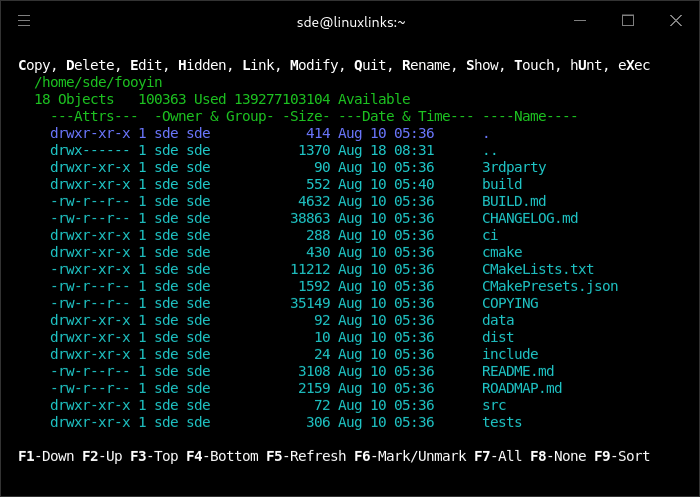
The show application lets users view the names of files and directories on a disk with information about the files. Files can be copied, moved, viewed, and edited (in your system’s default editor). The application is run using the show command. The output is similar to the ls command. A file view is also included which can be invoked using the sf command.
This is free and open source software.
Key Features
- List files. DF-SHOW’s primary function is to display a list of files on a system, in an interactive display allowing users’ to browse up and down large lists of files in a directory.
- View files. The ability to quickly peek into text files makes DF-SHOW a powerful tool for power users, this function uses the default pager defined in the user’s system environment or the included sf application.
- Edit files. Whilst DF-SHOW doesn’t come with a text editor like DF-EDIT (for the reason there are many good, well established text editors already available), it can launch the user’s default text editor for any given selected file.
- Copy files. DF-SHOW can copy files to another destination.
- Create links. Both Symbolic and Hard links can be created using DF-SHOW.
- Rename files. Users’ can move files to a different file name.
- Delete files. DF-SHOW also removes files at the user’s request.
- Create directories. Users’ are also able to create new directories from within the DF-SHOW interface.
- Touch files. Timestamps on files can be changed, as well as the creation of new blank files.
- Update permissions. Owners, groups, and permissions can be set within the application.
- SELinux security contexts can also be modified on supported systems.
- Hunt within files. Find files in a directory containing a string.
- Execute applications. Files with execution permissions can be launched from withing DF-SHOW.
Website: github.com/roberthawdon/dfshow
Support:
Developer: Robert Hawdon
License: GNU General Public License v3.0
DF-SHOW is written in C. Learn C with our recommended free books and free tutorials.
Related Software
| Shell tools | |
|---|---|
| fzf | Command-line fuzzy finder for your shell |
| zoxide | Smarter cd command, inspired by z and autojump |
| broot | Reviewed under our Excellent Utilities series |
| McFly | Also reviewed under our Excellent Utilities series |
| z | Maintains a jump-list of the directories you actually use |
| autojump | Offers a fast way to navigate your filesystem |
| z.lua | Helps you navigate faster by learning your habits |
| HSTR | Bash and zsh shell history suggest box |
| enhancd | Next-generation cd command |
| fzy | Simple, fast fuzzy finder for the terminal |
| Navita | Rapid directory traversal |
| Jump | Quick and fuzzy directory jumper |
| walk | Simple and minimalistic terminal navigator |
| lacy | cd alternative that makes navigating much more efficient |
| DF-SHOW | Directory File Show |
| fz | Adds fuzzy search to tab completion of z |
| v | z for vim |
| pazi | Fast autojump helper |
| jumper | Files/directories jumper |
| cdhist | Linux shell cd history directory stack |
| icd | Shell utility that makes changing directories quicker and more convenient |
| fasd | Command-line productivity booster. It seeks inspiration from autojump, z and v |
| kn | Navigate folders quickly |
| Dongle | Move around deep directory trees |
| cdwe | cd with env vars |
| slingshot | Lightweight tool to browse files in the terminal |
| ff | Manage favourite folders |
| fastdiract | Quick shell navigation and command execution |
| zm | cd for lazy people |
| qcd | Quickly change directory |
| pm | Switch between projects |
| nav | Quickly navigate through directories |
| menucd | Directory browser and changer |
| jmp | The superior cd |
| gump | Smarter cd command |
Read our verdict in the software roundup.
 Explore our carefully curated directory of recommended free and open source software, covering every major software category. Explore our carefully curated directory of recommended free and open source software, covering every major software category.The directory forms part of our extensive collection of articles for Linux enthusiasts. It includes hundreds of detailed reviews, together with free and open source alternatives to proprietary software from companies such as Google, Microsoft, Apple, Adobe, IBM, Cisco, Oracle, and Autodesk. LinuxLinks also covers interesting projects worth exploring, Linux-compatible hardware, free programming books and tutorials, and much more. Know a useful free and open source Linux application that we haven’t covered? Tell us about it using our submission form. |
Please read our Comment Policy before commenting.