

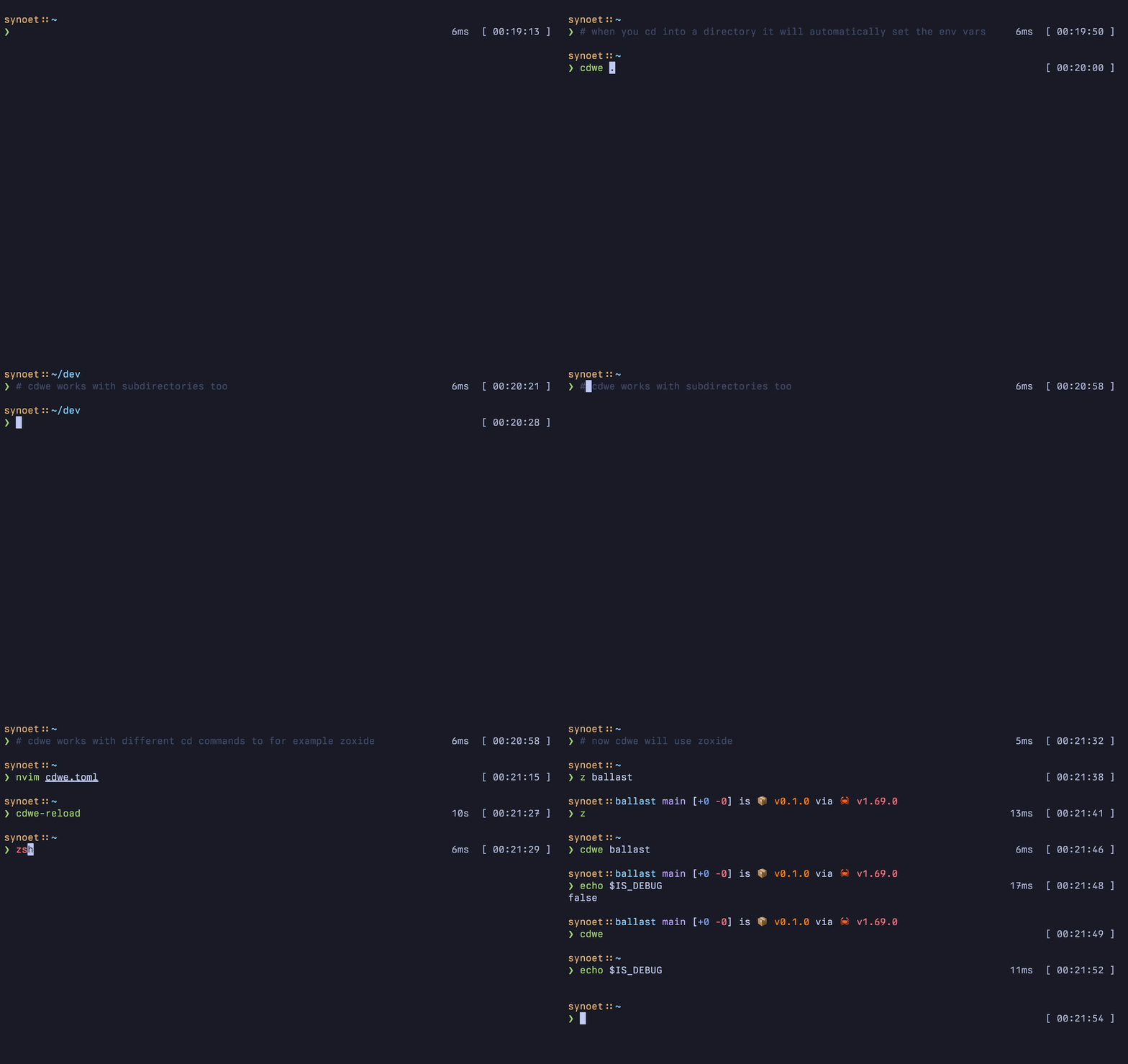
cdwe is a configurable cd wrapper that changes shell environment settings as you move between directories.
Its configuration associates paths with environment variables and other shell behaviour, making it useful when different projects require different settings. Rules can apply to a directory and its descendants, while environment files can be loaded for exact directory matches. cdwe can also define directory-specific aliases and execute commands automatically when a matching location is entered.
This is free and open source software.
Key Features
- Sets environment variables automatically when entering configured directories and removes them again when leaving their scope.
- Rules can apply to a directory and its subdirectories rather than requiring a separate configuration entry for every path.
- Loads variables from selected .env files when entering matching directories.
- Supports assigning a single environment variable to several directories from one configuration block.
- Defines aliases that exist only while the shell is within selected directory trees.
- Can associate an alias with a sequence of commands rather than a single command.
- Automatically executes configured commands when entering particular directories.
- Directory paths in configuration can contain environment-variable references, making rules portable across machines and user accounts.
- Supports local configuration files as well as the main configuration.
- Can be used with Bash, Zsh and Fish.
- Designed to work with other cd-like commands rather than forcing one fixed navigation workflow.
- Uses TOML for readable, structured configuration.
Website: github.com/synoet/cdwe
Support:
Developer: synoet
License: MIT License
cdwe is written in Rust. Learn Rust with our recommended free books and free tutorials
Related Software
| Shell tools | |
|---|---|
| fzf | Command-line fuzzy finder for your shell |
| zoxide | Smarter cd command, inspired by z and autojump |
| broot | Reviewed under our Excellent Utilities series |
| McFly | Also reviewed under our Excellent Utilities series |
| z | Maintains a jump-list of the directories you actually use |
| autojump | Offers a fast way to navigate your filesystem |
| z.lua | Helps you navigate faster by learning your habits |
| HSTR | Bash and zsh shell history suggest box |
| Zsh-z | Fast directory jumping based on frecency |
| enhancd | Next-generation cd command |
| fzy | Simple, fast fuzzy finder for the terminal |
| Navita | Rapid directory traversal |
| Jump | Quick and fuzzy directory jumper |
| walk | Simple and minimalistic terminal navigator |
| lacy | cd alternative that makes navigating much more efficient |
| DF-SHOW | Directory File Show |
| fz | Adds fuzzy search to tab completion of z |
| pazi | Fast autojump helper |
| jumper | Files/directories jumper |
| cdhist | Linux shell cd history directory stack |
| icd | Shell utility that makes changing directories quicker and more convenient |
| SD | Dynamic directory navigation from the command line |
| Dongle | Move around deep directory trees |
| cdwe | cd with env vars |
| fastdiract | Quick shell navigation and command execution |
| zm | cd for lazy people |
| slingshot | Lightweight tool to browse files in the terminal |
| qcd | Quickly change directory |
| nav | Quickly navigate through directories |
| menucd | Directory browser and changer |
| kn | Navigate folders quickly |
| jmp | The superior cd |
| gump | Smarter cd command |
Read our verdict in the software roundup.
 LinuxLinks helps you discover the best free and open source software for Linux. Explore our extensive collection of recommended applications, including alternatives to popular proprietary software. We also publish software reviews, Linux tutorials, hardware reviews, free programming books and articles covering the wider open source community. Browse our Linux resources to discover more. Know a useful free and open source Linux application we haven't covered? Suggest a program for inclusion. Has your software been featured on LinuxLinks? Display one of our Featured on LinuxLinks badges on your website or GitHub README. |
Please read our Comment Policy before commenting.