

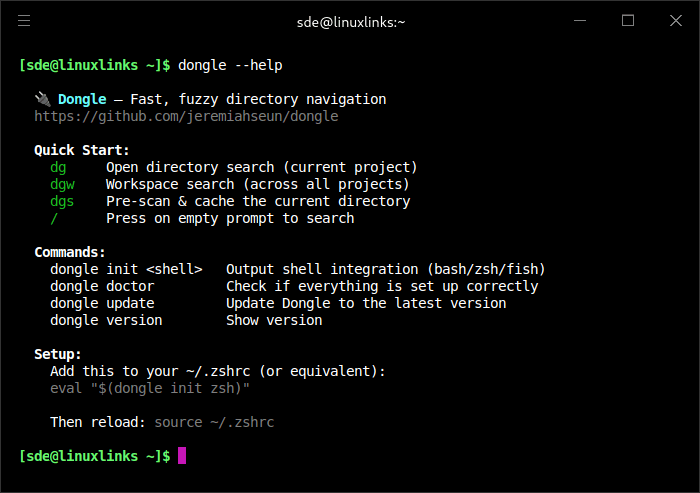
Dongle is a terminal utility that helps you move around deep directory trees without typing long cd paths by hand.
It opens an interactive picker where you can type a fragment of a path, browse matching directories, and jump straight to the one you want. The project is aimed at developers working in large codebases and multiple repositories, and it integrates with Bash, Zsh, and Fish for fast in-shell navigation.
This is free and open source software.
Key Features
- Provides live search results that update as you type.
- Searches from the project root instead of being limited to the current working directory.
- Includes workspace search for jumping across multiple projects.
- Respects `.gitignore` and `.dongleignore` files when scanning directories.
- Caches scanned paths to speed up repeated lookups.
- Supports configuration through environment variables for workspaces, scan depth, cache lifetime, and extra skipped directories.
Website: github.com/jeremiahseun/dongle
Support:
Developer: Jeremiah Oluwaseun Erinola
License: MIT License
Dongle is written in Python. Learn Python with our recommended free books and free tutorials.
Related Software
| Shell tools | |
|---|---|
| fzf | Command-line fuzzy finder for your shell |
| zoxide | Smarter cd command, inspired by z and autojump |
| broot | Reviewed under our Excellent Utilities series |
| McFly | Also reviewed under our Excellent Utilities series |
| z | Maintains a jump-list of the directories you actually use |
| autojump | Offers a fast way to navigate your filesystem |
| z.lua | Helps you navigate faster by learning your habits |
| HSTR | Bash and zsh shell history suggest box |
| Zsh-z | Fast directory jumping based on frecency |
| enhancd | Next-generation cd command |
| fzy | Simple, fast fuzzy finder for the terminal |
| Navita | Rapid directory traversal |
| Jump | Quick and fuzzy directory jumper |
| walk | Simple and minimalistic terminal navigator |
| lacy | cd alternative that makes navigating much more efficient |
| DF-SHOW | Directory File Show |
| fz | Adds fuzzy search to tab completion of z |
| pazi | Fast autojump helper |
| jumper | Files/directories jumper |
| cdhist | Linux shell cd history directory stack |
| icd | Shell utility that makes changing directories quicker and more convenient |
| SD | Dynamic directory navigation from the command line |
| Dongle | Move around deep directory trees |
| cdwe | cd with env vars |
| fastdiract | Quick shell navigation and command execution |
| zm | cd for lazy people |
| slingshot | Lightweight tool to browse files in the terminal |
| qcd | Quickly change directory |
| nav | Quickly navigate through directories |
| menucd | Directory browser and changer |
| kn | Navigate folders quickly |
| jmp | The superior cd |
| gump | Smarter cd command |
Read our verdict in the software roundup.
 Explore our carefully curated directory of recommended free and open source software, covering every major software category. Explore our carefully curated directory of recommended free and open source software, covering every major software category.The directory forms part of our extensive collection of articles for Linux enthusiasts. It includes hundreds of detailed reviews, together with free and open source alternatives to proprietary software from companies such as Google, Microsoft, Apple, Adobe, IBM, Cisco, Oracle, and Autodesk. LinuxLinks also covers interesting projects worth exploring, Linux-compatible hardware, free programming books and tutorials, and much more. Know a useful free and open source Linux application that we haven’t covered? Tell us about it using our submission form. |
Please read our Comment Policy before commenting.