

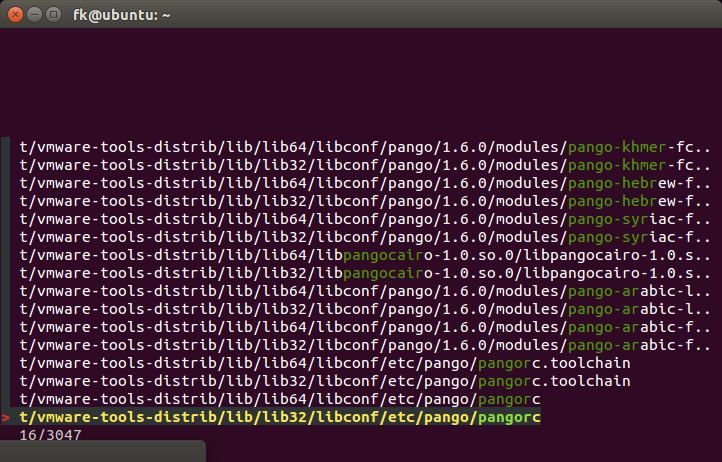
fzf is a general-purpose command-line fuzzy finder and interactive terminal toolkit. It helps users locate and select items from potentially large lists without needing to remember exact names or paths.
The program can operate on filenames, command history, running processes, Git commits, hostnames and arbitrary text supplied by other commands. Its matching engine narrows results as the user types, making it particularly useful when navigating large projects or working with unfamiliar directories.
fzf follows the Unix philosophy of combining small tools. It accepts data through standard input and writes selections to standard output, allowing it to be integrated into shell scripts and more elaborate terminal workflows.
Besides interactive searching, fzf provides configurable interfaces for previewing information and invoking other commands using selected items.
This is free and open source software.
Key Features
- Interactive fuzzy matching with results updated as search terms are entered.
- Supports exact matches, prefix and suffix matching, negated patterns and multiple search terms.
- Accepts arbitrary input from standard input and returns selected items through standard output.
- Supports selecting multiple results in a single search session.
- Built-in file traversal for searching files and directories without supplying an external file list.
- Configurable preview window for displaying file contents, command output and other information associated with a selected result.
- Full-screen, partial-height and popup interfaces, including support for tmux and Zellij.
- Shell integrations for Bash, Zsh, Fish and Nushell.
- Provides interactive command-history search, file selection and directory navigation shortcuts.
- Fuzzy shell completion for paths, processes, hostnames and other command arguments.
- Event-driven key bindings that can execute commands, change prompts and modify the interface.
- Dynamically reload candidate lists without exiting the interactive finder.
- Execute external commands or replace the finder process with another program using the selected item.
- Configurable borders, colours, margins, layouts and highlighting.
- Mouse interaction, keyboard navigation and customisable selection behaviour.
- Integrations for Vim and Neovim.
- Cross-platform support – runs on Linux, macOS, and Windows.
Website: github.com/junegunn/fzf
Support:
Developer: Junegunn Choi
License: MIT License
fzf is written in Go. Learn Go with our recommended free books and free tutorials.
Related Software
| Search Tools | |
|---|---|
| ripgrep | Recursively search directories for a regex pattern |
| fzf | Command-line fuzzy finder for your shell |
| McFly | Navigate through your shell history |
| peco | Interactive filtering tool |
| SeaGOAT | Semantic-code search engine |
| FSearch | Fast file search utility based on GTK+3 |
| Heatseeker | General-purpose fuzzy selector |
| ANGRYsearch | Like FSearch, a search tool inspired by Everything Search Engine |
| catfish | Versatile search GUI powered by locate and find |
Read our verdict in the software roundup. You’ll also find other similar software explored in these other roundups: Return to CLI Navigation Tools | Return to Small Console Menu Tools | Alternatives to find
 LinuxLinks helps you discover the best free and open source software for Linux. Explore our extensive collection of recommended applications, including alternatives to popular proprietary software. LinuxLinks helps you discover the best free and open source software for Linux. Explore our extensive collection of recommended applications, including alternatives to popular proprietary software.We also publish software reviews, Linux tutorials, hardware reviews, free programming books and articles covering the wider open source community. Browse our Linux resources to discover more. Know a useful free and open source Linux application we haven't covered? Suggest a program for inclusion. Has your software been featured on LinuxLinks? Display one of our Featured on LinuxLinks badges on your website or GitHub README. |
Please read our Comment Policy before commenting.