

BM is a minimalist terminal music player with a responsive text-based interface. It supports popular audio formats and offers directory browsing, playlists, fuzzy searching, and album artwork. It also integrates with the Linux desktop through MPRIS2, media keys, and track change notifications.
When I first looked at BM in July, I liked its uncluttered interface and straightforward approach to navigating a music collection. But there was one fairly serious omission: gapless playback. That’s something I consider essential in a music player, particularly when listening to live albums or recordings where tracks flow into one another.
The good news is that gapless playback has arrived. The developer has also been busy improving directory navigation, searching, playlist handling, and the player interface. There’s enough new functionality to justify taking another look.
This is free and open source software.
Installation
BM is available from the Arch User Repository. On an Arch-based distribution such as CachyOS, installation is simple using yay:
yay -S bm-terminal-music-player
Alternatively, you can build BM from source. You’ll need Go and Git installed. First, clone the project’s repository:
git clone https://github.com/zyoung11/BM.git
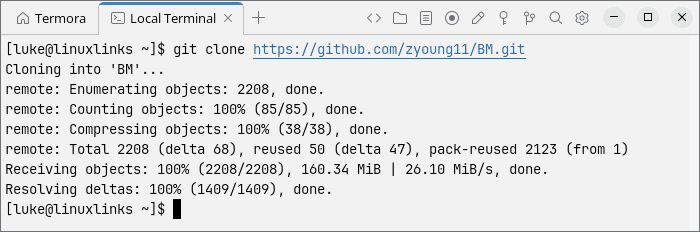
Change into the new directory and compile the application:
cd BM
go build -ldflags="-s -w" .
Go normally produces no terminal output when the build succeeds. You’ll find the resulting bm executable in the current directory. Copy it to a directory in your PATH, such as /usr/local/bin, if you want to launch it from anywhere.
One detail worth mentioning is that BM expects a music directory when it’s launched. Simply typing bm without an argument won’t start the player. For example:
bm ~/Music
You can equally specify an absolute path to your music collection.
In Operation
BM supports FLAC, MP3, WAV, and OGG audio files. The interface is divided into three pages: Player, PlayList, and Library. Switching between them is straightforward using the Tab key, or you can jump directly to a page with the 1, 2, and 3 keys.
Library
Directory browsing remains one of BM’s strongest attractions. I’ve always preferred music players that let me navigate my existing directory structure rather than insisting on organising everything through an automatically generated library. BM accommodates that preference rather nicely.
The browser has undergone a significant improvement since July. It now offers a multi-column layout, somewhat reminiscent of the terminal file manager yazi, with a preview of the selected directory. It’s a much better way to explore a sizeable music collection than the simpler navigation offered by earlier releases.
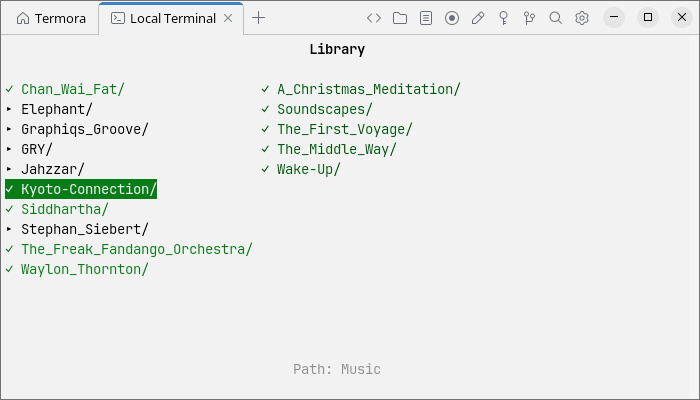
BM also remembers cursor positions and scroll locations when moving between directories. That might sound like a minor improvement, but it makes browsing much less irritating, particularly when you’re moving back and forth through a large collection.
Searching has improved too. Fuzzy search supports English and Chinese text, and directories can now appear in search results and be opened directly. There are three sorting modes and five song-name display styles, including options to remove file extensions and adjust the presentation of artist and title information. The library can also refresh automatically when files are added or removed, without requiring a restart.
Player
The Player page displays track information, album artwork, and playback progress. Artwork can be extracted from audio files or loaded from images stored alongside the music. BM supports the Kitty, Sixel, and iTerm2 image protocols, selecting an appropriate method automatically.
The interface takes its colours from the album artwork, although this isn’t always a recipe for legibility. The colour selection has been improved to provide better contrast, especially with dark or muted covers. There are also more layout options, including narrow, text-only, and image-focused arrangements. BM adapts to the available terminal space and handles long track titles more gracefully.
Gapless playback
This is the improvement I’ve been most keen to see. BM now supports gapless playback, removing the unwanted pauses between tracks that spoiled the experience when listening to certain albums. It’s especially important for live recordings, classical music, and concept albums, where even a brief interruption can be jarring.
The implementation prepares the next track in the background as the current one approaches its end. When consecutive tracks share a compatible sample rate, BM can move between their audio decoders without restarting the playback stream. Track advancement is tied to the actual end of the audio stream rather than periodic checks, helping to avoid cutting off the final moments of a recording.
There is a qualification. When consecutive tracks use different sample rates, the audio output may need to be reinitialised, and BM falls back to a different transition. Nevertheless, gapless playback is a substantial improvement and addresses my biggest reservation about the original release.
PlayList
The PlayList page handles the current playback queue. Tracks can be selected, played, and removed using keyboard shortcuts, and the interface remains pleasingly uncomplicated.
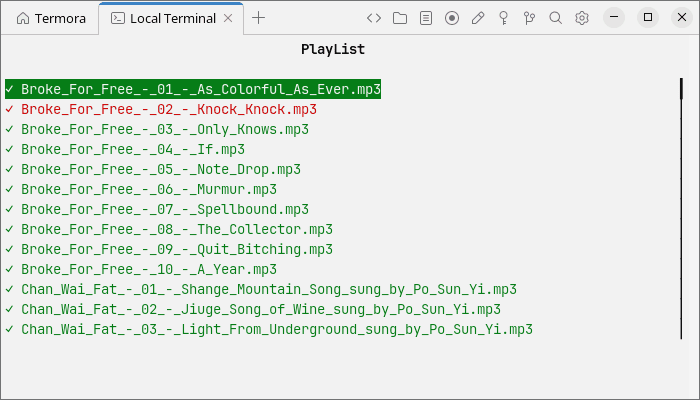
Playlist handling is more polished than before. BM remembers the cursor position and search state when switching pages, while improvements to playback history and error handling make it better at dealing with tracks that have been removed or are no longer playable. These aren’t headline features, but they’re the sort of refinements that make a player more pleasant to use every day.
Keyboard controls
BM is designed around keyboard operation, although I still find some of its default shortcuts rather unconventional. Fortunately, they’re extensively configurable, and pressing ? opens a full-screen reference showing the current mappings.
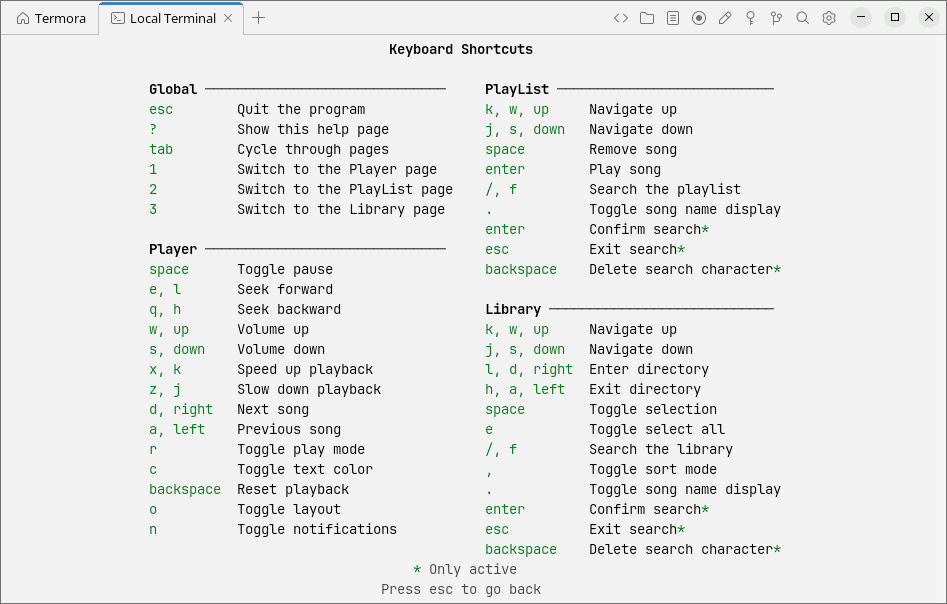
The Escape key now behaves more sensibly, closing search input, clearing results, and moving back through directories before offering to quit. Quit confirmation can also be configured for individual pages. BM works inside terminal multiplexers such as tmux, zellij, and GNU screen, falling back to a text-only layout where graphical image protocols may not be available.
Key Features
- Gapless playback with background preparation of the next track.
- Supports FLAC, MP3, WAV, and OGG audio formats.
- Adjustable playback speed from 0.1x to 4.0x, volume control, and seeking in five-second intervals.
- Automatic audio output sample rate switching when required.
- Multi-column directory browser with previews and remembered navigation positions.
- Fuzzy searching with support for opening directories from search results.
- Three sorting modes and five configurable song-name display styles.
- Automatic library refreshing when music files are added or removed.
- Dynamic playlists, playback history, repeat modes, and shuffle playback.
- Album artwork display using Kitty, Sixel, and iTerm2 protocols.
- Interface colours automatically derived from album artwork.
- Automatic, narrow, text-only, and image-focused player layouts.
- MPRIS2 integration, media key support, and track change notifications.
- Configurable keyboard shortcuts and full-screen shortcut reference.
- Support for tmux, zellij, and GNU screen.
- Customisable player icons, startup behaviour, and session restoration.
- Detection and marking of unplayable audio files.
Summary
BM has made considerable progress since I first reviewed it. The improved directory browser is particularly welcome, as I much prefer navigating my own music folders to relying entirely on a metadata-driven library. The multi-column layout, remembered navigation positions, and automatic library refreshing make this a much more practical proposition.
But gapless playback is the real attraction. Its absence was my main criticism of the earlier release, and I’m pleased the developer has addressed it. Combined with the improvements to playlist handling, searching, and desktop integration, BM feels like a more mature music player without losing the simplicity that made it interesting in the first place.
I still wouldn’t describe the default keyboard shortcuts as particularly intuitive, and anyone who prefers a conventional graphical interface will probably be happier elsewhere. But if you enjoy terminal applications and want a music player that respects your existing directory structure, BM deserves a look.
Linux already has an excellent selection of terminal music players, many of which appear in our roundup. BM now makes a stronger case for inclusion among the better choices.
Website: github.com/zyoung11/BM
Support:
Developer: zyoung11
License: MIT License
BM is written in Go. Learn Go with our recommended free books and free tutorials.
 LinuxLinks helps you discover the best free and open source software for Linux. Explore our extensive collection of recommended applications, including alternatives to popular proprietary software. We also publish software reviews, Linux tutorials, hardware reviews, free programming books and articles covering the wider open source community. Browse our Linux resources to discover more. Know a useful free and open source Linux application we haven't covered? Suggest a program for inclusion. Has your software been featured on LinuxLinks? Display one of our Featured on LinuxLinks badges on your website or GitHub README. |
Please read our Comment Policy before commenting.