

Images are part of every day internet usage, and are particularly important for social media engagement. A good image viewer is an essential part of any operating system.
There are so many image viewers available for Linux. Some would argue too many. But many of them offer something different. For example, I personally mostly use Geeqie, not because it’s got the best UI or feature set. It stands out for me courtesy of a really useful function where changes to an image are automatically displayed by the program without any human intervention. That’s really useful when I generate charts generated with R.
Lightning Image Viewer (LIV) is billed as a desktop image (previewer) with some notable UX features. This is free and open source software written in Rust.
Installation
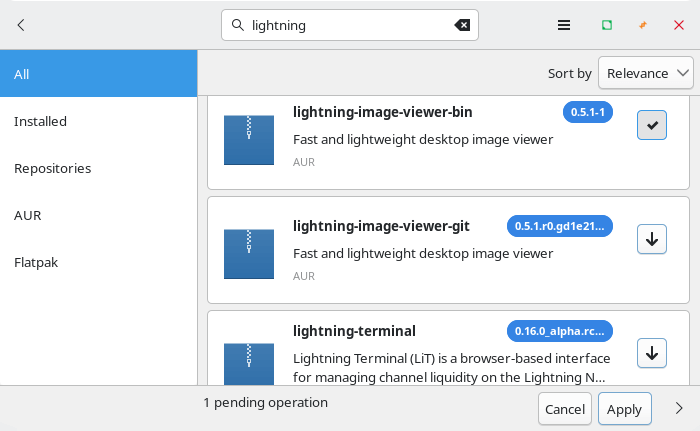
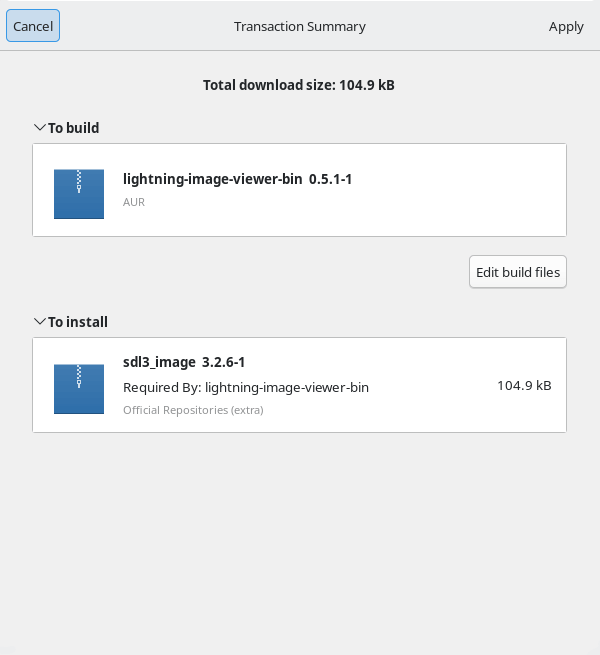
I evaluated LIV using Manjaro, an Arch-based Linux distribution. Arch is famous for the Arch User Repository (AUR), a community-driven repository. It contains package descriptions (PKGBUILDs) that allow users to compile a package from source with makepkg and then install it via the in-house pacman, a lightweight, simple and fast package manager that allows for continuously upgrading the entire system with one command.
There’s a couple of packages in the AUR. I installed the binary package with Pamac (Manjaro’s GUI package manager).
The project provides a .deb package for Debian/Ubuntu, and there’s also a Windows binary if you’re still dabbling in the occult.
In Operation
LIV is very different to your typical image viewer. The program doesn’t have a menu interface at all. Open an image from a file manager, and you’ll see the image displayed without any menu, and the only window decoration is a small semi-transparent grey border. .

While there’s no menu interface, you can use the mouse or keyboard to zoom in and out, as well as pan around the image. You can make the image full screen by pressing the F key or F11, or with a mouse wheel click. And you can play animations with the space bar.
It’s also possible to navigate between images in the same directory using using Page Up and Page Down. Keyboard shortcuts also let you rotate and mirror images.
It’s also possible to open files from the command-line but the developer intends images to be opened from a file manager.
Summary
LIV is pretty light on features but it may be all that you need. It’s a decent previewer for images and supports a wide range of formats.
LIV has a strange bug where images don’t display in KDE Plasma depending on the wallpaper chosen for the desktop I tested the software on multiple machines and each exhibited the same problem.
Website: github.com/shatsky/lightning-image-viewer
Support:
Developer: Eugene Shatsky
License: GNU General Public License v3.0
Lightning Image Viewer is written in Rust. Learn Rust with our recommended free books and free tutorials.
Related Software
| Graphical Image Viewers | |
|---|---|
| feh | Fast and light Imlib2-based image viewer |
| Regards | Modern image viewer with OpenGL/OpenCL support |
| Loupe | Written with GTK 4, Libadwaita and Rust |
| PhotoQT | Good looking, highly configurable, yet easy to use and fast |
| gThumb | Advanced image viewer and browser |
| Geeqie | Lightweight Gtk+ based image viewer |
| qimgv | Qt5 image viewer with video support |
| Vooki | Lightweight viewer with fast image preview |
| Gwenview | Simple image viewer for KDE |
| QuickViewer | Graphic image viewer for comfortable browsing |
| nomacs | Handles most image formats including RAW images |
| qView | Image viewer designed with minimalism and usability in mind |
| Oculante | Hardware-accelerated image viewer |
| GPicView | Simple and fast image viewer |
| Tacent View | Image and texture viewer |
| FIM | Viewer which is highly customizable and scriptable |
| Eye of Gnome | Fast and functional image viewer |
| vipsdisp | Tiny GTK+ image viewer |
| Pineapple Pictures | Lightweight image viewer with Stay-on-Top window |
| Viewnior | Designed with usability in mind |
| sxiv | Simple X Image Viewer |
| PreviewQt | Preview all kinds of files |
| pqiv | Powerful image viewer with minimal UI |
| Ristretto | View and scroll through images |
| QIV | Quick Image Viewer |
| Fotema | Simple photo gallery software |
| CoreImage | Lightweight image viewer; part of the C suite |
| swayimg | Image viewer for Wayland |
| ParaPara | Lightweight and high-speed operation |
| Eye of MATE | Simple graphics viewer for the MATE Desktop Environment |
| LXImage-Qt | LXQt image viewer and screenshot tool |
| Mirage | Fast and simple GTK+ image viewer |
| PixelViewer | .NET based cross-platform image viewe |
| Pix | Image viewer and browser utility which is based on gThumb |
| ImageFan Reloaded | Tab-based image viewer |
| BeeRef | Simple reference image viewer |
| Ephoto | Image viewer based on the EFL |
| SphereView | 360° equirectangular photospheres and panoramas |
| Imagot | Basic graphical image viewer |
| flxvwr | Image viewer written in Go using the Fyne toolkit |
| Blackbody | Thermogram viewer. It allows viewing FLIR and TIFF images |
| Lightning Image Viewer | Fast and lightweight desktop image viewer |
| roseate | Simple image viewer |
| ImageGlass | Versatile image viewer |
| nsxiv | Fork of sxiv |
Read our verdict in the software roundup.
 Explore our carefully curated directory of recommended free and open source software, covering every major software category. Explore our carefully curated directory of recommended free and open source software, covering every major software category.The directory forms part of our extensive collection of articles for Linux enthusiasts. It includes hundreds of detailed reviews, together with free and open source alternatives to proprietary software from companies such as Google, Microsoft, Apple, Adobe, IBM, Cisco, Oracle, and Autodesk. LinuxLinks also covers interesting projects worth exploring, Linux-compatible hardware, free programming books and tutorials, and much more. Know a useful free and open source Linux application that we haven’t covered? Tell us about it using our submission form. |
Please read our Comment Policy before commenting.
Hi Steve. Lightning Image Viewer is cross-platform.
Hi Torin. I had mentioned it runs under Windows too (in the Installation section).
Ok. 👍🏻
I love that picture of the Eiffel Tower.
Yes, I like it too!